CMP203 User Guide
3. Check Multiplex on the channel you want to output to. You can output multiple services to one
channel or output one service to multiple channels.
The second eth is reserved to output IP streams in an another different VLAN. Enabling the second
eth and set IP Address, Subnet Mask, Default Gateway in the same segment of the Unicast IP (the
another different VLAN), you can output the Unicast stream to the another VLAN.
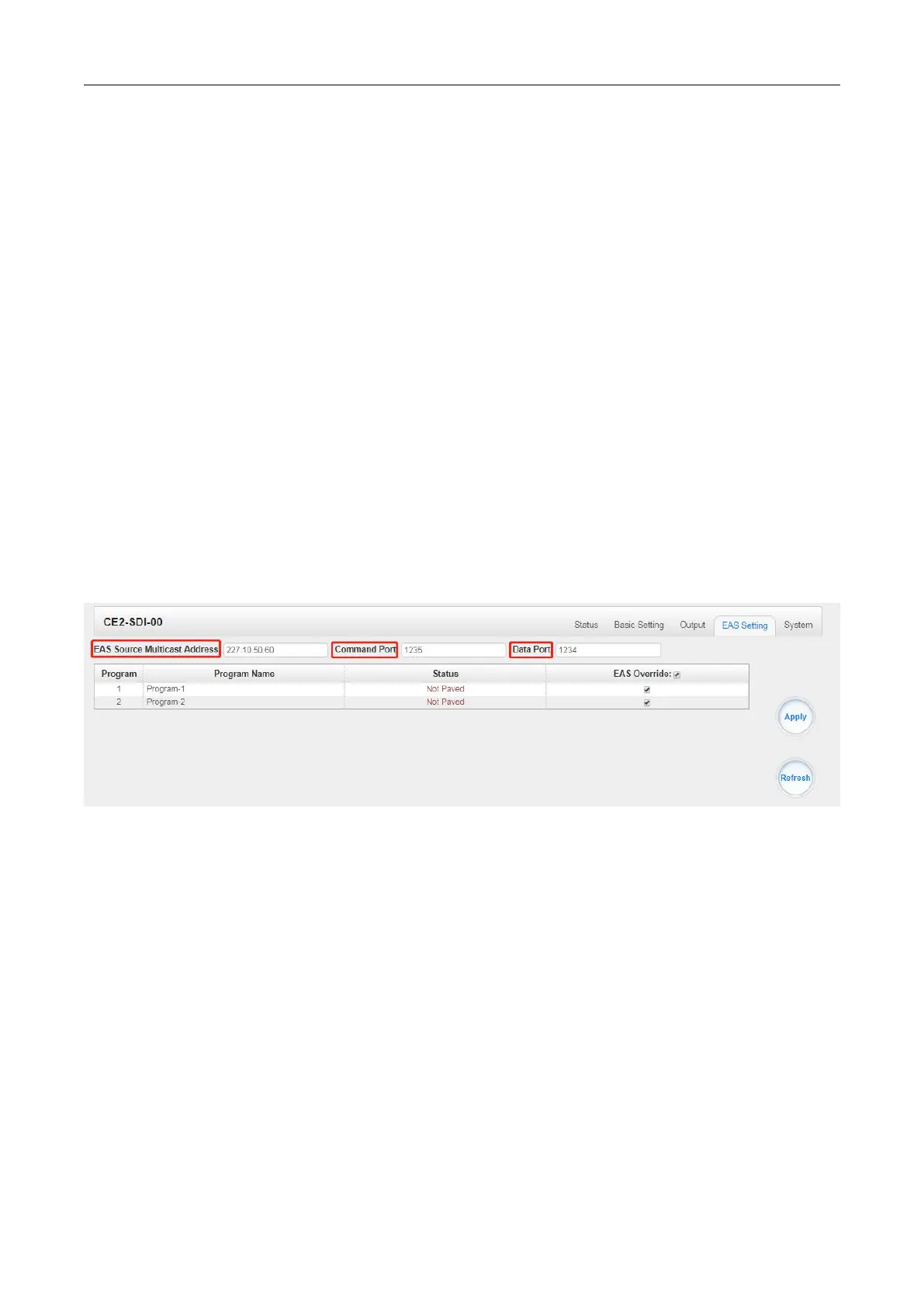
CE2-SDI-00 >EAS Settings
This function need to be used together with CP2-EAS-00 module.
The parameters of EAS Source Multicast Address & Command Port & Data Port should be
consistent with CP2-EAS-00 module. Then the EAS module will be detected automatically by
CE2-SDI-00 module so that the service(s) could be paved by EAS input(ASI or AV signal). When it is
triggered by external IP or analogue signal, the services(s) will be switched to the AV or ASI service
from EAS module.
Service: There are 2 programs corresponding to 2 HDMI/Component ports
Status: Paved/Unpaved
EAS Override: Tick the check-box to select the program(s) needing to be paved.
Click the Apply button on the right side to make the change take effect.
CE2-SDI-00 >System
Please refer to CR2-DVBC module.


 To Next Page