CMP203 User Guide
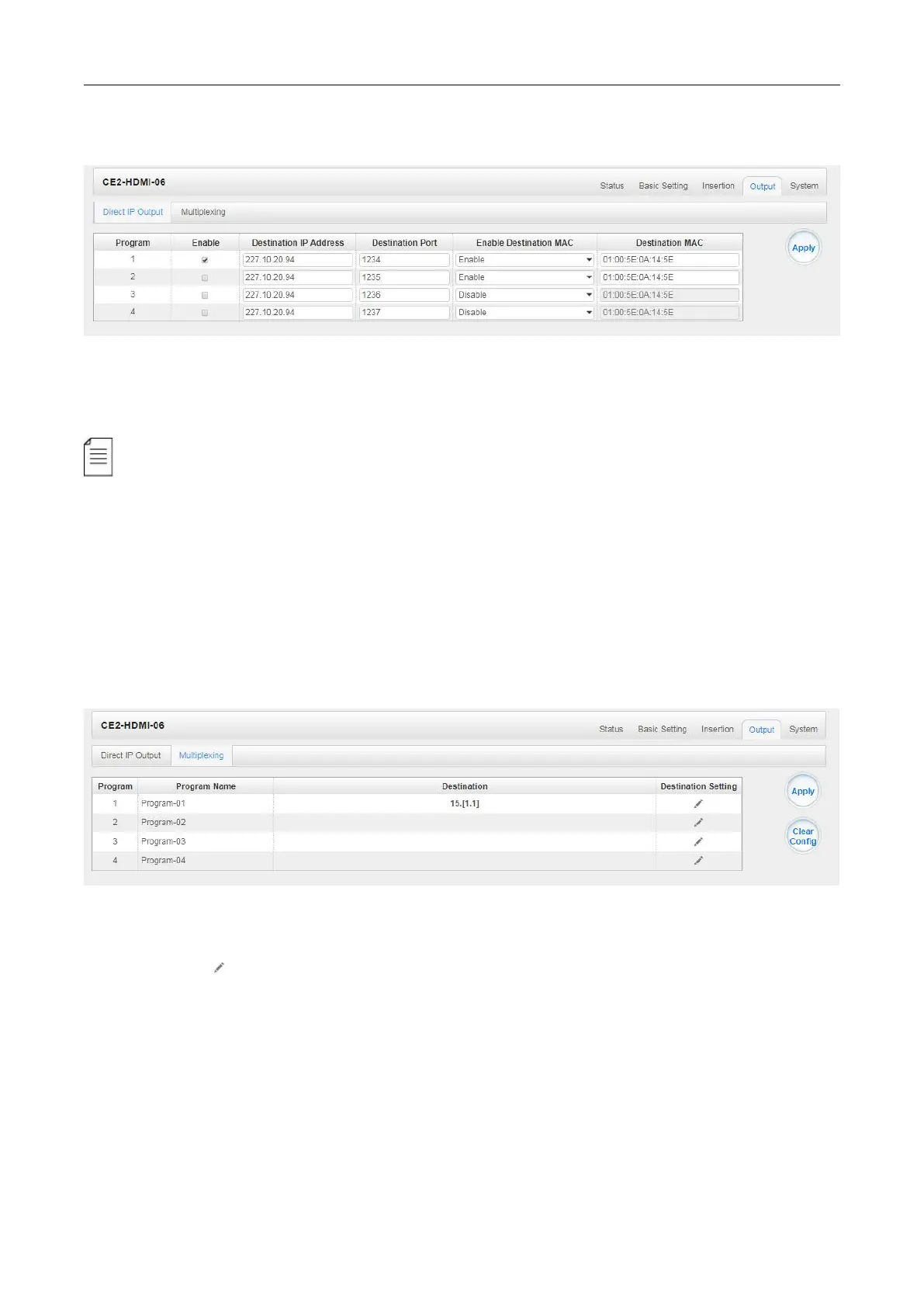
CE2-HDMI-06 >Output
This feature is specifically for single program encoding and IP output directly. Outputting this way will
not occupy baseboard multicast bandwidth.
If you want to use IP output channels in the encoder module and baseboard IP Output module
at same time, you should avoid a multicast IP address conflict. If there are two same IP addresses
enabled meantime, all the multicast video will be affected.
Destination IP Address and Destination Port: Using for multicast IP addresses or unicast IP
addresses and ports.
Enable Destination MAC: Generally, you do not need to enable this option. This is reserved for
exceptional cases where the unicast stream cannot be received with unicast IP addresses You
can enable destination MAC and streaming out by setting Destination MAC.
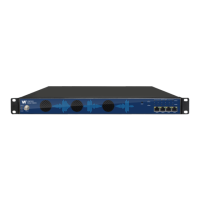
To use Multiplexing mode at service level:
1. Click on (pencil) icon. There will always be a BaseBoard selection for the IP output and
other Output options depending on the module inserted.
2. Select the correct Output and Channel you want to output the service to.
Check Multiplex on the channel you want to output to. You can output multiple services to one
channel or output one service to multiple channels.


 To Next Page