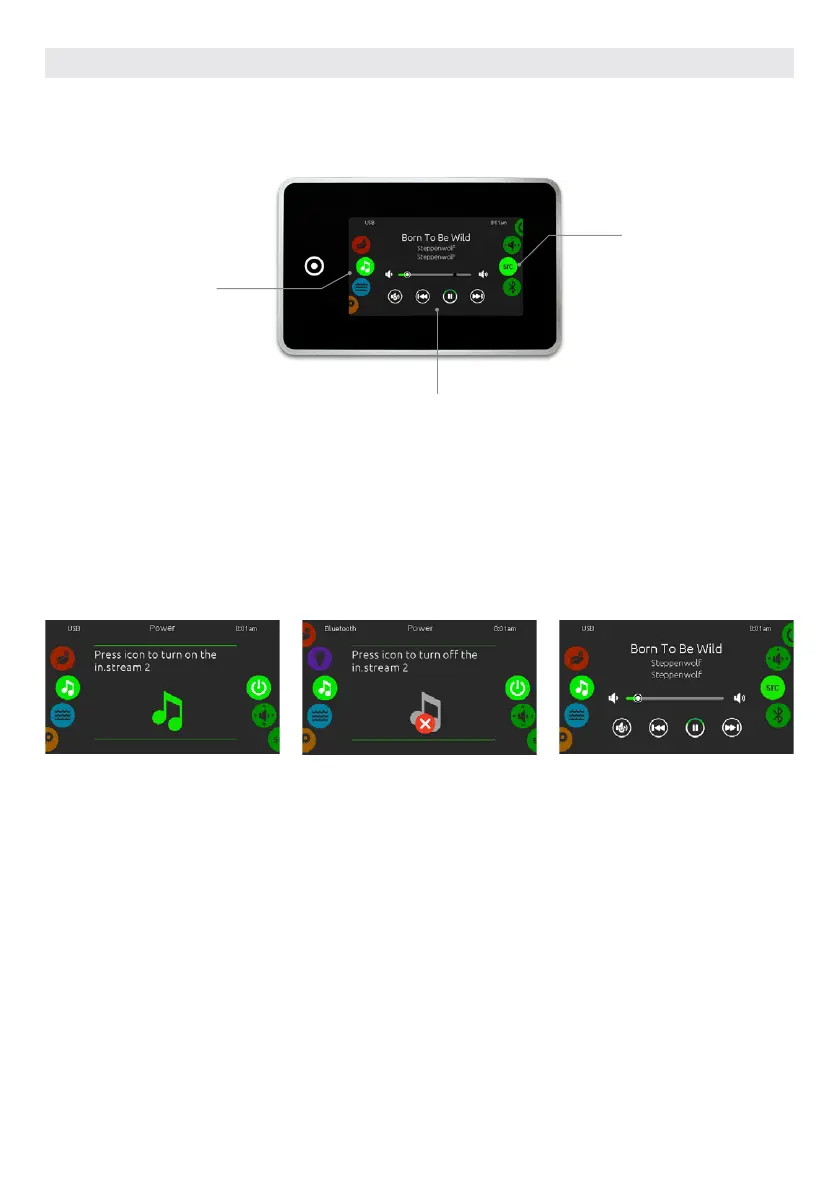
Direct to function
selection wheel:
– on/off
– speakers
– source
– bluetooth
Mute / last track / play/pause / next track
Mode
selection wheel:
audio mode
To select the audio mode, slide the left wheel up or down until the audio icon menu is highlighted in the middle.
In the Audio page you can access the following:
• Aquasoul Pro on/off • audio source selector
• speaker calibration • bluetooth pairing
To select an item, slide the right wheel until the desired icon is highlighted in the middle.
AUDIO MODE
(only available if the system detects a connected Aquasoul Pro audio station)
TURN AQUASOUL PRO ON
Slide the right wheel until the power
on/off icon is highlighted in the middle.
Press on the audio icon at the center of
the screen to turn Aquasoul Pro on.
MAIN DISPLAY
Press Play / Pause to start or pause
playback of audio files.
Drag the volume slider to adjust the
volume or tap the mute button to mute
or unmute sound.
Press the last track or next track but-
tons to go to the previous song or skip
to the next.
TURN AQUASOUL PRO OFF
Press on the audio icon in the center of
the screen to turn Aquasoul Pro off.
ON/OFF
USER INTERFACE SMART TOUCH
70



 To Next Page