LEONARDO DATALOGGER
User manual
3
Serial Connection of the External Charge Controllers
The inverters of the Leonardo System series accept the possibility of expanding the capacity of photovoltaic
production, through the installation of external charge controllers, connected to the same inverter battery bank.
Usually these controllers are of the WRM30 type. The photovoltaic production of the WRM30 charge controllers
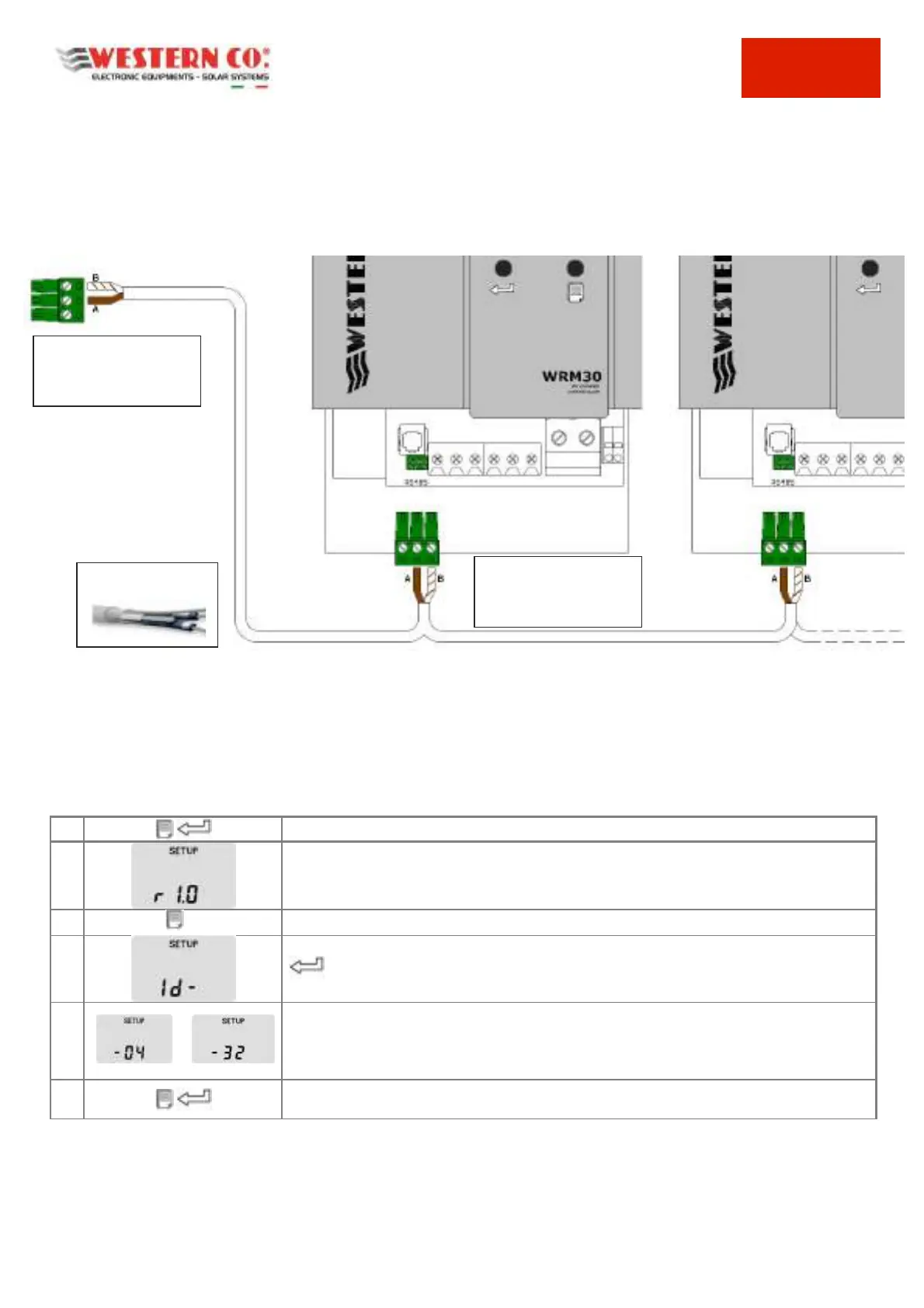
(external to the inverter) can be monitored through the dedicated serial connection on the Leonardo Datalogger,
according to the following connection diagram:
Pic.2 External Charge Controllers Connection
To correctly enable the serial communication between the Leonardo Datalogger and each external WRM30 charge
controller, in addition to the RS485 serial connection, it is necessary to set the correct ID address on the communication
BUS, with sequence from point n. 4 to follow.
Questo può essere effettuato accedendo al menù SETUP:
Keeping both keys pressed for 1 sec. from any display page, the SETUP pages are accessed
Look at the controller firmware revision.
By pressing 8 times the page key, the MODBUS address setting menu is accessed
Set the node address ID.
By pressing this key the setting can be changed.
Select the value in sequence:
ID - 4 - EXTERNAL CHARGE CONTROLLER WRM30 no.1
ID - 5 - EXTERNAL CHARGE CONTROLLER WRM30 no.2
... down to the address 32 at last
Keeping pressed for 1 sec. the keys, you return to the display page, saving the modified
configuration parameters, which become operational.
Tab.1 Setting External WRM30 Addresses
DATALOGGER - POLARITY:
No.2 – A Pole ex.BROWN
No.3 - B Pole ex. WHITE/
BROWN
RS485 SERIAL CABLE 2
POLES or of UTP type
WRM30 - POLARITY
No.2 – A Pole ex.BROWN
No.3 - B Pole ex. WHITE/
BROWN



 To Next Page