ENGLISH INSTRUCTIONS
5
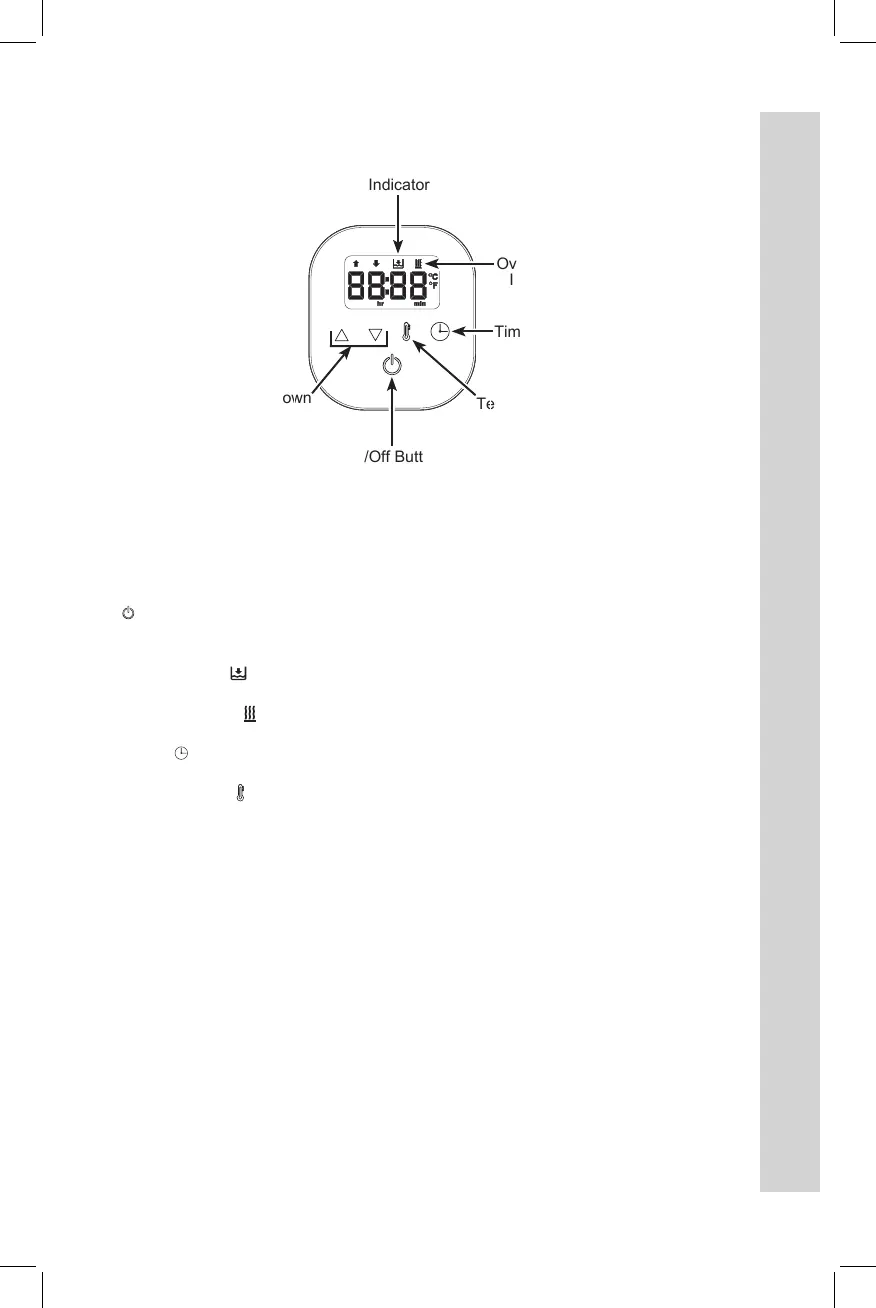
On/Off Button
Up and Down
Arrows
Temperature
Button
Timer Button
Overheating
Indicator
Low Water
Indicator
DISPLAY/CONTROL PANEL
On/Off ( ) Button – Powers the circulator on and off.
Up and Down Arrows – Adjusts time and temperature. Time increases by 10-minute
intervals for the first hour, then 1-hour intervals after.
Low Water Indicator ( ) – Illuminates when water level is below minimum water line.
Circulator will chime continuously until water is added.
Overheating Indicator ( ) – Illuminates if water is above set temperature. Circulator will
chime until water cools to set temperature.
Timer Button ( ) – Sets cooking time. Default cook time is 0 hours; maximum cook
time is 99 hours.
Temperature Button
( )
– Sets cooking temperature. Default temperature
is 125°F
(52°C). Temperature range is 86–210°F (30–99°C).
Additional Functions
• Fahrenheit/Celsius Shift – Hold both arrow buttons at the same time.
• Short Press on button – Less than one second.
• Long Press on button – More than one second.
840299600 ENv10.indd 5 1/29/19 12:22 PM


 To Next Page