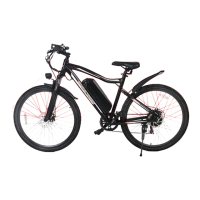
The WHEELSPEED ARIES E-Bike is a compact, zero-emissions personal transportation device designed to offer a riding experience similar to a moped, while maintaining the feel of a traditional bicycle. It is an environmentally-friendly product that incorporates high-quality components and industry-leading safety features. The E-Bike is capable of reaching riding speeds of up to 20 MPH and features a rechargeable, portable, and reliable battery system.
Function Description
The ARIES E-Bike operates with both pedal assist and throttle modes, allowing riders to choose their preferred level of assistance. The bike is equipped with a motor that provides power, making it easier to navigate various terrains and achieve higher speeds. A key feature is the power switch located beside the battery charging port, which must be turned to "I" to activate the throttle and/or battery power for assisted riding. For regular pedaling without power or after riding, the switch should be turned to "O" to power off the battery.
The E-Bike's display system provides essential riding information. It includes a speed display showing current, maximum, and average speeds, along with a battery indicator that shows the remaining charge. The multifunctional display area can show total mileage (ODO), single trip mileage (TRIP), single driving time (TIME), current voltage (VOL), and running current (CUR). The bike also features a power motor with 5 gears, allowing riders to switch between different levels of assistance, ranging from 7.5 MPH (12 KM/H) in Gear 1 to 20 MPH (32 KM/H) in Gear 5.
Usage Features
To start the E-Bike, riders can either long-press the "M" Power Button for 2 seconds or begin riding with their feet directly. A quick press of the "M" button allows switching between menus on the multifunctional display. Moving forward is as simple as pressing the throttle. For extended rides, a cruise mode can be activated by long-pressing the throttle for 8 seconds, and can be exited by pressing the throttle or handbrake.
The E-Bike offers 7 gears, which can be shifted using the Gear Button or Gear Switch. To slow down, riders should first release the throttle and then gradually squeeze the Rear Hand Brake to reduce the speed of the motorized rear wheel. For a complete stop, both front and rear hand brakes should be engaged after releasing the throttle.
The display also includes various status indicators:
- 6KM/H Push assist mode: This mode assists the rider when pushing the bike.
- Power assist mode: Indicates that the pedal assist system is active.
- Brake tips: Provides alerts related to braking.
- Motor failure: Warns of a motor malfunction.
- Cruise mode: Indicates that the cruise control is active.
- Battery undervoltage: Alerts the rider to low battery levels.
- Controller failure: Indicates an issue with the E-Bike's controller.
- Throttle failure: Warns of a throttle malfunction.
For safety, the E-Bike is equipped with a horn button to alert pedestrians and other riders. The headlight can be turned on or off by long-pressing the "∧" button for 3 seconds. The "∧" button also increases the power assist gear, while the "∨" button decreases it. A long press of the "∨" button for 3 seconds activates the 6KM/H push assist mode, which can be exited by pressing the handbrake.
The display settings can be accessed by long-pressing the "∧" and "∨" buttons simultaneously when the display is powered on. P01 allows adjustment of display brightness (levels 1-3), and P02 enables switching between KM/KM/H and MILE/MPH units for mileage and speed.
Maintenance Features
Proper maintenance is crucial for ensuring a longer lifespan and smooth riding experience. The E-Bike should be cleaned regularly by wiping its outer body with a soft, dry microfiber cloth. It's important to check around the wheels for any blockages, as the E-Bike's design facilitates easy wheel maintenance. The ARIES E-Bike has an IPX4 water-resistance rating, meaning it can withstand splashes, but it should not be submerged in water, and care should be taken to prevent water or liquids from entering the electric parts or battery.
For battery maintenance, it is recommended to fully charge the battery before its first use (up to 6 hours) and after each riding session to maximize its life. If the E-Bike is not in active use, the battery should be charged at least once a month to maintain optimal levels. Periodic visual inspection of the battery ports and charging cables is also advised. When the battery is fully charged, charging should be stopped, and the unit unplugged. The charging environment should be kept clean and dry, and the E-Bike should not be charged if the charging port is damp or has any liquid on it. To ensure maximum efficiency, charging in extremely hot or cold environments should be avoided. Only the battery and charging cable provided by WHEELSPEED should be used, as third-party products may compromise the battery and damage the E-Bike.
The battery can be removed for easier charging or enhanced security. To remove, the included keys are used to unlock the battery by rotating the key to the unlock icon around the keyhole, and then pushing the battery bottom to detach it from the base. When reinstalling, the battery is placed on the base, and the key is inserted into the keyhole and rotated to the lock icon. It is recommended to keep a backup key in case the original keys are lost.
The E-Bike's components, such as tires, cables, and brakes, should be inspected before each ride, especially for long distances. Tires should be checked for proper inflation and cracks, cables for fraying, breaks, rust, or corrosion, and brakes for proper function and pad wear. All nuts and bolts should be taut and properly fastened.
Disposal of the E-Bike at its end-of-life should be done responsibly. It should not be incinerated, landfilled, or mixed with household trash due to the chemical risks posed by the lithium-ion battery. The recommended disposal method is through an e-waste recycling center, program, or facility, in accordance with local regulations and laws.
For storage, the E-Bike should be fully charged to prevent over-discharge. If stored for more than a month, the battery should be discharged and recharged at least once a month. Covering the E-Bike helps keep dust out, and it should not be stored in dusty environments.
When transporting the E-Bike, it should be turned off and grasped firmly. The E-Bike weighs approximately 49.6 lbs, so assistance may be needed for lifting. Lithium-ion batteries are considered hazardous materials, and international law prohibits shipping bare lithium-ion batteries; therefore, if shipping the WHEELSPEED ARIES Electric Bike, the battery must be installed.


 To Next Page
 General