Section 3
CHARGING YOUR ARIES E-BIKE
Step 1. Connect the adapter and the charging cable together.
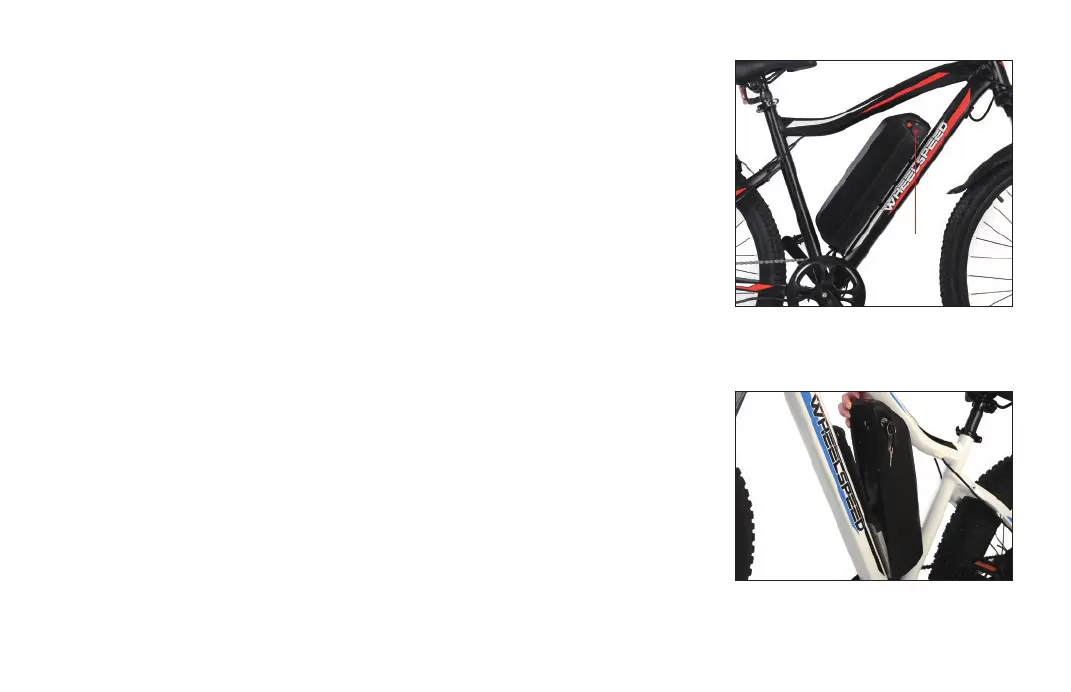
Step 2. Rotate the battery's charging port cover to expose the charging port, insert
one end of the charging cable into the charging port and connect the other
end to a wall outlet(fig.7).
Step 3.
Allow at least 6 hours when charging for the first time. After this initial
charge, average charging time is 5-6 hours.
Step 4. While the E-Bike is charging, the adapter's indicator light will turn red.
Step 5. When the E-Bike is fully recharged, the adapter's indicator light will turn green.
You may then disconnect the E-Bike from the charger.
Step 1. Use the included keys to unlock the battery by rotating the key to the
unlock icon around the key hole.
Step 2.
Push the battery bottom to remove the battery from the base(fig.8).
11
WARNING: Ensure the E-Bike is turned off before charging and remains off while
charging.
3.2 How to Detach the Battery
NOTE: You must push the key in and turn it at the same time.
fig.7
fig.8
For your convenience, the ARIES's battery can be removed for easier charging
and/or an extra measure of security. Before you remove the battery, please turn
off the battery power.
Charging
Port
3.1 How to charge the Battery


 To Next Page