13
Section 4
HOW TO RIDE AND LCD DISPLAY DESCRIPTION
4.1 How to Ride
1 2
5
6
8
4
3
11
11
9
7
12
10
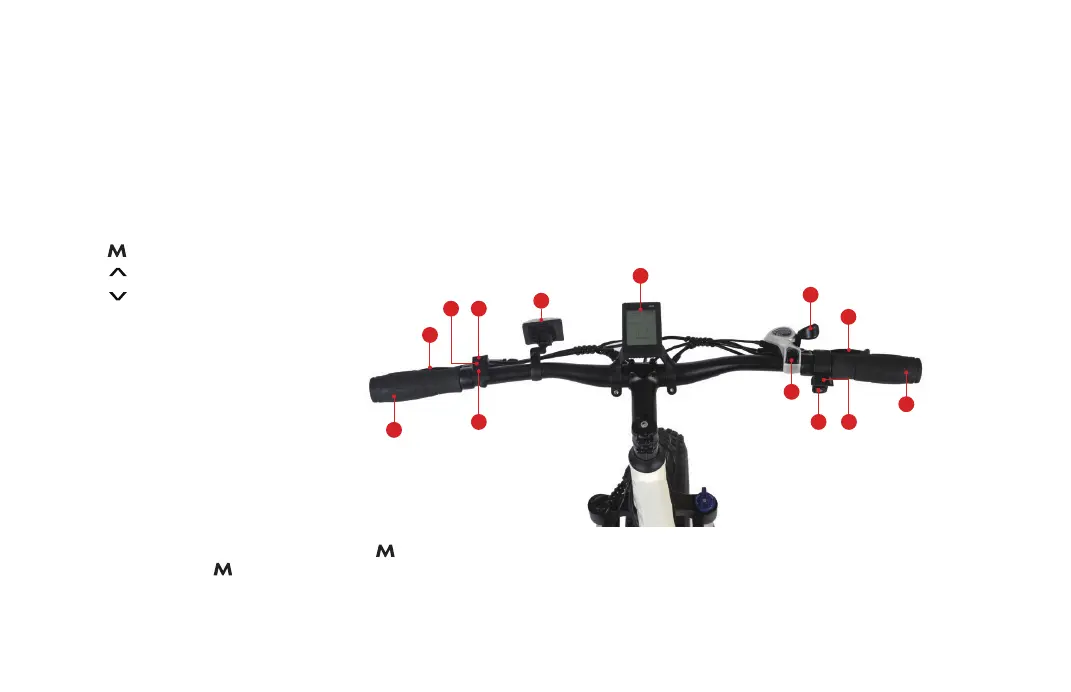
1. “ ”-Power Button
2. “ ”-Upshift Button
3. “ ”-Downshift Button
4. Front Reflector
5. LCD Display
6. Gear Switch
7. Gear Button
8. Horn Button
9. Throttle
10. Rear Hand Brake
11. Handlebar
12. Front Hand Brake
• Start your E-Bike by long pressing the “ ”Power Button for 2 seconds , or ride it with your feet directly.
Quick press the “ ” button to switch the menu on the Multifunctional display area.
• Moving forward on your E-Bike is as easy as pressing the Throttle. Long press the throttle for 8 seconds to enter
the cruise mode, then press the throttle or handbrake to quit the cruise mode.
The instructions below will ensure you have a comfortable and safe riding experience. Please read carefully.
There’s a power switch beside the battery charging port. Remember to turn the battery power switch to “ I ”
if you plan to use the throttle and/or battery power. For regular pedaling without power and/or after you are
done riding, turn the battery power switch to “ O ” to power the battery OFF.


 To Next Page