15
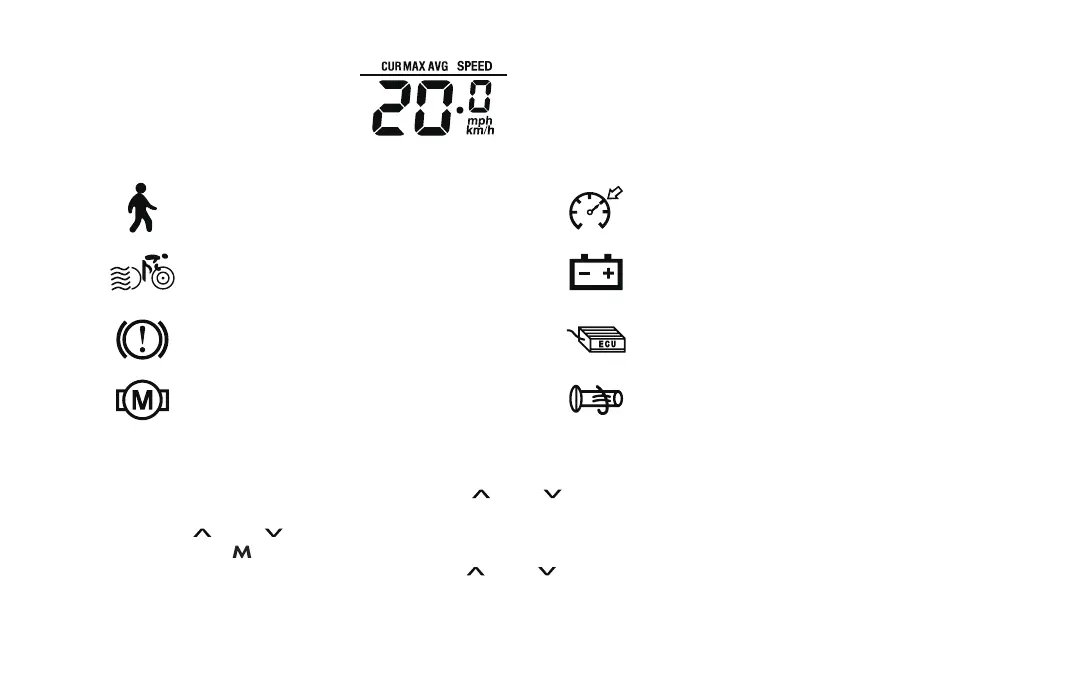
6KM/H Push asist mode Cruise mode
Power asist mode Battery undervoltage
Brake tips Controller failure
Motor failure Throttle failure
6. E-bike status display
5. Speed display
CUR MAX: Current Max.Speed
AVG: Average Speed
MPH, KM/H:Speed Uint
7. E-bike display settings
When the display is powered on, long press the “ ” and “ ” button at the same time to enter the setting mode.
P01: The screen displays P01, it is Display brightness setting mode, level 1 is the darkest, level 3 is the brightest,
press the “ ” and “ ” button to switch the brightness from level 1 to level 3;
P02: Press the “ ” button to switch to P02, it is mileage/speed unit adjustment mode, 0 means KM and KM/H unit
mode; 1 means MILE and MPH unit. Press the “ ” and “ ” button to switch the unit mode from 0 to 1.


 To Next Page