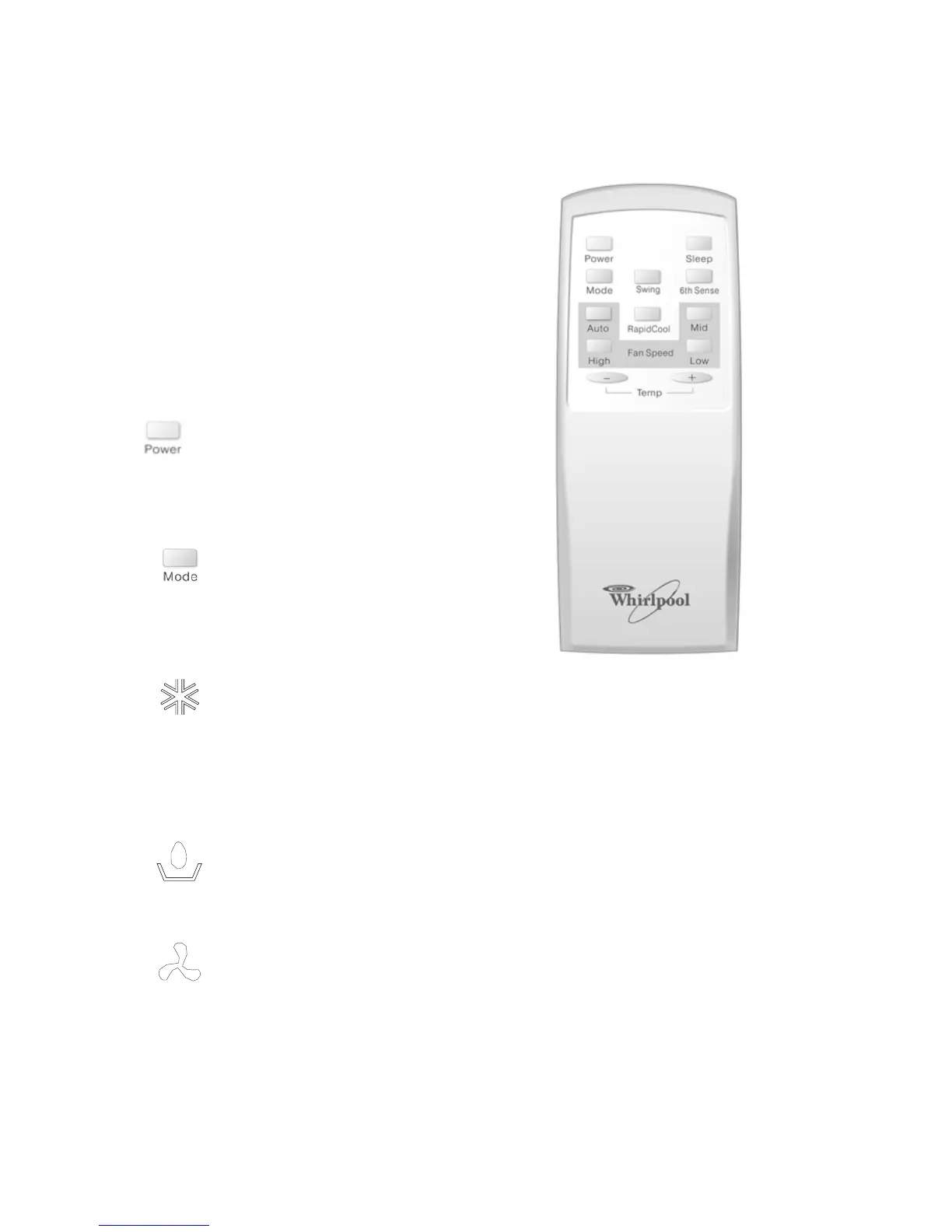
USING THE REMOTE CONTROL
NOTE: Remote control may vary in appearance.
NOTES:
• Two AAA batteries (included) power the remote
control. Replace batteries after 6 months of use,
or when the remote control starts to lose
power.
• To operate the air conditioner with the remote
control, aim the remote control at the signal
receptor from no more than 23 ft (7 m) away.
Power On or Off
Press POWER.
Selecting mode
1. Press and release MODE until you see the
symbol glow for the desired setting.
2. Choose Cooling, Dry or Fan Only.
• Cooling-Cools the room. Press Fan to select
Auto, High, Mid or Low. Press the up or down
Adjust button to adjust the temperature.
• Dry-Dries the room. The air conditioner
automatically selects the temperature. Fan
runs on Low speed only.
NOTE: Dry mode should not be used to cool the
room.
• Fan Only-Only the fan runs. Press FAN to
select High, Mid or Low.
NOTE: Auto fan speed cannot be selected in Fan
Only mode.
9



 To Next Page