COMPONENT ACCESS
4-6
n
Multi-Door Freestanding Refrigerator
Accessing Refrigerator Compartment Components (Continued)
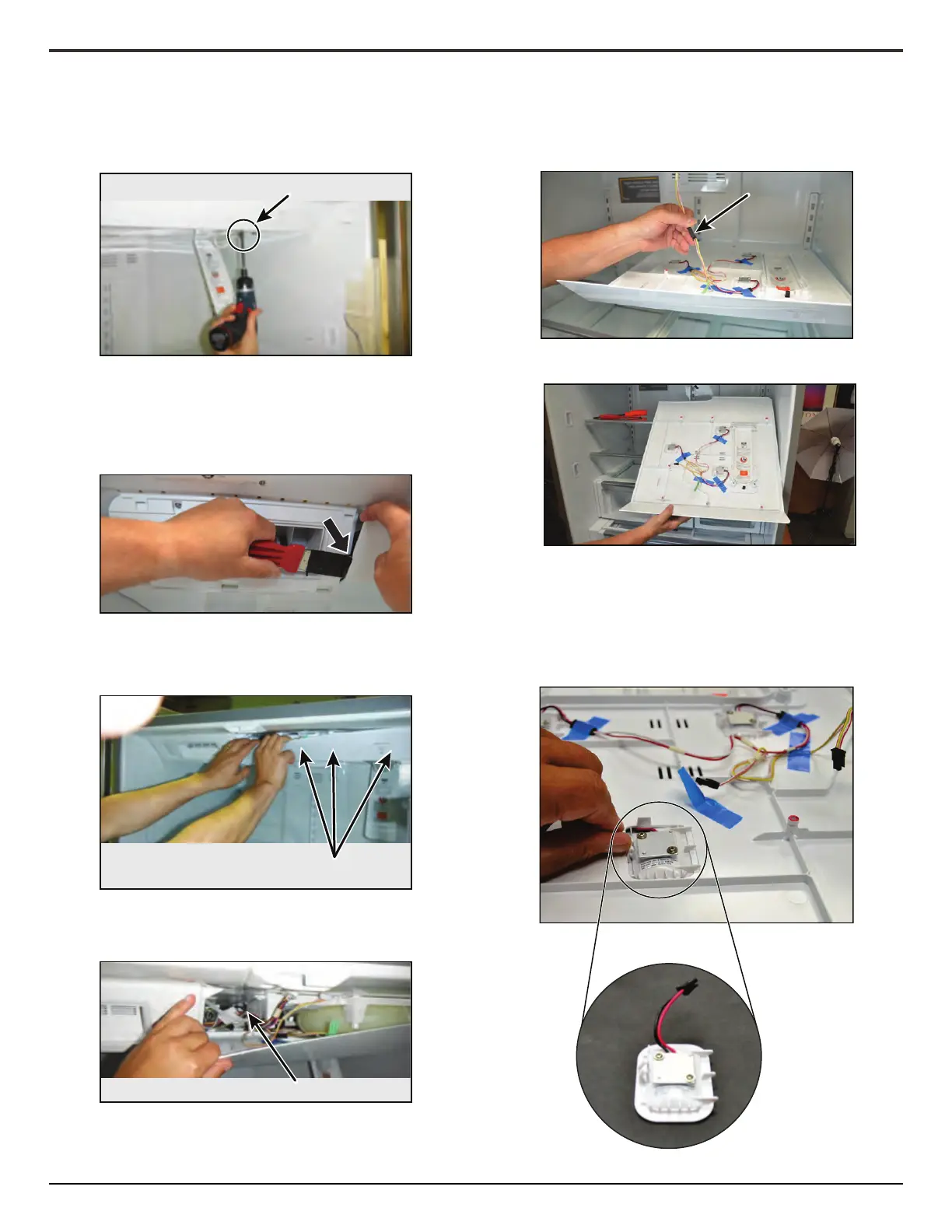
7. Using a 1/4" (6.4 mm) nut driver remove the two screws from
under the water lter door.
8. Starng from the ice box side, place a at head screw driver
between the water reservoir cover and refrigerator
compartment liner creang enough room to place your hand
between the two.
9. Working from le to right, slide your hand between the water
reservoir cover and refrigerator compartment liner to
disengage the snaps.
10. Disengage rear le snap.
11. To remove the water reservoir cover, slide it forward and
disconnect LED lighng connector.
12. To remove LED light modules from water reservoir cover, li
out.
NOTE: To remove LED modules from boom of ice box
assembly and cabinet walls, protect the liner while using a
puy knife to pry them out.
A
A. Two screws
A
A. Snaps (not shown)
A
A. Snap
A
A. LED connector




 To Next Page