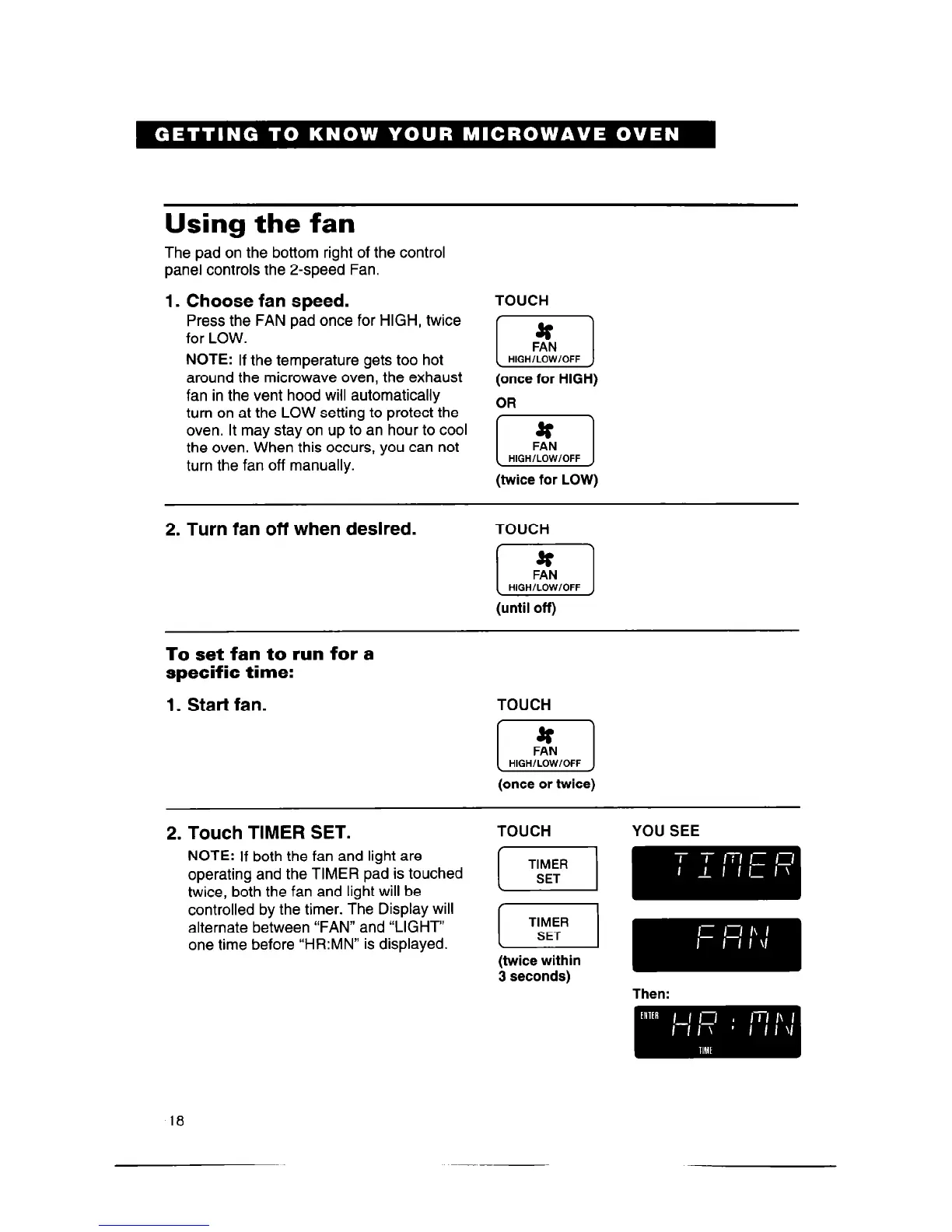
Using the fan
The pad on the bottom right of the control
panel controls the 2-speed Fan.
1. Choose fan speed.
Press the FAN pad once for HIGH, twice
for LOW.
NOTE:
If the temperature gets too hot
around the microwave oven, the exhaust
fan in the vent hood will automatically
turn on at the LOW setting to protect the
oven. It may stay on up to an hour to cool
the oven. When this occurs, you can not
turn the fan off manually.
TOUCH
(once for HIGH)
OR
1 H,GHi!!i,OFF 1
(twice for LOW)
2. Turn fan off when desired.
TOUCH
(until off)
To set fan to run for a
specific time:
1. Start fan.
TOUCH
1 H,GHi!i,OFF 1
(once or twice)
1
2. Touch TIMER SET.
TOUCH
YOU SEE
NOTE:
If both the fan and light are
operating and the TIMER pad is touched
twice, both the fan and light will be
(7,
controlled by the timer. The Display will
alternate between “FAN” and “LIGHT”
one time before “HR:MN” is displayed.
(7
IL--C- --~!LLI-
pme wmm
3 seconds)
Then:
18



 To Next Page