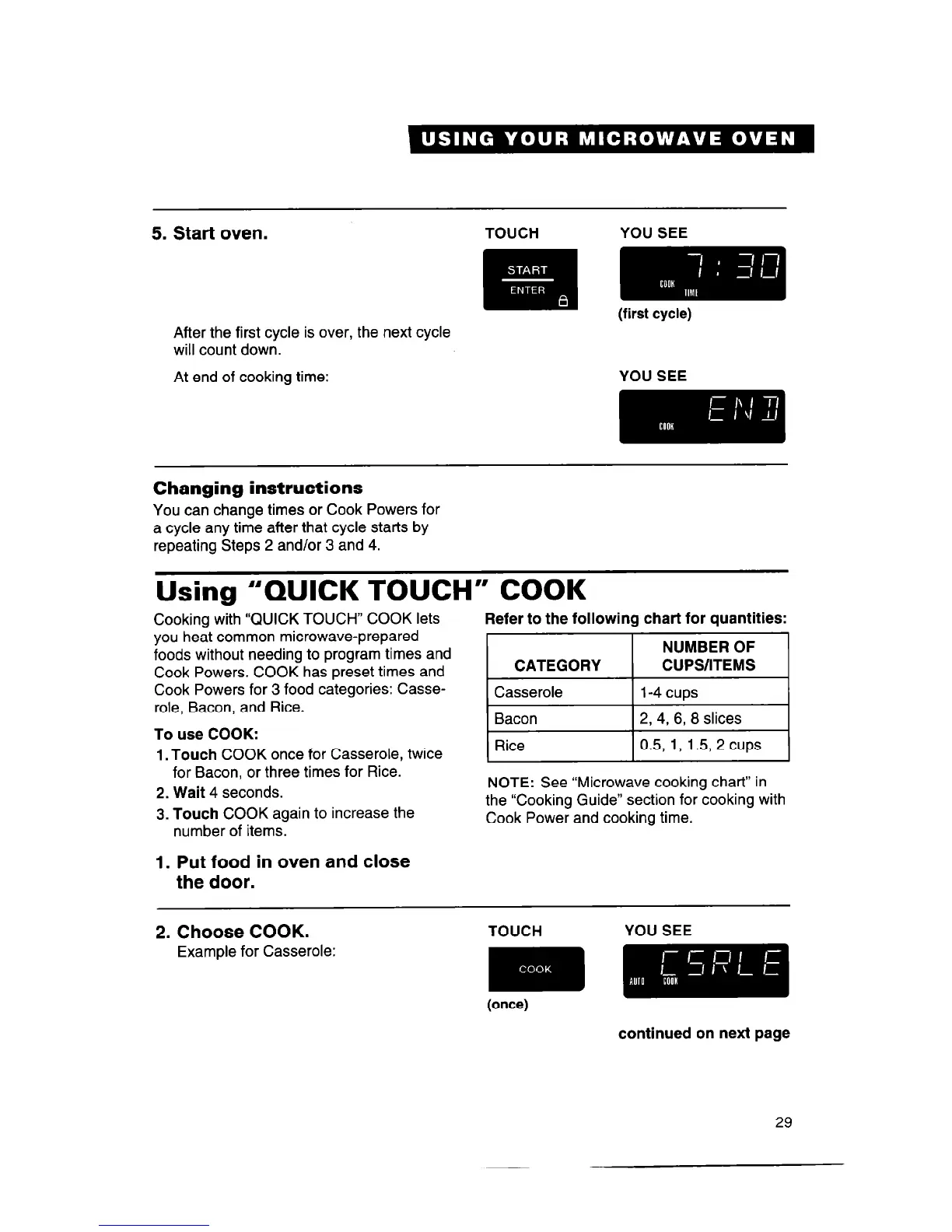
5. Start oven.
After the first cycle is over, the next cycle
will count down.
At end of cooking time:
YOU SEE
Changing instructions
You can change times or Cook Powers for
a cycle any time after that cycle starts by
repeating Steps 2 and/or 3 and 4.
Using “QUICK TOUCH” COOK
Cooking with “QUICK TOUCH” COOK lets
Refer to the following chart for quantities:
you heat common microwave-prepared
foods without needing to program times and
Cook Powers. COOK has preset times and
Cook Powers for 3 food categories: Casse-
role, Bacon, and Rice.
To use COOK:
1. Touch
COOK once for Casserole, twice
for Bacon, or three times for Rice.
2. Wait 4
seconds.
3. Touch
COOK again to increase the
number of items.
CATEGORY
Casserole
Bacon
NUMBER OF
CUPS/ITEMS
l-4 cups
2, 4, 6, 8
slices
Rice
0.5,
1, 1.5, 2 cups
NOTE: See “Microwave cooking chart” in
the “Cooking Guide” section for cooking with
Cook Power and cooking time.
1. Put food in oven and close
the door.
2. Choose COOK.
TOUCH
YOU SEE
Example for Casserole:
m
(once)
continued on next page
29



 To Next Page