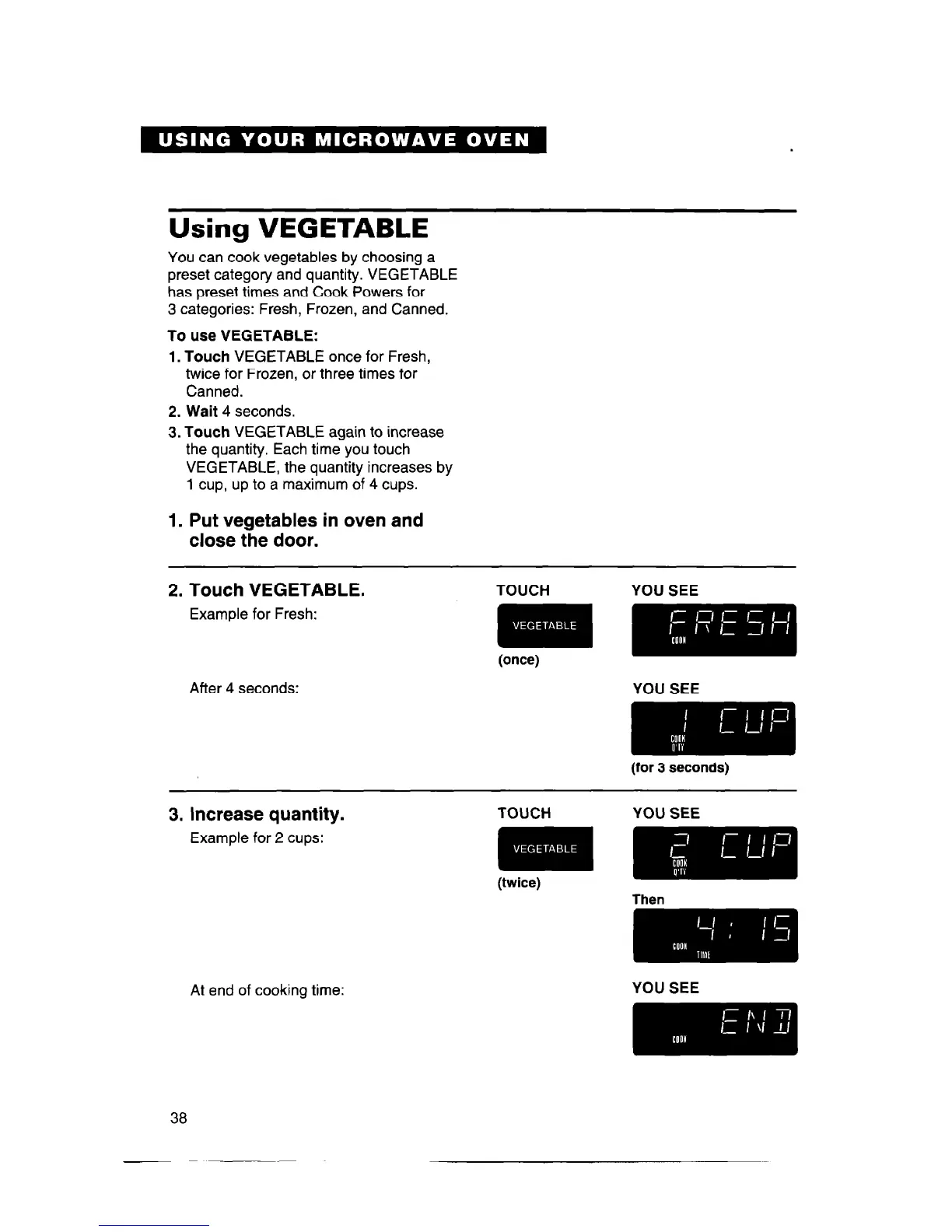
Using VEGETABLE
You can cook vegetables by choosing a
preset category and quantity. VEGETABLE
has preset times and Cook Powers for
3 categories: Fresh, Frozen, and Canned.
To use VEGETABLE:
1. Touch
VEGETABLE once for Fresh,
twice for Frozen, or three times for
Canned.
2. Wait 4
seconds.
3. Touch
VEGETABLE again to increase
the quantity. Each time you touch
VEGETABLE, the quantity increases by
1 cup, up to a maximum of 4 cups.
1. Put vegetables in oven and
close the door.
2. Touch VEGETABLE.
Example for Fresh:
After 4 seconds:
TOUCH YOU SEE
(once)
3. Increase quantity.
Example for 2 cups:
TOUCH YOU SEE
(twice)
Then
mm
At end of cooking time:
YOU SEE
mm
38



 To Next Page