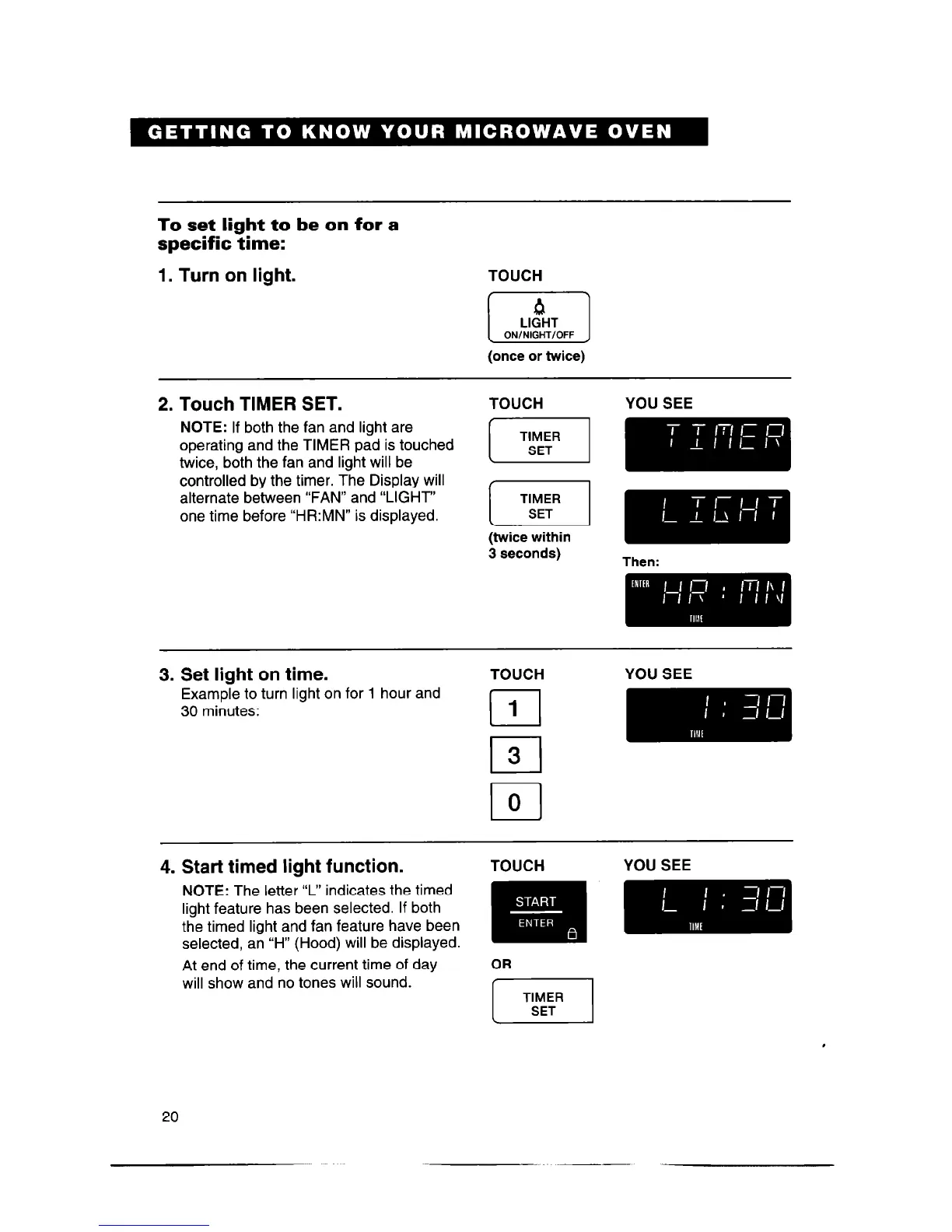
To set light to be on for a
specific time:
1. Turn on light.
TOUCH
I
Q
LIGHT
I
ON/NIGHT/OFF
(once or twice)
2. Touch TIMER SET.
NOTE:
If both the fan and light are
operating and the TIMER pad is touched
twice, both the fan and light will be
controlled by the timer. The Display will
alternate between “FAN” and “LIGHT”
one time before “HR:MN” is displayed.
3. Set light on time.
Example to turn light on for 1 hour and
30 minutes:
4. Start timed light function.
NOTE:
The letter ‘I” indicates the timed
light feature has been selected. If both
the timed light and fan feature have been
selected, an “H” (Hood) will be displayed.
At end of time, the current time of day
will show and no tones will sound.
TOUCH YOU SEE
(twice within
3 seconds)
Then:
TOUCH YOU SEE
cl
1
l-l
3
TOUCH
YOU SEE
I
TIMER
SET
I
,
20



 To Next Page