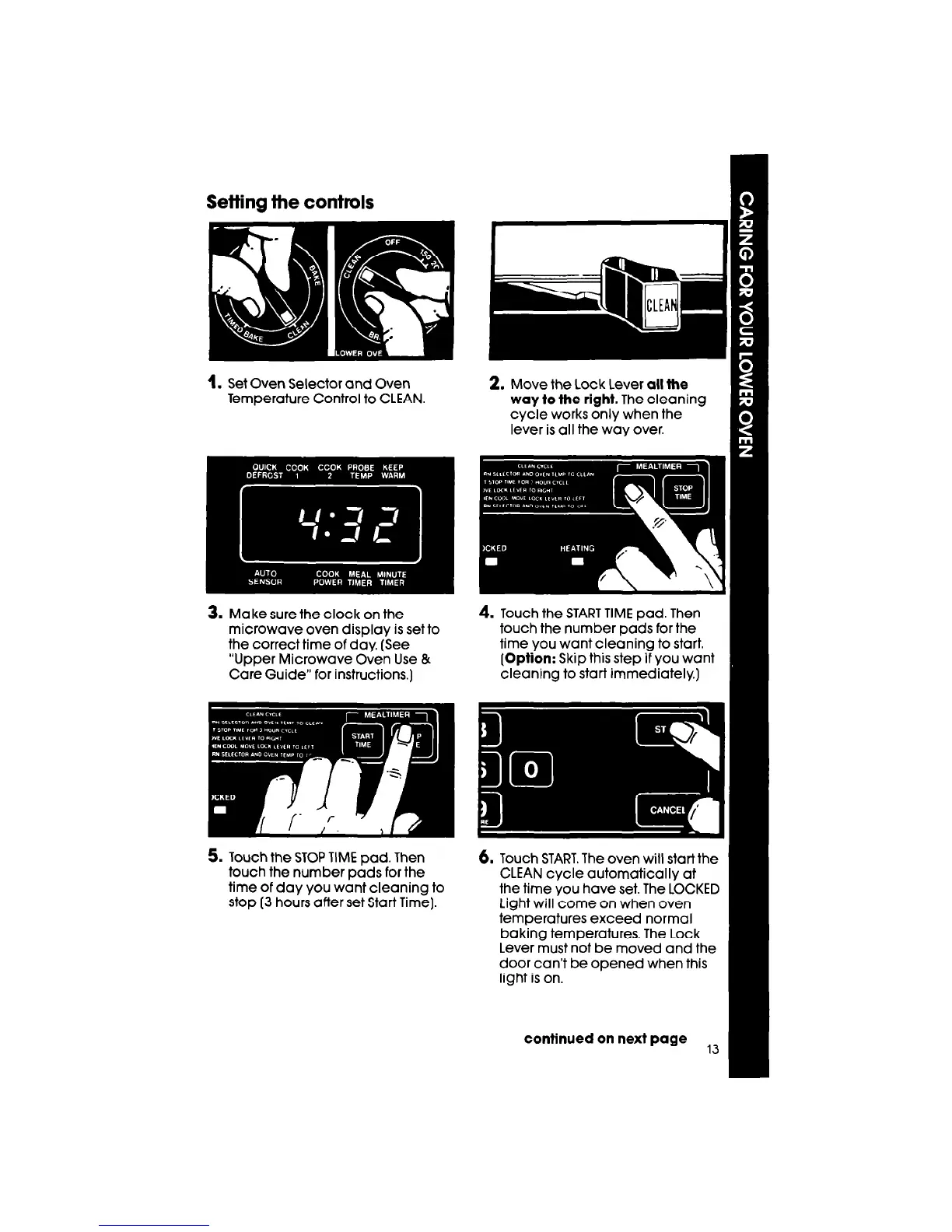
Setting the controls
1. Set Oven Selector and Oven
Temperature Control to CLEAN.
2. Move the Lock Lever
all
the
way to the right.
The cleaning
cycle works only when the
lever is all the way over.
3. Make sure the clock on the
microwave oven display is set to
the correct time of day. (See
“Upper Microwave Oven Use &
Care Guide” for instructions.]
4. Touch the START TIME pad. Then
touch the number pads for the
time you want cleaning to start.
(Option:
Skip this step if you want
cleaning to start immediately)
5. Touch the STOP TIME pad. Then
touch the number pads for the
time of day you want cleaning to
stop (3 hours after set Start Time].
6.
Touch START. The oven will start the
CLEAN cycle automatically at
the time you have set. The LOCKED
Light will come on when oven
temperatures exceed normal
baking temperatures. The Lock
Lever must not be moved and the
door can’t be opened when this
light is on.
continued on next page
13



 To Next Page