14 15
MUTE
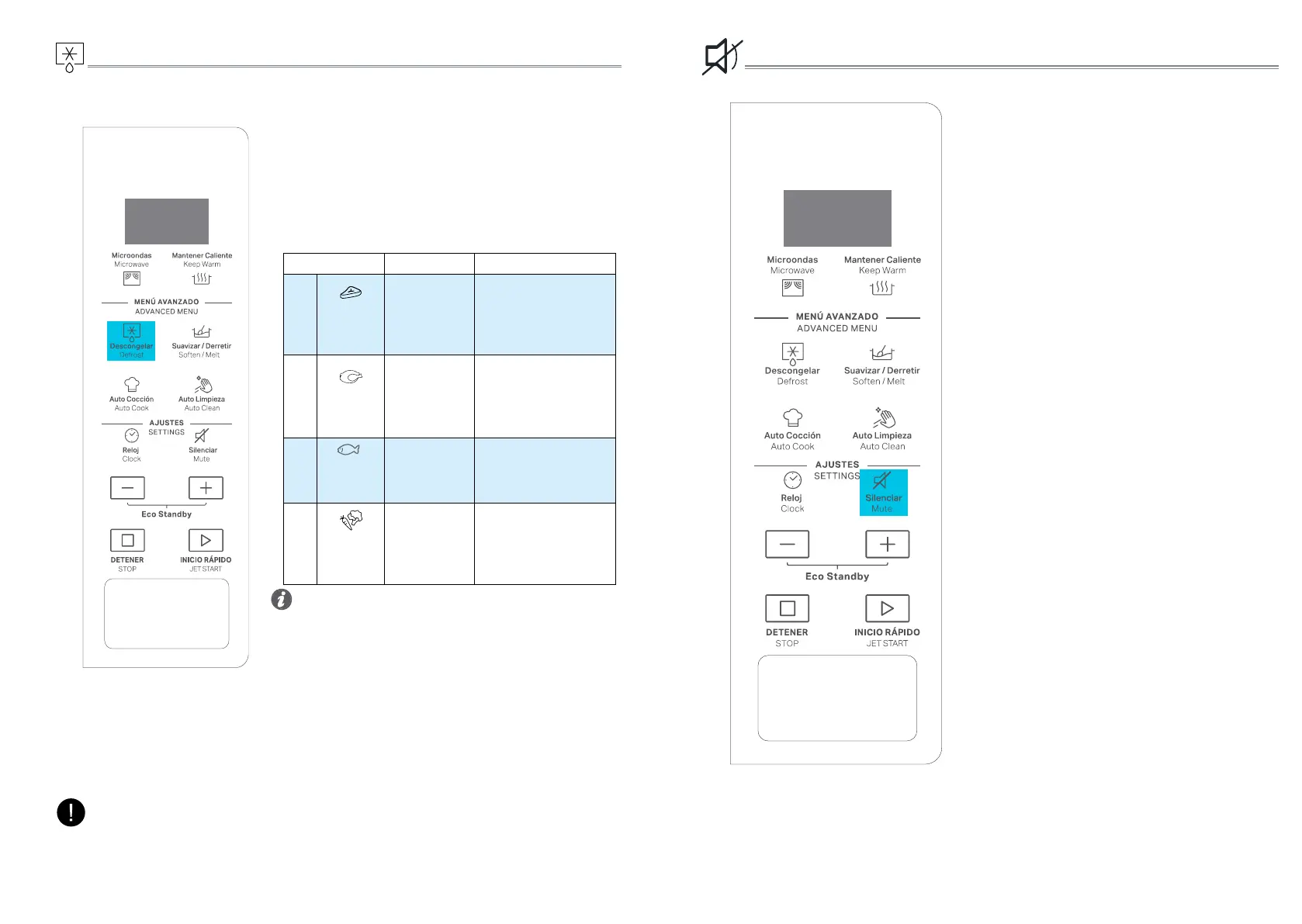
This function allows you to activate/deactivate
all the sounds played by the appliance,
includes button press, warnings,alarm, even
end audio feedback.
Press the button MUTE(SILENCIAR) to
enter the MUTE mode
Press the button MUTE(SILENCIAR) again
to return on the sound
q
Press the Defrost button.
w
Press the Defrost button repeatedly or +/-
button to select the food category in below
table and press JET START to conrm.
e
Press the +/- button to set the weight and press
JET START button to start.
DEFROST
• For better result we recommend to defrost directly
on the cavity bottom.
• If the food is warmer than deep-freeze temperature
(-18°C), choose a lower weight than the food.
• If the food is colder than deep-freeze temperature
(-18°C), choose a higher weight than the food.
• Separate pieces as they begin to defrost. Individual
slices defrost more easily.
• Standing time after defrosting always improves
the result since the temperature will then be
evenly distributed throughout the food.
Tips and suggestions:
Use this function for defrosting Meat, Poultry,
Fish, and Vegetables.
FOOD TYPE WEIGHT SUGGESTED USE
P1
Meat 100-2000g/50g
Minced meat, cutlets,
steaks or roasts.
After defrosting,allow
food to rest for at least 5
minutes for better results.
P2
Poultry 100-2000g/50g
Whole chicken,pieces or
fillets.
After defrosting ,allow
food to rest for 5-10
minutes for better results..
P3
Fish 100-2000g/50g
Whole fish or fish fillet.
After defrosting,allow food
to rest for 5-10 minutes for
better results.
P4
Vegetables 100-1000g/50g
Larger,medium and small
cut vegetables.
After defrosting,allow food
to rest for 3-5 minutes for
better results
The cooking recipe will be confirmed once you leave the function button for 3 seconds,
press the function key again to change the recipe type.
NOTE:



 To Next Page