EasyManua.ls Logo

White 310 - Getting to Know Your Machine; Stitch Length Dial; Reverse Button

Default Icon
39 pages
Print Icon
To Next Page IconTo Next Page
To Previous Page IconTo Previous Page
Loading...
SECTION
III
II
REVERSE
BUTTON
LZ
:
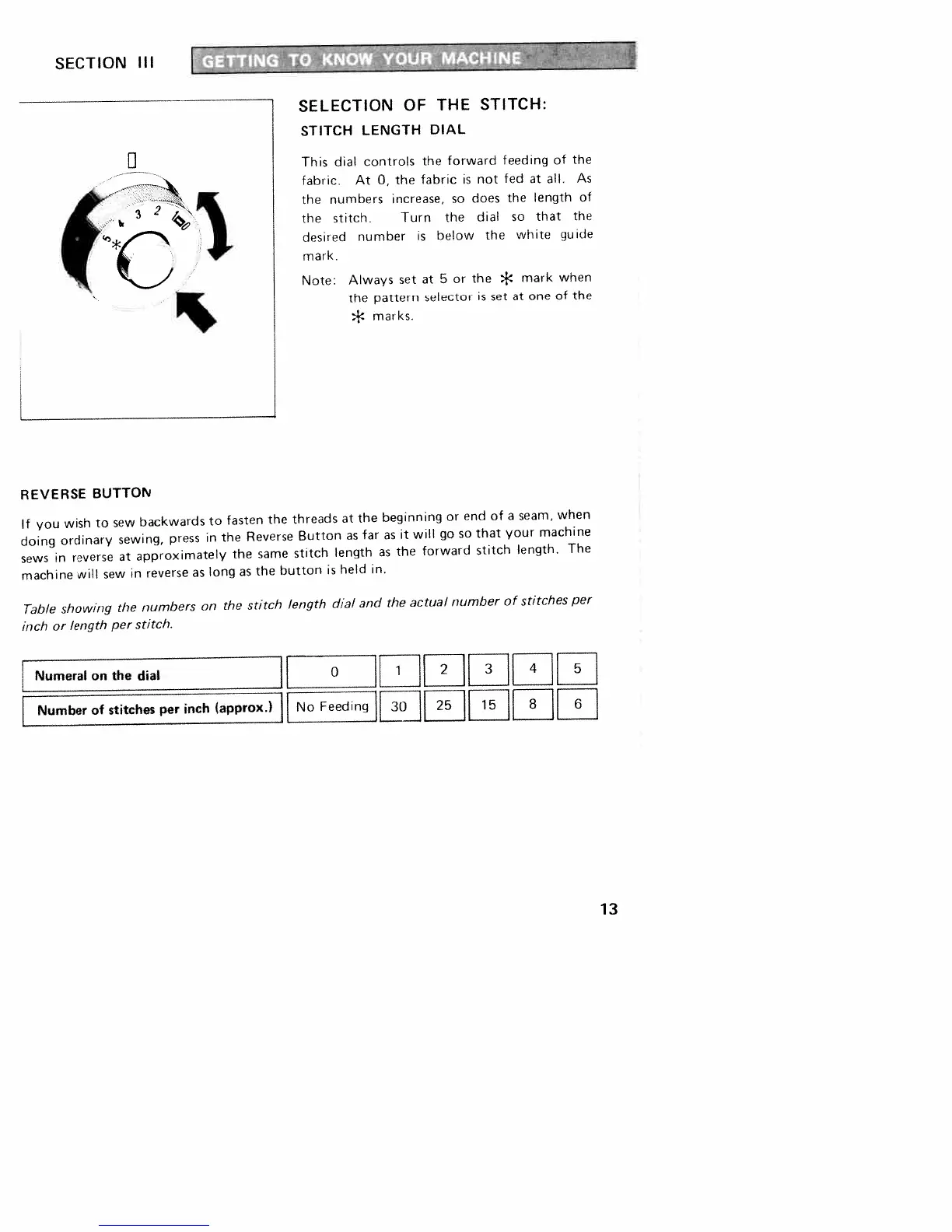
SELECTION
OF
THE
STITCH:
STITCH
LENGTH
DIAL
This
dial
controls
the
forward
feeding
of
the
fabric.
At
0,
the
fabric
is
not
fed
at
all.
As
the
numbers
increase,
so
does
the
length
of
the
stitch.
Turn
the
dial
so
that
the
desired
number
is
below
the
white
guide
mark.
Note:
Always
set
at
5
or
the
*
mark
when
the
pattern
selector
is
set
at
one
of
the
*
marks.
If
you
wish
to
sew
backwards
to
fasten
the
threads
at
the
beginning
or
end
of
a
seam,
when
doing
ordinary
sewing,
press
in
the
Reverse
Button
as
far
as
it
will
go
so
that
your
machine
sews
in
reverse
at
approximately
the
same
stitch
length
as
the
forward
stitch
length.
The
machine
will
sew
in
reverse
as
long
as
the
button
is
held
in.
Table
showing
the
numbers
on
the
stitch
length
dial
and
the
actual
number
of
stitches
per
inch
or
length
per
stitch.
Numeral
on
the
dial
[
0
1
2
3
1
I
Numberofstitchesperinch(approx.)
No
Feeding
25
15
8
j[
I
13

Related product manuals