EasyManua.ls Logo

White 310 - Cleaning and Oiling the Shuttle Area

Default Icon
39 pages
Print Icon
To Next Page IconTo Next Page
To Previous Page IconTo Previous Page
Loading...
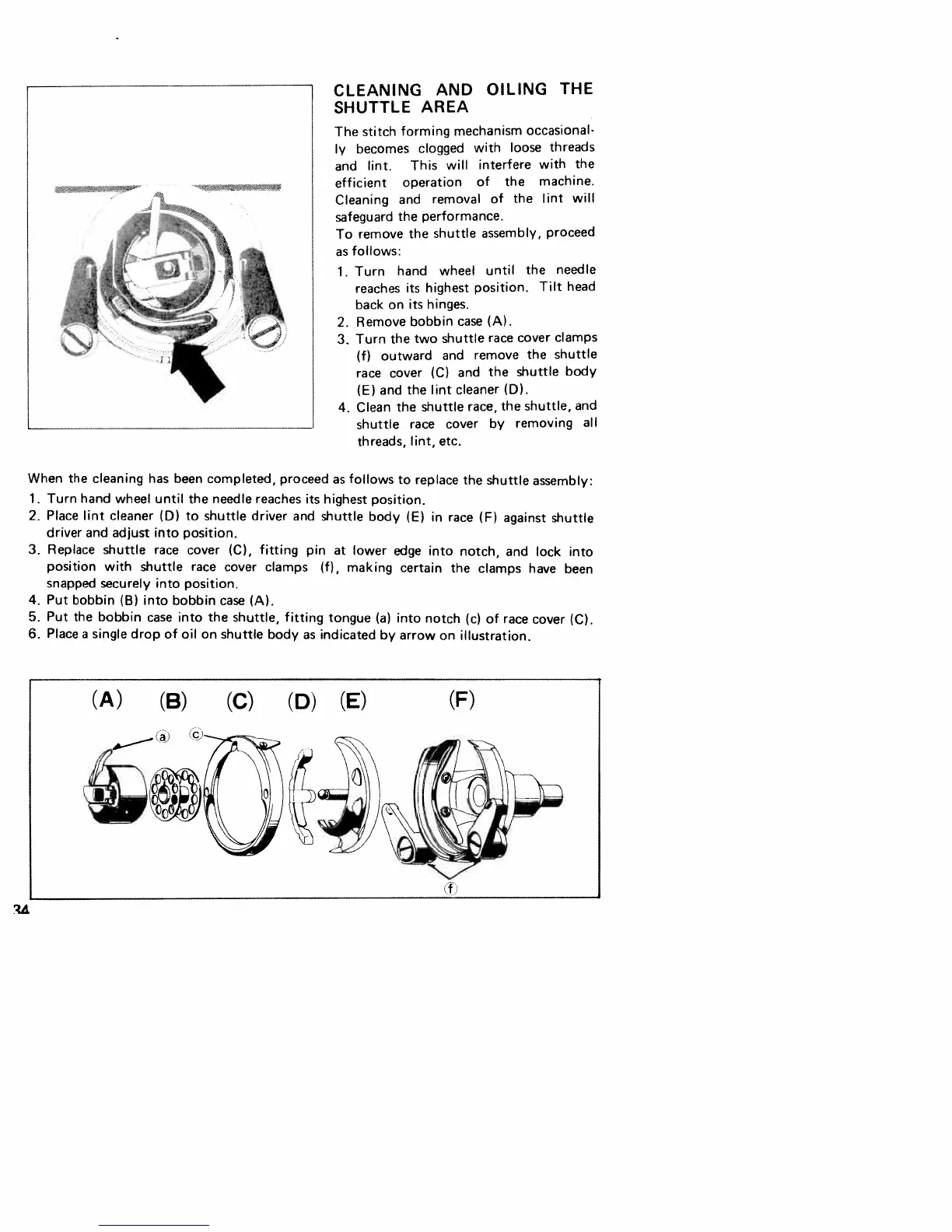
CLEANING
AND
OILING
THE
SHUTTLE
AREA
The
stitch
forming
mechanism
occasional
ly
becomes
clogged
with
loose
threads
and
lint.
This
will
interfere
with
the
efficient
operation
of
the
machine.
Cleaning
and
removal
of
the
lint
will
safeguard
the
performance.
To
remove
the
shuttle
assembly,
proceed
as
follows:
1.
Turn
hand
wheel
until
the
needle
reaches
its
highest
position.
Tilt
head
back
on
its
hinges.
2.
Remove
bobbin
case
(A).
3.
Turn
the
two
shuttle
race
cover
clamps
(f)
outward
and
remove
the
shuttle
race
cover
(C)
and
the
shuttle
body
(E)
and
the
lint
cleaner
(0).
4.
Clean
the
shuttle
race,
the
shuttle,
and
shuttle
race
cover
by
removing
all
threads,
lint,
etc.
When
the
cleaning
has
been
completed,
proceed
as
follows
to
replace
the
shuttle
assembly:
1.
Turn
hand
wheel
until
the
needle
reaches
its
highest
position.
2.
Place
lint
cleaner
(0)
to
shuttle
driver
and
shuttle
body
(E)
in
race
(F)
against
shuttle
driver
and
adjust
into
position.
3.
Replace
shuttle
race
cover
(C),
fitting
pin
at lower
edge
into
notch,
and
lock
into
position
with
shuttle
race
cover
clamps
(f),
making
certain
the
clamps
have
been
snapped
securely
into
position.
4.
Put
bobbin
(B)
into
bobbin
case
(A).
5.
Put
the
bobbin
case
into
the
shuttle,
fitting
tongue
(a)
into
notch
(c)
of
race
cover
(C).
6.
Place
a
single
drop
of
oil
on
shuttle
body
as
indicated
by
arrow
on
illustration.
(A)
(B)
(C)
(0)
(E)
(F)

Related product manuals