EasyManua.ls Logo

White 445 - Straight Sewing; Double Presser Foot Lifter; Pattern Selection Dial

Default Icon
24 pages
Print Icon
To Next Page IconTo Next Page
To Previous Page IconTo Previous Page
Loading...
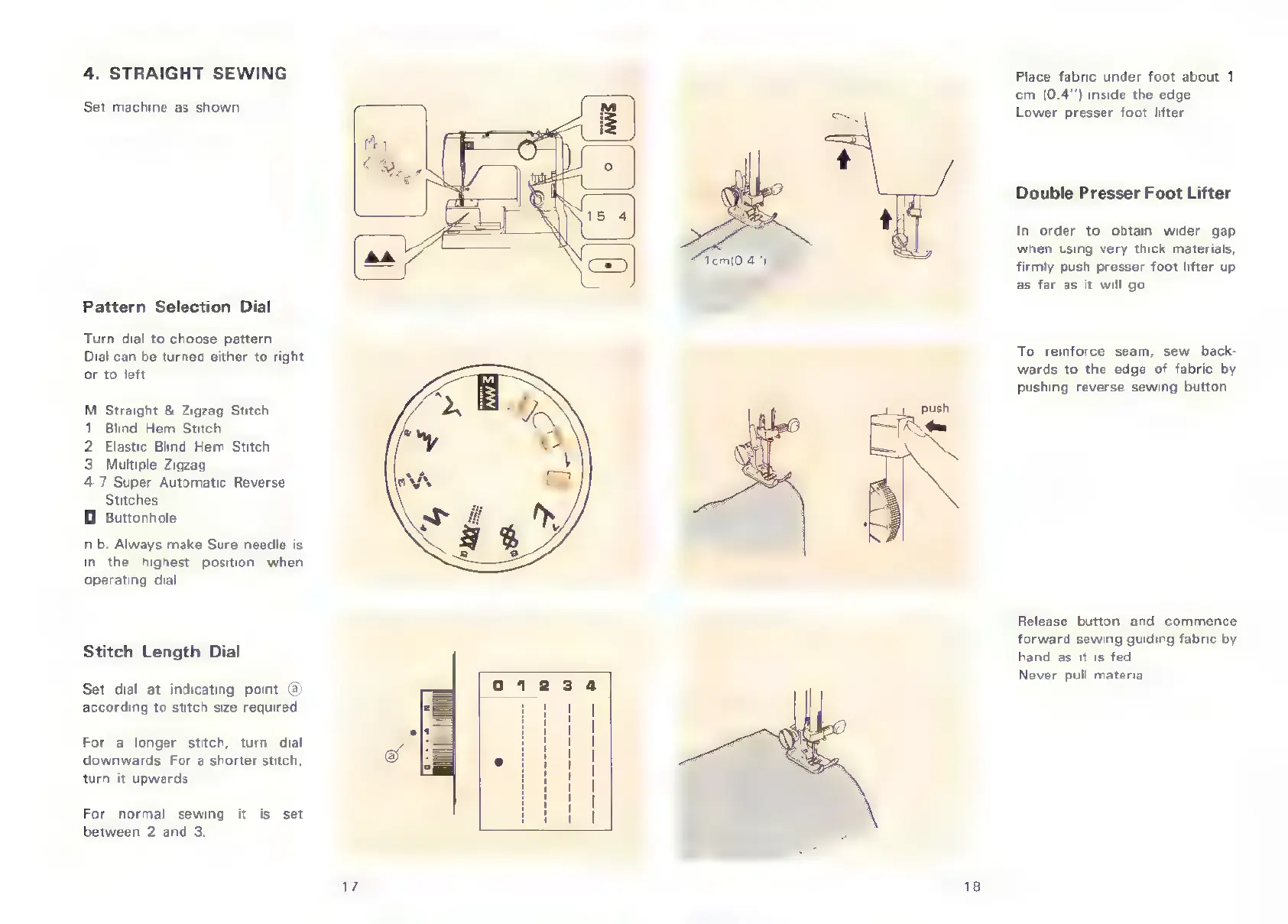
4.
STRAIGHT
SEWING
Set
machine
as
shown.
Pattern
Selection
Dial
Turn
dial
to
choose
pattern.
Dial
can
be
turned
either
to
right
or
to
left.
M
Straight
&
Zigzag
Stitch
1
Blind
Hem
Stitch
2
Elastic
Blind
Hem
Stitch
3
Multiple
Zigzag
4-7
Super
Automatic
Reverse
Stitches
0
Buttonhole
n.b.
Always
make
Sure
needle
is
in
the
highest
position
when
operating
dial
Stitch
Length
Dial
Set
dial
at
indicating
point
(а)
according
to
stitch
size
required.
For
a
longer
stitch,
turn
dial
downwards.
For
a
shorter
stitch,
turn
it
upwards.
For
normal
sewing
it
is
set
between
2
and
3.
push
Place
fabric
under
foot
about
1
cm
(0.4")
inside
the
edge.
Lower
presser
foot
lifter.
Double
Presser
Foot
Lifter
Іп
order
to
obtain
wider
gap
when
using
very
thick
materials,
firmly
push
presser
foot
lifter
up.
as
far
as
it
will
go.
To
reinforce
seam,
sew
back-
wards
to
the
edge
of
fabric
by
pushing
reverse
sewing
button
Release
button
and
commence
forward
sewing
guiding
fabric
by
hand
as
it
is
fed.
Never
pull
material

Related product manuals