EasyManua.ls Logo

White 535 - Sewing on Buttons; Sewing Four-Hole Buttons

White 535
52 pages
Print Icon
To Next Page IconTo Next Page
To Previous Page IconTo Previous Page
Loading...
22
SEWING
ON
BUTTONS
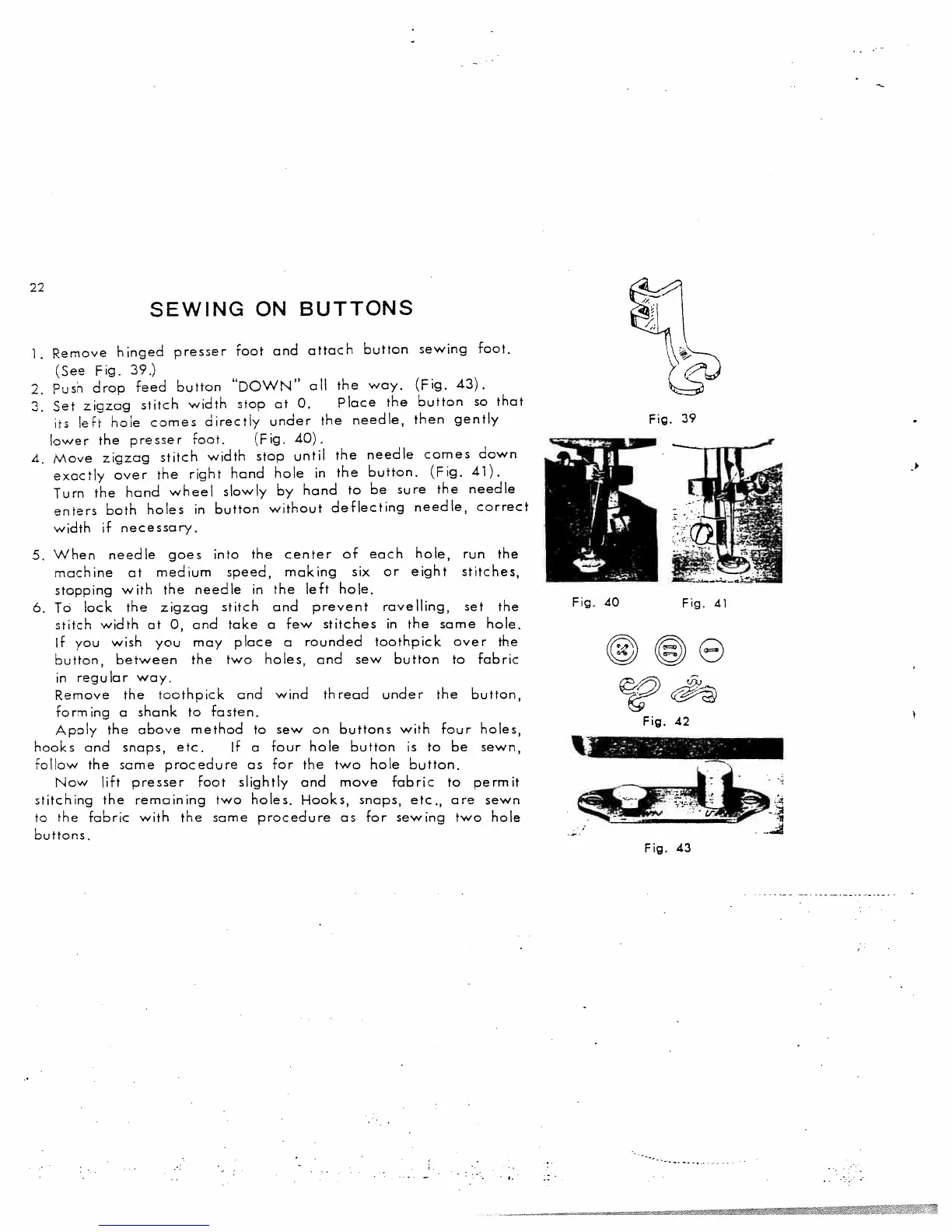
1.
Remove
hinged
presser
foot
and
attach
button
sewing
foot.
(See
Fig.
39.)
2.
Push
drop
feed
button
“DOWN”
all
the
way.
(Fig.
43).
3.
Set
zigzag
stitch
width
stop
at
0.
Place
the
button
so
that
irs
left
hole
comes
directly
under
the
needle,
then
gently
lower
the
presser
foot.
(Fig.
40).
4.
Move
zigzag
stitch
width
stop
until
the
needle
comes
down
exactly
over
the
right
hand
hole
in
the
button.
(Fig.
41).
Turn
the
hand
wheel
slowly
by
hand
to
be
sure
the
needle
enters
both
holes
in
button
without
deflecting
needle,
correct
width
if
necessary.
5.
When
needle
goes
into
the
center
of
each
hole,
run
the
machine
at
medium
speed,
making
six
or
eight
stitches,
stopping
with
the
needle
in
the
left
hole.
6.
To
lock
the
zigzag
stitch
and
prevent
ravelling,
set
the
stitch
width
at
0,
and
take
a
few
stitches
in
the
same
hole.
If
you
wish
you
may
place
a
rounded
toothpick
over
the
button,
between
the
two
holes,
and
sew
button
to
fabric
in
regular
way.
Remove
the
toothpick
and
wind
thread
under
the
button,
forming
a
shank
to
fasten.
Apply
the
above
method
to
sew
on
buttons
with
four
holes,
hooks
and
snaps,
etc.
If
a
four
hole
button
is
to
be
sewn,
follow
the
same
procedure
as
for
the
two
hole
button.
Now
lift
presser
foot
slightly
and
move
fabric
to
permit
stitching
the
remaining
two
holes.
1-looks,
snaps,
etc.,
are
sewn
to
the
fabric
with
the
same
procedure
as
for
sewing
two
hole
buttons.
Fig.
39
Fig.
41
Fig.
42
Fig.
40
Fig.
43

Related product manuals