EasyManua.ls Logo

White 734 - Needle Position and Stitch Width Control; Stitch Length vs. Stitch Width; Stitch Pattern Selector Guide; Stretch Stitch Control Function

Default Icon
22 pages
Print Icon
To Next Page IconTo Next Page
To Previous Page IconTo Previous Page
Loading...
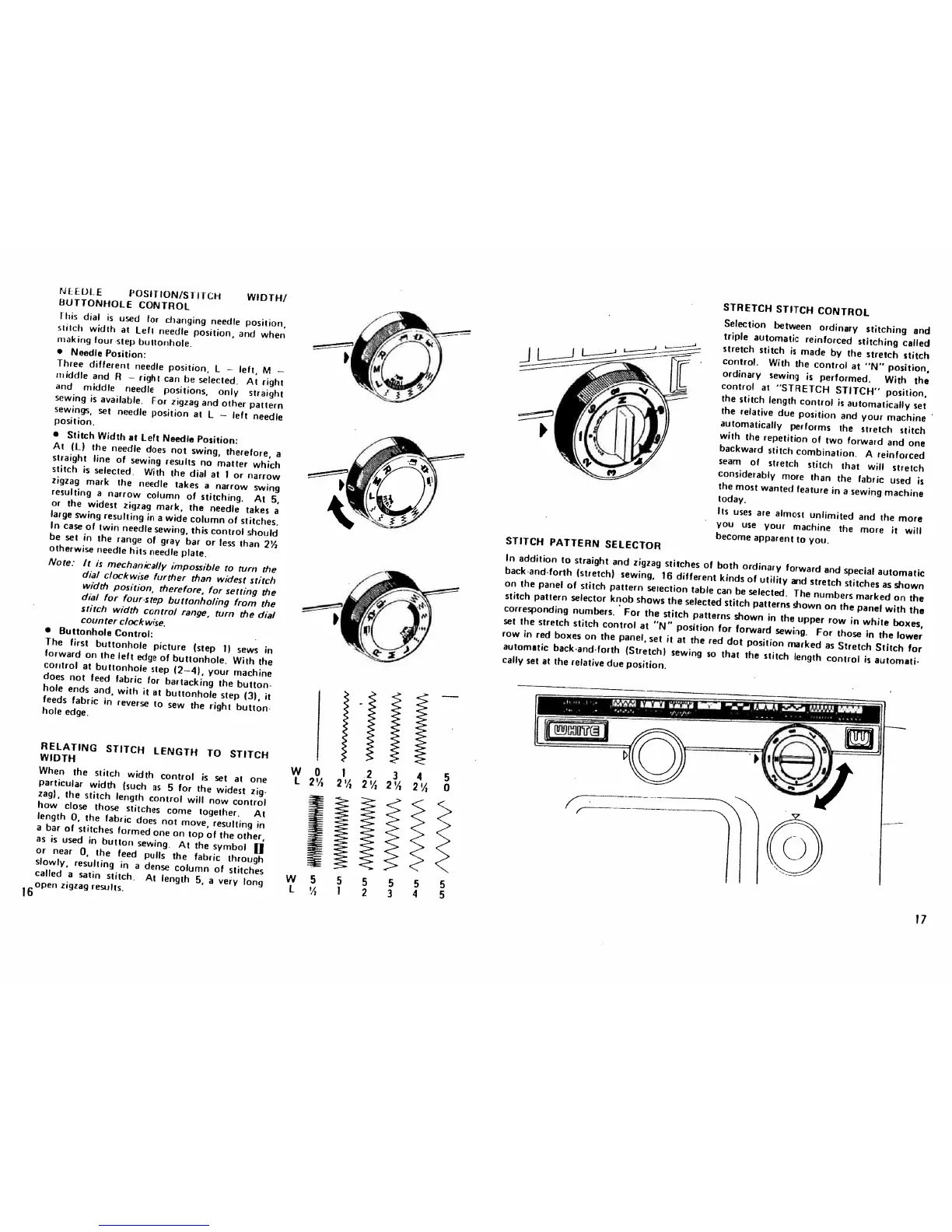
NH
DL.
E
POSITION/Si
I
rct-t
WIDTH/
BUTTONHOLE
CONTROL
this
dial
is
used
for
changing
needle
position.
stitch
width
at
Left
needle
position,
and
when
making
lour
-step
buttonhole.
Needle
Position:
Three
different
needle
position,
I
left,
M
middle
and
B
right
can
be
selected.
At
right
and
middle
needle
positions,
only
straight
sewing
is
available.
For
zigzag
and
other
pattern
sewings,
set
needle
position
at
L
left
needle
position.
Stitch
Width
at
Left
Needle
Position:
At
(L)
the
needle
does
not
swing,
therefore,
a
straight
line
of
sewing
results
no
matter
which
stitch
is
selected.
With
the
dial
at
1
or
narrow
zigzag
mark
the
needle
takes
a
narrow
swing
resulting
a
narrow
column
of
stitching.
At
5,
or
the
widest
zigzag
mark,
the
needle
takes
a
large
swing
resulting
in
a
wide
column
of
stitches.
In
case
of
twin
needle
sewing,
this
control
should
be
set
in
the
range
of
gray
bar
or
less
than
2Y,
otherwise
needle
hits
needle
plate.
Note:
It
is
mechanically
impossible
to
turn
the
dial
clockwise
further
than
widest
stitch
width
position,
therefore,
for
setting
the
dial
for
four-step
buttonholing
from
the
stitch
width
control
range,
turn
the
dial
counter
clockwise.
Buttonhole
Control:
The
first
buttonhole
picture
(step
1)
sews
in
forward
on
the
left
edge
of
buttonhole.
With
the
control
at
buttonhole
step
(2—4),
your
machine
does
not
feed
fabric
for
bartacking
the
button
hole
ends
and,
with
it
at
buttonhole
step
(3),
it
feeds
fabric
in
reverse
to
sew
the
right
button
hole
edge.
RELATING
STITCH
LENGTH
TO
STITCH
WIDTH
When
the
stitch
width
control
is
set
at
one
particular
width
(such
as
5
for
the
widest
zig
zag),
the
stitch
length
control
will
now
control
how
close
those
stitches
come
together.
At
length
0,
the
fabric
does
not
move,
resulting
in
a
bar
of
stitches
formed
one
on
top
of
the
other,
as
is
used
in
button
sewing.
At
the
symbol
fl
or
near
0,
the
feed
pulls
the
fabric
through
slowly,
resulting
in
a
dense
column
of
stitches
called
a
satin
stitch.
At
length
5,
a
very
long
open
zigzag
results.
STITCH
PATTERN
SELECTOR
STRETCH
STITCH
CONTROL
Selection
between
ordinary
stitching
and
triple
automatic
reinforced
stitching
called
stretch
stitch
is
made
by
the
stretch
stitch
control.
With
the
control
at
“N”
position,
ordinary
sewing
is
performed.
With
the
control
at
“STRETCH
STITCH”
position,
the
stitch
length
control
is
automatically
set
the
relative
due
position
and
your
machine
automatically
performs
the
stretch
stitch
with
the
repetition
of
two
forward
and
one
backward
stitch
combination.
A
reinforced
seam
of
stretch
stitch
that
will
stretch
considerably
more
than
the
fabric
used
is
the
most
wanted
feature
in
a
sewing
machine
today.
Its
uses
are
almost
unlimited
and
the
more
you
use
your
machine
the
more
it
will
become
apparent
to
you.
In
addition
to
straight
and
zigzag
stitches
of
both
ordinary
forward
and
special
automatic
back
and-forth
(stretch)
sewing,
16
different
kinds
of
utility
and
stretch
stitches
as
shown
on
the
panel
of
stitch
pattern
selection
table
can
be
selected.
The
numbers
marked
on
the
stitch
pattern
selector
knob
shows
the
selected
stitch
patterns
shown
on
the
panel
with
the
corresponding
numbers.
For
the
stitch
patterns
shown
in
the
upper
row
in
white
boxes,
set
the
stretch
stitch
control
at
“N”
position
for
forward
sewing.
For
those
in
the
lower
row
in
red
boxes
on
the
panel,
set
it
at
the
red
dot
position
marked
as
Stretch
Stitch
for
automatic
back-and-forth
(Stretch)
sewing
so
that
the
stitch
length
control
is
automati
cally
set
at
the
relative
due
position.
-
1111
—-
,‘m
,--
-
‘‘••
16
WO
1
2
3
4
5
I
2’/
0
ii!!,!
17

Related product manuals