EasyManua.ls Logo

White 915 - STITCH SELECTION DIAL; OVERCASTING

White 915
61 pages
Print Icon
To Next Page IconTo Next Page
To Previous Page IconTo Previous Page
Loading...
Page
22
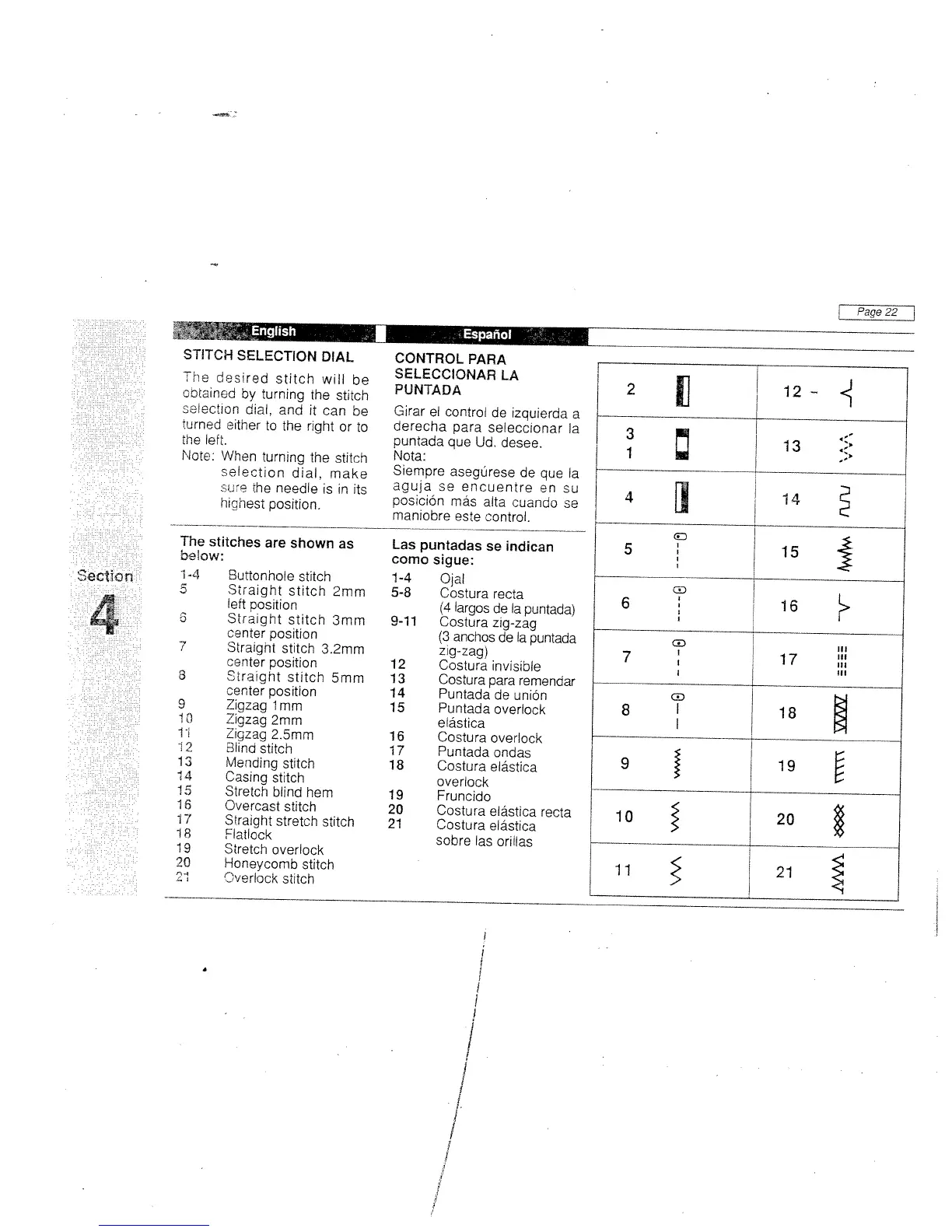
STITCH
SELECTION
DIAL
The
desired
stitch
will
be
obtained
by
turning
the
stitch
oeiection
dial,
and
it
can
be
turned
either
to
the
right
or
to
the
left.
Note:
When
turning
the
stitch
selection
dial,
make
SLP
he
needle
is
in
its
highest
position.
The
stitches
are
shown
as
below:
i4
Suffonhole
stitch
5
Straight
stitch
2mm
left
position
S
Straight
stitch
3mm
center
posibon
7
Straight
stitch
3.2mm
center
position
3
Straight
stitch
5mm
center
position
9
Zigzag
1mm
I
0
Zigzag
2mm
11
Zigzag
2.5mm
12
Blind
stitch
13
Mending
stitch
14
Casing
stitch
15
Stretch
blind
hem
1
6
Overcast
stitch
17
Straight
stretch
stitch
18
Flatlock
19
Stretch
overlock
20
Honeycomb
stitch
21
Overlock
stitch
CONTROL
PARA
SELECCIONAR
LA
PtJNTADA
Girar
el
control
de
izquierda
a
derecha
para
seleccionar
a
puntada
que
Ud.
desee.
Nota:
Siempre
asegSrese
de
que
Ia
aguja
so
encuentre
en
su
posición
más
alta
cuando
se
maniobre
este
control.
Las
puntadas
se
indican
coma
sigue:
1-4
Ojai
5-8
Costura
recta
(4
largos
de
a
puntada)
9-il
Costura
zig-zag
(3
anchos
de
Ia
puntada
zig-zag)
12
Costura
invisible
13
Costura
para
remendar
14
Puntadadeunión
15
Puntada
overlock
elástica
16
Costura
overlock
17
Puntadaondas
18
Costura
elástica
overlock
19
Fruncido
20
Costura
elástica
recta
21
Costura
elástica
sobre
las
orillas
I
1’
English
EspanoI
1
ectBD
fl
i
T
tl
2
11
12-
13
4
]
14
D
15
6
16
G
III
7
17
:
I
In
8
T
18
9
19
10
20
11
21

Related product manuals