EasyManua.ls Logo

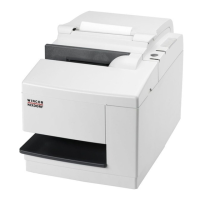
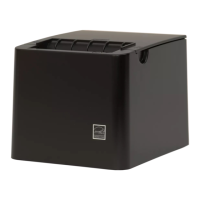
Wincor Nixdorf TH250 - User Manual

Wincor Nixdorf TH250
53 pages
Print Icon
To Next Page IconTo Next Page
Loading...
TH250
Thermal Printer
User Manual
Edition January 2016

Other manuals for Wincor Nixdorf TH250

Questions and Answers

  • A
    Ashley ValentineSep 9, 2025
    What does it mean if the LED on my Wincor Nixdorf Printer blinks twice and then stays on?
    • J
      Jesse JoyceSep 9, 2025
      If the LED blinks twice and then stays on, the voltage is low. Wait for the voltage to recover, or try a new power supply.
  • K
    Kathleen GrahamAug 23, 2025
    What to do if my Wincor Nixdorf TH250 Printer starts printing but stops during the process?
    • E
      Erin BrooksAug 23, 2025
      If your printer starts to print but stops while printing the receipt, it is likely due to a paper jam. To resolve this, open the top cover, inspect the knife, and remove any jammed paper.
  • A
    Anna WilsonAug 25, 2025
    What to do if my Wincor Nixdorf TH250 receipt does not come out all the way?
    • A
      Andrew LangAug 25, 2025
      If the receipt does not come out all the way, the paper may be jammed. Open the top cover, inspect the knife, and clear any jammed paper.
  • S
    Sarah PhillipsAug 27, 2025
    Why is my Wincor Nixdorf Printer printout light or spotty?
    • K
      Kathleen PayneAug 27, 2025
      A light or spotty printout could be due to a few reasons: * The paper roll may be loaded incorrectly; check that the paper is loaded properly. * The thermal printhead could be dirty; use the recommended thermal paper roll. * There may be variations in the paper; increase print density in the printer Configuration Menu to 110% or 120% as needed (monochrome printer only).
  • C
    Chris MontgomeryAug 27, 2025
    What to do if my Wincor Nixdorf Printer LED blinks three times, then off?
    • D
      Donna EvansAug 27, 2025
      If the LED blinks three times and then remains off, the printer is likely out of paper. Load a new paper roll to resolve this issue.
  • L
    luis89Aug 29, 2025
    Why does my Wincor Nixdorf TH250 Printer have a colored stripe on the receipt?
    • J
      Jacob PerezAug 29, 2025
      A colored stripe on the receipt indicates that the paper is low. Replace the paper to resolve this issue.
  • R
    Richard BanksSep 18, 2025
    What to do if my Wincor Nixdorf TH250 has a vertical column of print missing?
    • C
      carrlisaSep 18, 2025
      If a vertical column of print is missing, this indicates a serious condition with the printer electronics. Stop using the printer.
  • F
    Frederick BassSep 19, 2025
    What to do if one side of my Wincor Nixdorf TH250 Printer receipt is missing?
    • J
      jeffreyarnoldSep 22, 2025
      If one side of the receipt is missing, this indicates a serious condition with the printer electronics. Stop using the printer.
  • W
    walterthomasSep 7, 2025
    What to do if my Wincor Nixdorf Printer color print is light?
    • J
      John CurtisSep 8, 2025
      If the color print is light, this could be due to variations in the paper. Increase the energy level of the print-head in the “Color Density Adj” of the printer configuration menu.
  • E
    Eric NelsonSep 4, 2025
    What does it mean when the LED on my Wincor Nixdorf Printer blinks slow and steady?
    • C
      Clayton RothSep 4, 2025
      A slow, steady blinking LED indicates a non-Wincor power supply is being used. Switch to a Wincor power supply.

Summary

General Safety Information

Safety Instructions

General safety advice including not touching hot parts and ESD sensitive components.

Safety Precautions (Caution)

Precautions for installation, environment, power connection, and handling.

Printer Control Buttons and Indicators

Paper Feed Button Function

Explains the function of the paper feed button for paper advancement and menu access.

LED Status Indicator

Describes the meaning of the green LED status light for printer operation.

Printer Setup and Unpacking

Loading and Changing Paper Roll

Connecting Printer Cables

Power Supply Cable Connection

Guidance on connecting the power supply cable, emphasizing safety.

Printer Testing Procedures

Performing a Diagnostic Test

Detailed steps to perform a diagnostic test printout for printer status.

Energy Saving Features

Monochrome Print Density Adjustment

Color Print Density Adjustment

Paper Roll Handling and Replacement

Maximum Power Setting Configuration

Printhead Setting Configuration

Preventing Printhead Overheating

Troubleshooting Common Printer Issues

Technical Specifications

Appendix A: Ethernet Setup Guide

Ethernet Terminology and Default Setup

Defines Ethernet terms and provides default setup instructions.

Ethernet Default Settings

Details the default Ethernet configuration settings for the printer.

Ethernet Installation (POSReady7+)

Step-by-step instructions for installing the printer on a Windows POSReady7 network.

Ethernet Installation (XP;POSReady2009)

Step-by-step instructions for installing the printer on a Windows XP/POSReady2009 network.

Ethernet Configuration Commands

Details commands for configuring printer internal parameters for Ethernet operation.

Wincor Nixdorf TH250 Specifications

General IconGeneral
BrandWincor Nixdorf
ModelTH250
CategoryPrinter
LanguageEnglish

Related product manuals