EasyManua.ls Logo

Winegard FlatWave FL-5000 - User Manual

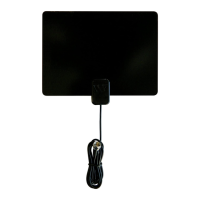
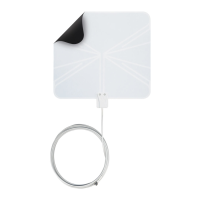
Winegard FlatWave FL-5000
8 pages
Print Icon
To Next Page IconTo Next Page
Loading...
• For indoor use only
• Range of 25 miles (performance may
vary based on terrain and obstructions)
• For high VHF & UHF channels
• Recommended for use with one TV
• Small, compact size
• Includes 3M™ Command™
Brand Strips
• No assembly required
• Model FL-5000
Connect the mini coax cable
to the “Antenna In” coax port
on the TV.
Run a channel scan. (For a listing
of likely channels available in your area, go
online to www.winegard.com/localchannels.)
If not satisfied with the number of channels found, try re-positioning the
antenna. Moving the antenna three feet in one direction is often enough
to change the reception. Then, re-run a channel scan.
1
2
3
Setup
Specifications
2452248
For help, email help@winegard.com or call 1-800-788-4417.
DO NOT RETURN ANTENNA TO PLACE OF PURCHASE.
Model FL-5000

Questions and Answers

  • M
    manueljonesJul 26, 2025
    What to do if the picture freezes on Winegard TV Antenna?
    • J
      jeanettelambertJul 26, 2025
      If the picture or sound freezes, or you see boxes in the picture while watching a channel on your Winegard TV Antenna, it's often due to a weak or intermittent signal. Try relocating the antenna to a better spot or aiming it directly at the broadcast tower for that channel.
  • R
    Robert SmithAug 6, 2025
    How to fix Winegard TV Antenna not getting channels?
    • K
      Kaitlin WhiteAug 6, 2025
      If you are not getting any channels on your Winegard TV Antenna, try performing a new channel scan on your TV. Also, try repositioning the antenna to a different location, as something might be obstructing the signal.
  • H
    Hannah WilsonAug 14, 2025
    Why is one channel missing on my Winegard FlatWave FL-5000?
    • J
      Justin YangAug 14, 2025
      If one channel is missing on your Winegard TV Antenna, try turning the antenna 10 or 20 degrees in either direction to optimize the signal and avoid reflection, or try moving the antenna to a new location. You can also try running a new channel scan on the TV. Refer to the channel scan insert for more information.

Summary

Specifications

Setup

Connect Coaxial Cable

Connects the mini coax cable to the TV's "Antenna In" port.

Run Channel Scan

Initiate a channel scan on the TV after connecting the antenna.

Re-position and Rescan

Adjust antenna position if reception is poor and rescan channels.

Tips for Maximizing Reception

Antenna Placement and Orientation

Mount on window facing tower, consider coax cable orientation and height.

Antenna Height and Electronics

Mount higher on the wall if near electronics to improve signal reflection.

Troubleshooting

No Channels Found

Rescan channels, try a new location, or check for obstructions.

Single Channel Missing

Adjust antenna orientation by 10-20 degrees or move to a new location.

Frozen Picture or Sound

Address weak or intermittent signals by repositioning or aiming the antenna at the tower.

90 Day Limited Warranty

Winegard FlatWave FL-5000 Specifications

General IconGeneral
Reception RangeUp to 50 miles
Antenna TypeFlat Panel
RangeUp to 50 miles
Impedance75 ohms
AmplifiedNo
ColorBlack
TypeIndoor
Weight0.4 pounds
ConnectorF-type
FrequencyVHF and UHF

Related product manuals