To Next Page
Z
Zachary MeyerAug 4, 2025
How to set Winegard TV Antenna for new provider?
- Eemily57Aug 4, 2025
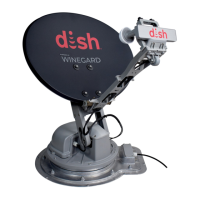
To set your Winegard TV antenna for a new provider, remove the dome and set the switches to the correct provider. Refer to page 3 for switch settings.

How to set Winegard TV Antenna for new provider?
To set your Winegard TV antenna for a new provider, remove the dome and set the switches to the correct provider. Refer to page 3 for switch settings.
Why Winegard TV Antenna does not move?
If your Winegard TV antenna doesn't attempt to find a satellite or never moves, verify that the power source is providing +12VDC to the antenna. Also, ensure that the quick disconnect power connector is fully seated and locked into the quick disconnect socket.
What to do if my Winegard TV Antenna receiver is locked up?
If your receiver seems frozen and isn't responding, DIRECTV users can reboot by pressing the red reset button inside the small door on the receiver, or unplug the receiver from the AC outlet for 20 seconds and plug it back in. DISH users can reboot by pressing and holding the power button on the receiver for 15 seconds and then releasing it, or unplugging the receiver from the AC outlet for 20 seconds and plugging it back in.
Why Winegard RTT-40B TV Antenna locks on signal but no picture?
If your Winegard TV antenna appears to lock onto a signal, but your receiver isn't showing a picture or signal reading, first check that the switch settings are correct for your provider. DIRECTV users should ensure the antenna type is set to either 3 LNB “18X20” or 2 LNB oval. DISH users should verify the “Check Switch” is set to SW64, and Bell users should verify it's set to SW42. Note that a new receiver might initially show an “Unknown Check Switch”, but the antenna will still search, though it won't toggle to alternate satellites.
What to do if Winegard TV Antenna continuously searches?
If your Winegard TV antenna continuously searches without acquiring any satellites, check the main coax cable to ensure it's connected to the “Satellite In” port on the back of the receiver. Also, make sure all coax cables are properly terminated and that there are no loose connections. Ensure that the southern sky is clear of obstructions like trees, buildings, or overpasses. Rain, snow, or excessive dew on the dome can also interrupt the signal, so brush off any snow or dew. If heavy rain or snowfall is blocking the signal, you may need to wait for the weather to clear.
Why am I not getting all DISH channels on my Winegard RTT-40B?
If you're not getting all the DISH channels you've subscribed to, go to the Check Switch Menu on your receiver and make sure it's set for SW64. Both even and odd transponders on satellite 110°, 119°, and 129° should be listed. Keep in mind that local programming might not be available outside of your local coverage area.
Why Winegard RTT-40B TV Antenna finds alternate but not primary satellite?
To resolve this issue with DIRECTV on your Winegard TV antenna, make sure that the switches on the electronics control box are set for DIRECTV. You can find these switches on the electronics box under the dome; see page 3.
Provides contact details for technical services and general inquiries.
Instructions for registering your Winegard product.
Details satellite support, elevation, azimuth, dimensions, and power requirements.
Advises against installation in wet conditions and painting the antenna.
Guidance on safely opening the carton and removing the unit.
Guide to setting antenna switches for DIRECTV, DISH, and Bell TV receivers.
Advice on choosing a level spot and maintaining distance from obstructions.
Steps for securing the base feet to the roof using sealant and screws.
Instructions for connecting power and coax cables to the antenna and receiver.
Procedure for placing and securing the antenna dome.
Detailed steps for wiring the On/Off power switch.
Visual representation of the overall installation wiring.
Steps to clear old receiver settings before setup.
Guide to performing installation and testing for DISH receivers.
Recommendations for DISH receiver types and usage.
Maps and information on DISH Western Arc, Hybrid, and Eastern Arc coverage.
Steps for navigating receiver menus for satellite setup.
Configuration steps for the satellite dish setup menu.
Interpreting installation status screens and verifying settings.
Downloading program guide data and setting up the remote control.
Map of DIRECTV 101° & 119° coverage and compatibility notes.
Steps to turn on the receiver, television, and antenna.
Explanation of the antenna's search, acquisition, and tracking process.
Addresses common problems like no satellite search or no picture.
Guidance on adjusting switch settings for different service providers.
Troubleshooting steps for unresponsive receivers and signal issues.
Details the 2-year parts, 1-year labor warranty and exclusions.
 General
| Brand | Winegard |
|---|---|
| Model | RTT-40B |
| Category | TV Antenna |
| Language | English |