Foollow Me
POI
>
14
Foolow Me
POI
>
Mobile device
S6
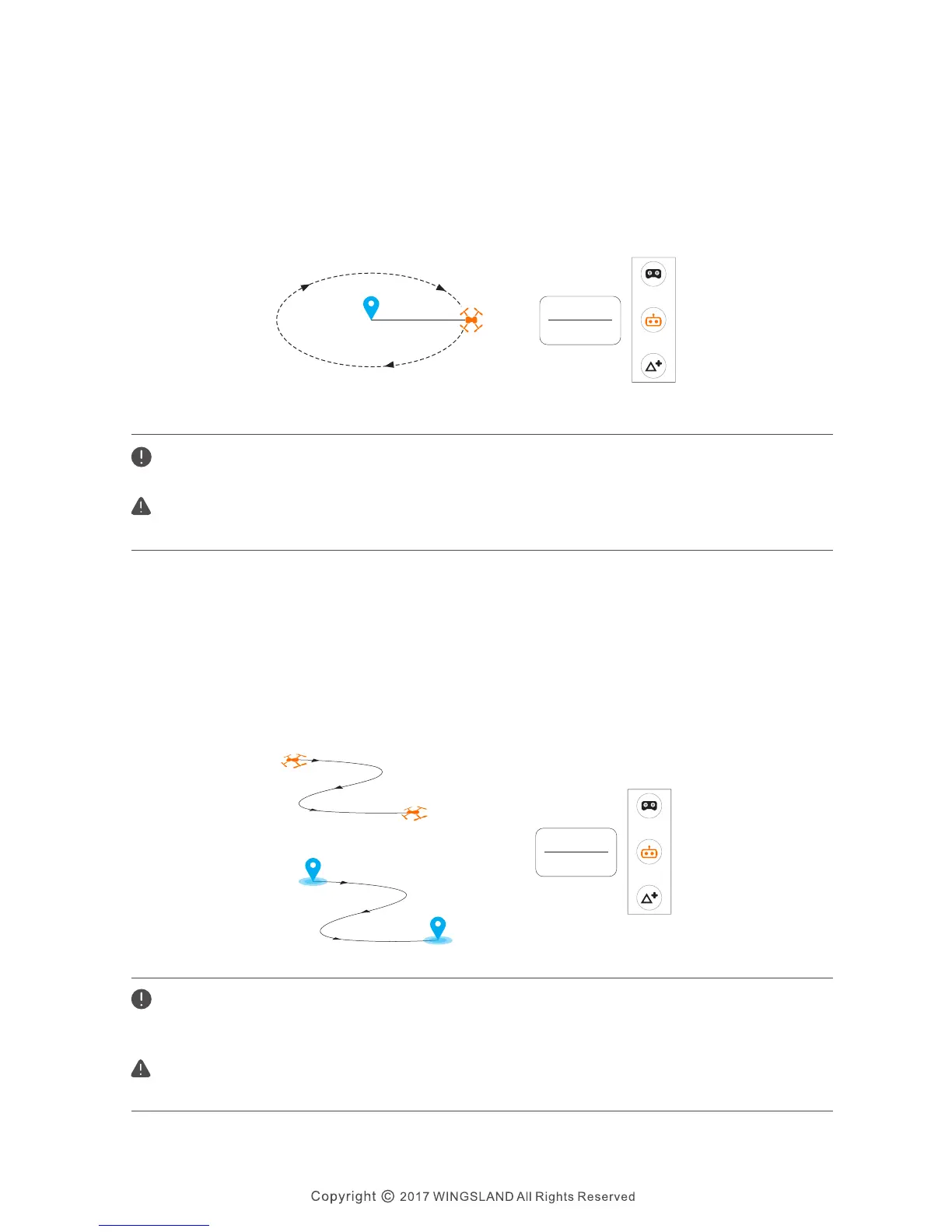
If the radius is smaller than 5 meters, the aircraft will automatically fly away from the point
to 5 meters and perform POI.
Please enable the GPS function on your mobile device. Active the Follow Me function when
the aircraft is 5 meters away for best function performance. Do not cover your mobile device,
and do not shake your mobile device during the Follow Me.
Please pay attention to the flying environment and battery level during the Follow Me flying.
Only fly in an open area.
Please pay attention to the flying environment and battery level during the POI flying. Only
fly in an open area.
Follow me feature is based on your mobile device hot-spot. The performance will be
affected by the mobile devices and the environment.
After confirmed Follow Me function, the aircraft will follow the operating mobile
device automatically.
Follow Me
S6 User Manual
The aircraft will orbit around a subject automatically in POI mode. To perform POI, you
need to fly the aircraft above the object that you are interested in, and then after
confirmed POI function, move your aircraft from the current location to your desired
location to set the orbit radius. After that the aircraft will fly in a circle with the camera
fixed on the object.
Point-of-Interest


 To Next Page