6
Aircraft
Out door Flyi ng
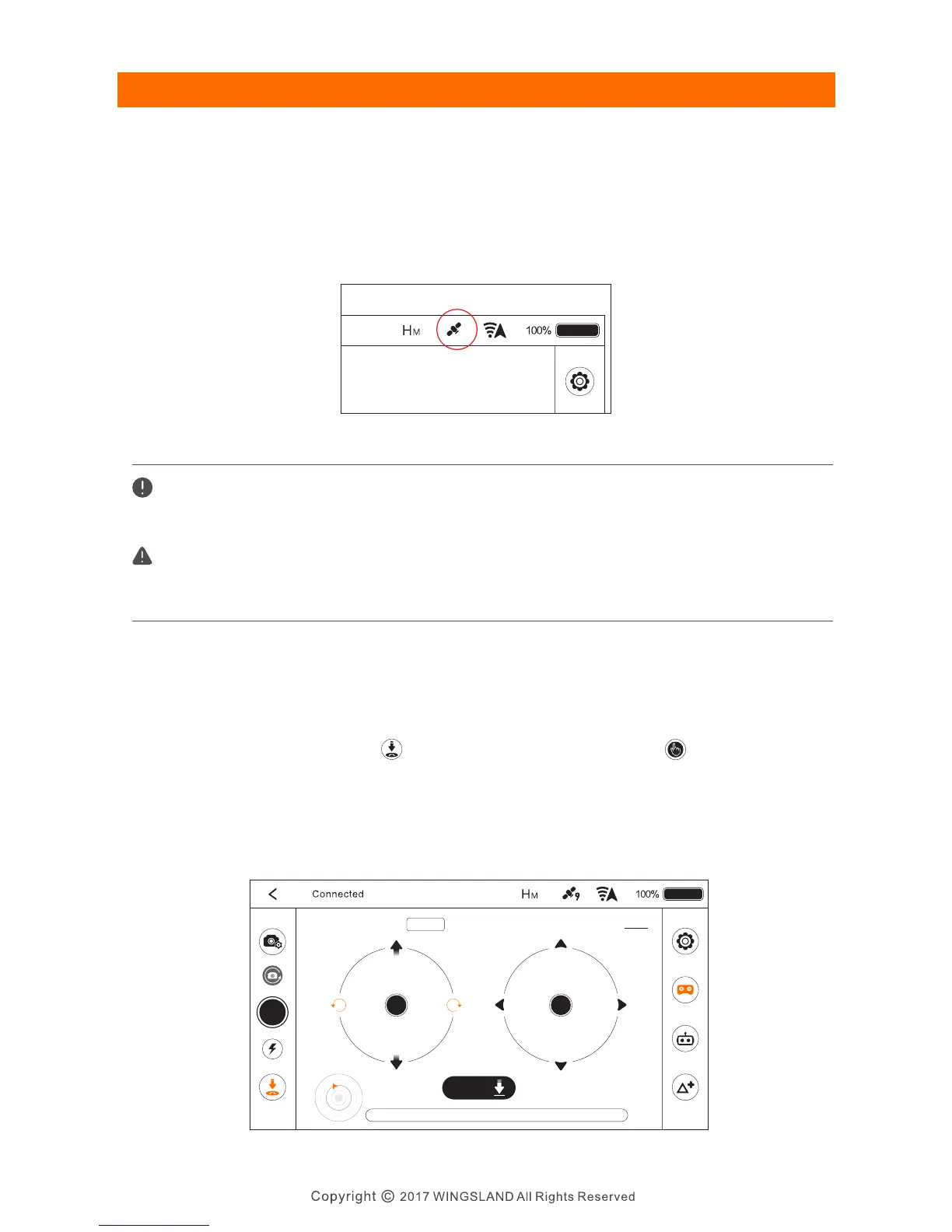
With the help of dual satellite system (GPS+GLONASS), the S6 can hover steadily in
an outdoor area when the number of searched-out satellites≥7. The user can check
the satellite number on the main interface of the app.
The S6 equips a auto Return-to-Home feature, when you are not clear of the position
of the aircraft, you could active the feature to call back the aircraft.
Tap the Return-to-Home icon in the flying interface and tap to command the
aircraft return to the last recorded home point. If the aircraft is flying under 7 meters,
the aircraft will automatically ascend to 7 meters from the current height. If the
current height is 7 meters or above 7 meters, the aircraft will return to the home
point with the current altitude.
GPS Mode
Auto Return-to-Home
Satellite Number
When flying outdoor, a sufficient GPS reception is needed for a safe takeoff and home point
recording(GPS satellite number≥7).
Home Point: The point where the aircraft connected to 7 or more satellites at initial flight.
The satellite reception is affected by the flying environment. Always fly at locations that
are clear of buildings power lines, and locations where it may have a chance of strong
magnetic interference.
APP Interface
Now:Auto Return to home
Exit
Exit
Landing
H : 1. 2 H . S: 0 . 0 V. S : 0 . 0 D : 1 .0
S6 User Manual


 To Next Page