4. Tosavethesettingsyouhavetomanuallyturnoffthecamerabyswitchingtheon/offbutton.Incase
oftheRX1makesuretoturnonthecameraafterwardsagain.
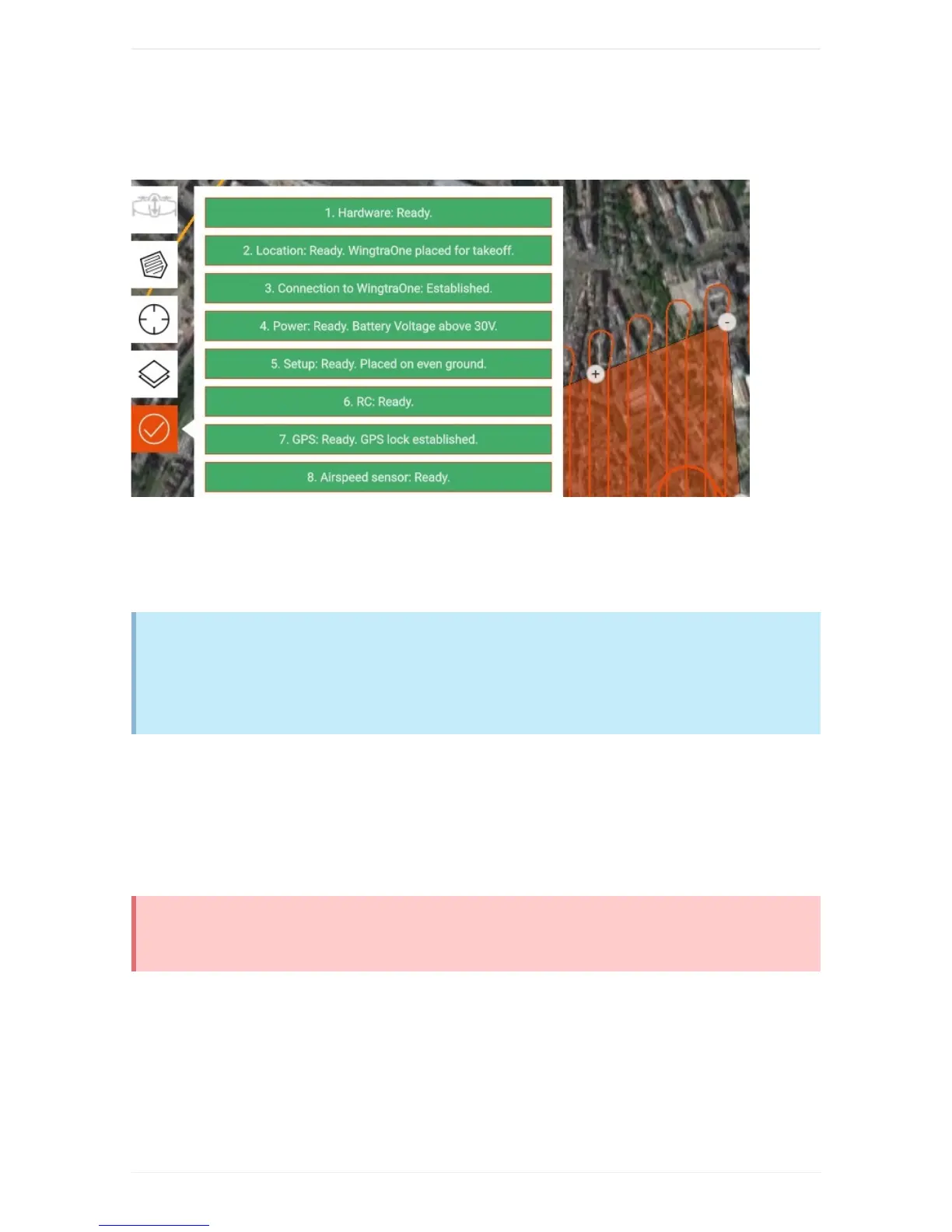
6.GothroughPreflightChecks
GothroughthepreflightchecklistwithinWingtraPilotbeforeyoustarttheflight.Ifanyofthepreflight
checksfails(e.g.sensorfailure),therespectivepreflightcheckturnsred.Startingaflightispossibleonly
onceallcheckshavebeencompletedsuccessfully.Foradetaileddescriptionofallpreflightchecksand
troubleshootingadvice,seethepreflightchecklistsection.
WingtraOnetakesaseriesoftestpicturesduringpreflightproceduretoensurethecamerais
working.ForQX1,checkifyoucanhearthecamera'sshutter,forRX1R2openthecoverandwatch
onscreenifpicturesaretaken.Waitfortheaudio-feedback"Testpicturesaretaken"beforetaking
off.
Fly&CollectImages
7.StarttheFlight
Makesurethatnopeoplearecloserthan5meterstoWingtraOne.Takeoffbyclickingonto"StartFlight"
andmovingthesliderslowlyfromlefttoright.
AlwaysrepowerWingtraOnebetweenflights.Donottakeoffagainafterlandingwithoutpoweringoff
andrepoweringWingtraOne.
8.FlightObservation


 To Next Page