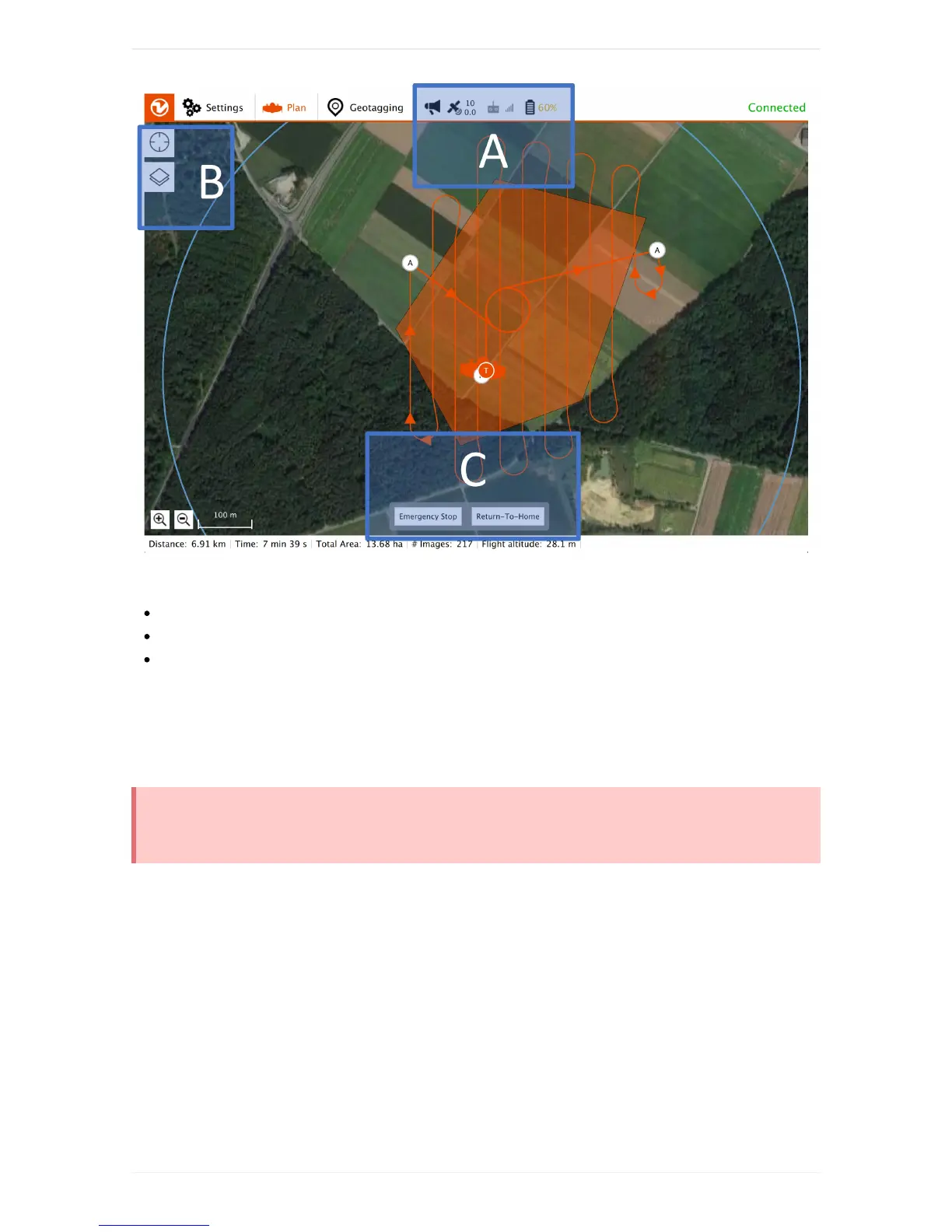
AlwaysobserveWingtraOneduringflight.
A:InformationaboutremainingbatteryandGPSquality.
B:Changedisplayoptions(centermap,changemaptiles)
C:Optionstotakeover(afterclickingabutton,youhavetoconfirmwithaslider).
Engage"Return-to-Home"tobringbackWingtraOneandletitlandautonomously.WingtraOnewill
automaticallyengageReturn-to-Homeincaseoflowbattery,geofenceviolation,orifbothtelemetryand
RCconnectionarelost.Forfurtherdetails,seethechaptersaboutyouroptionstointeractandfailsafe
scenarios.
Onlyuseemergencystopinrealemergencycases.Emergencystopwillkillthemotorsandmake
WingtraOnespiraldownwithoutanycontrol.Thereisnowaytoregaincontrolonemergencystop.
ProcessyourImages
9.GeotagtheImages
ThecollectedimagesaresavedontheSDcardinthecamerawithoutassignedGPSinformation
(geotags).Toassigngeotagstotheimages,youneedtoperformthefollowing3steps.Tagyourimages
alwaysrightafterflight.
STEP1:DownloadtheGeotags
Afterlanding,WingtraPilotwillstartdownloadingthegeotagsautomatically.Ifthedownloadfails,clickon
"Retry"andwalktowardsWingtraOnetogetbetterconnection.



 To Next Page