English
14
C555
•For optimal performance, only Winix filters should be used
with this unit.
NOTICE
①
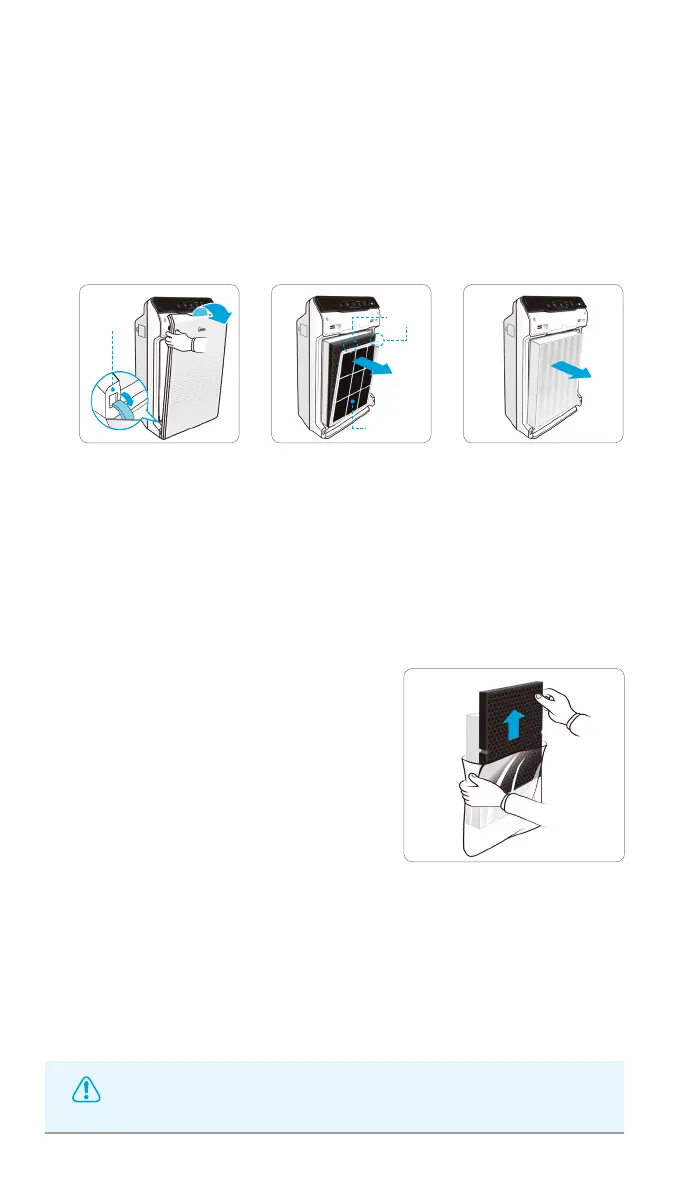
Remove the front panel by grasping its upper edge and gently pulling
forward.
②
Press on the Pre-filter tabs near the top of the filter, release and
remove.
③
Pull out the AOC
TM
Carbon filter and Anti-microbial True HEPA filter.
▶▶
Tabs
Pre-filter
Latch
FILTER CARE
2. Removing Filters
Turn the unit power off before removing filters.
①
Remove replacement filters from
protective plastic wrap.
•Operating the unit without removing
filters from plastic wrap may cause
abnormal noise, deformation, or fire as
a result of overheating.
3. Preparing New Filters


 To Next Page