English | 5 | Commissioning
28 | 89014383; Version 2 | Operating instructions UC-Serie
Connecting the mains cable
Note:Select the correct cross section and number of wires in the mains cable to suit the on-site voltage and fuse
protection.
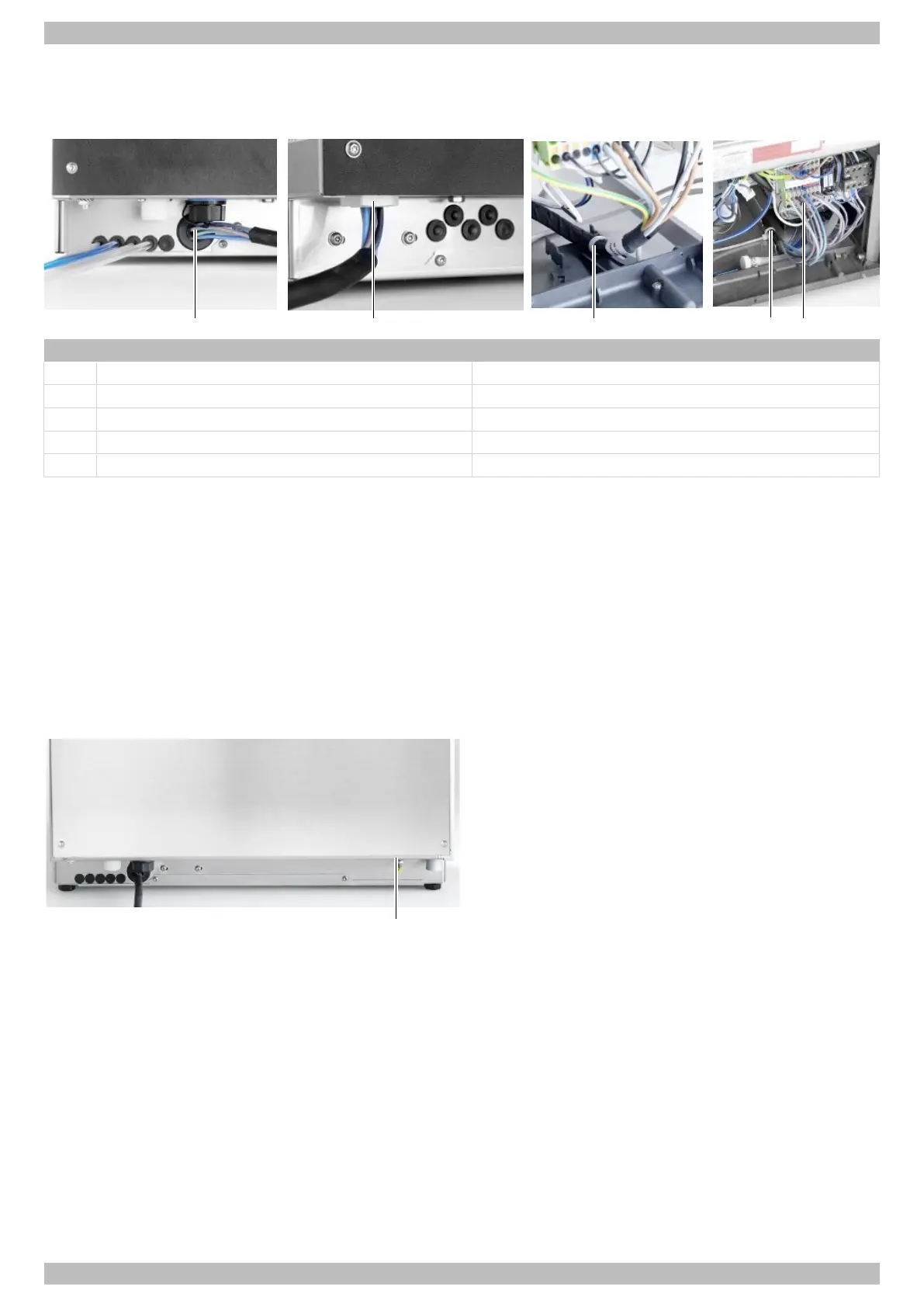
Item Name Note
1 Mains cable UC-M, -L, -XL
2 Mains cable UC-S
3 Strain relief UC-S
4 Strain relief UC-M, -L, -XL
5 Terminal strip
Ø Remove the front cover.
Ø Insert the mains cable (1 / 2) at the rear of the machine.
Ø Pull out the mains cable at the front.
Ø Secure the mains cable to the strain relief on the mounting plate using a cable tie (3 / 4).
Ø Strip the wire end of the mains cable and attach ferrules.
Ø Observe the connection diagram affixed to the rear of the partition wall for the electrical installation compartment.
Ø Connect the mains cable wires (5) according to the connection diagram (see } page 29).
Ø If necessary, Install new bridges in accordance with the connection diagram and press in firmly using a screwdriver.
Ø Connect the green-yellow wire to the distributor of the earth wires.
Establishing equipotential bonding
Ø Connect the warewasher to the on-site equipotential
bonding system.
Ø Position of the connecting screw (1) see drawing.





 To Next Page