HOW TO USE MPR50 RX MANAGER
Wisycom MPR50 RX Manager can be used to load or save the channels memory and upgrade
the firmware.
Instruction to connect MPR50 using UPKmini
1. Connect to the PC the infrared programming interface (UPKmini) using a USB cable
2. Check if the version of ENG RX Manager installed in your PC is the latest version. If
not, uninstall the ENG RX Manager actives in your PC and install the new version
3. Run ENG RX Manager
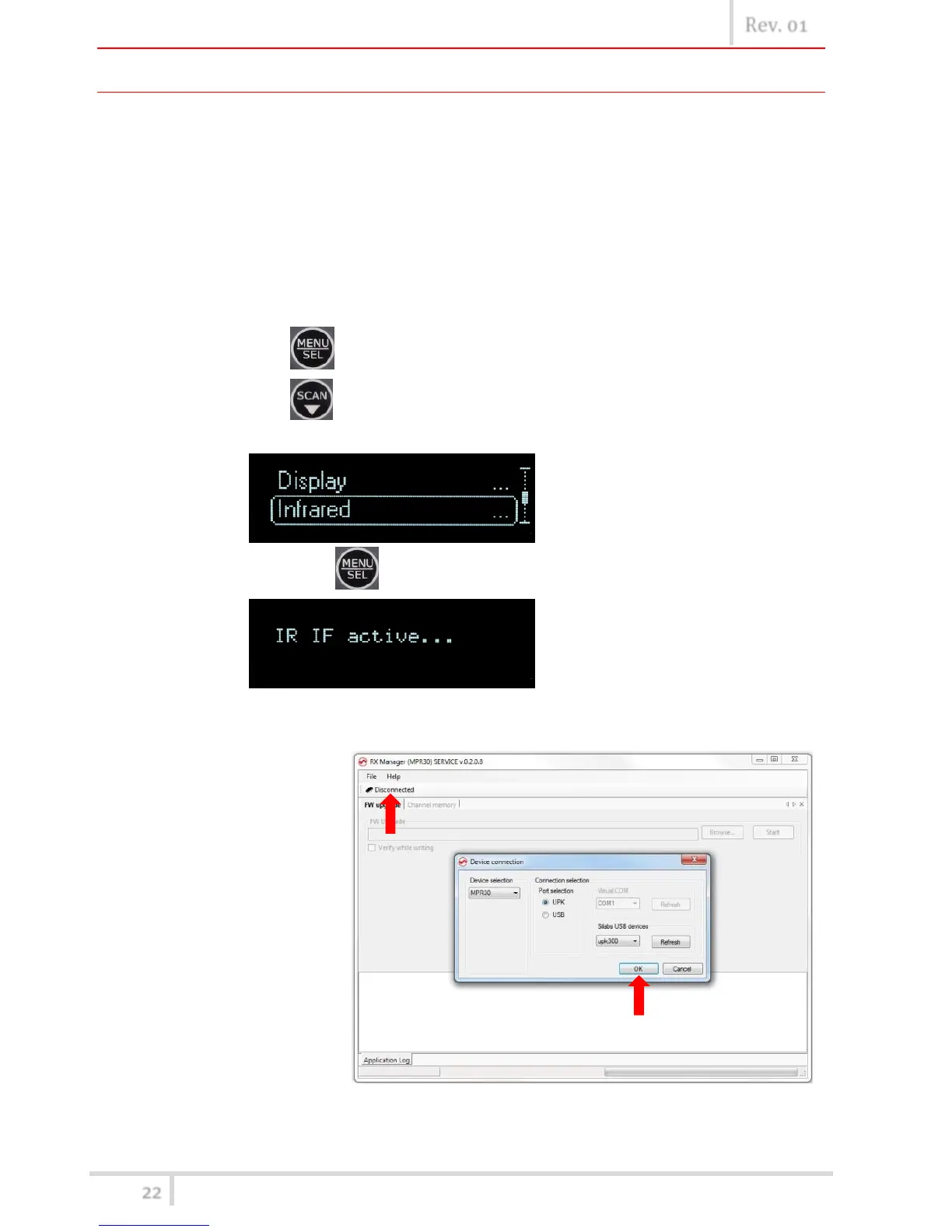
4. Power up the receiver MPR50 and enable the IRDA interface:
a. push button,
b. push button until that Infrared submenu appears on the display
(Headphones>Edit RX>Display>Infrared)
c. push again button
5. Put in contact MPR50 and UPKmini
6. Push Disconnected button. On the Device connection windows select UPK port and
verify that upkmini
is selected on the
Silabs USB devices
panel. If UPKmini
device is not
showed, push
Refresh button
and/or try to
disconnect and
reconnect the USB
cable connected to
the UPKmini. Then
click OK.
7. If the connection is ended well, the Connected icon is showed on the top of the panel



 To Next Page