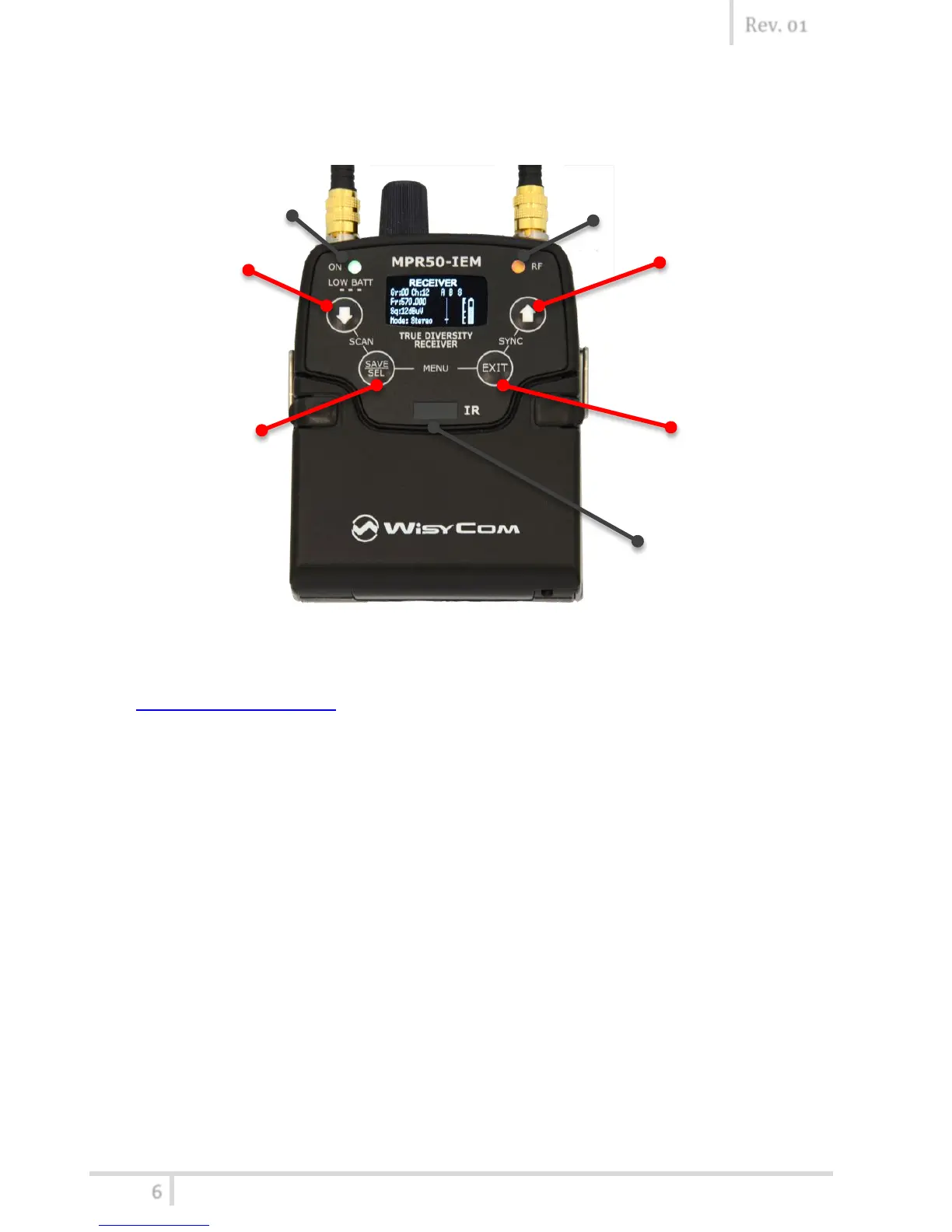
Front panel
MPR50-
display.
OLED Display
The receiver has a high contrast display. Pushing one of the 4 buttons while the receiver is
active (but the display is off), turn on automatically the display. After a time-out user setting
(see Display>Off timeout menu) the display turns off automatically.
SEL & EXIT Buttons
Push the 2 buttons together to enter on the function menu
SEL Button
EXIT Button
Push this button to turn off the display.
During menu navigation push this button to exit from current menu (escape function).
SYNC/UP Button
Push and keep this button to start a synchronisation with a Wisycom transmitter (follow
instructions on display). Before starting synchronization IRDA must be enabled on Wisycom
transmitter.
During menu navigation push this button to move -up and select the previous item.
SCAN/DOWN Button
Push and keep this button to start the automatic scan.
During menu navigation push this button to move-down and select the previous item



 To Next Page