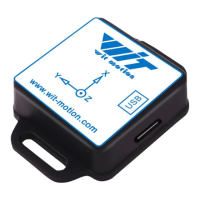
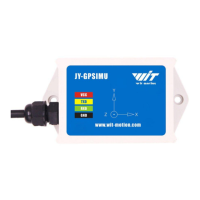
The WT901BLECL BLE5.0 is a multi-sensor device designed for attitude measurement, detecting acceleration, angular velocity, angle, and magnetic field. It is described as an AHRS IMU sensor, emphasizing its robust housing and small outline, making it suitable for industrial retrofit applications such as condition monitoring and predictive maintenance. The device leverages a smart algorithm to accurately calculate three-axis angles.
Function Description:
The WT901BLECL BLE5.0 measures 3-axis angle, angular velocity, acceleration, and magnetic field. Its core strength lies in its algorithm, which enables accurate calculation of the three-axis angle. The sensor is designed for applications requiring high measurement accuracy.
Important Technical Specifications:
- Sensor Type: Multi-sensor device (AHRS IMU sensor)
- Measurements: 3-axis angle, angular velocity, acceleration, magnetic field.
- Connectivity: Bluetooth 5.0.
- Power Supply: Requires less than 5 Volts; exceeding this can cause permanent damage. VCC should not be directly connected to GND to prevent circuit board damage.
- Baud Rate: Fixed for WitMotion Bluetooth sensors; cannot be changed.
- Accelerometer Range: Configurable (2/4/8/16g/s²).
- Gyroscope Range: Configurable (250/500/1000/2000 deg/s).
- Bandwidth Range: Configurable (5/10/20/42/98/188/256Hz). Default is 20Hz. Higher bandwidth leads to higher data fluctuation, while lower bandwidth results in smoother data.
- Algorithms: Supports 6-axis and 9-axis algorithms.
- 6-axis algorithm: Z-axis angle is primarily calculated based on angular velocity integral, which may introduce calculated error.
- 9-axis algorithm: Z-axis angle is mainly calculated and analyzed based on the magnetic field, resulting in less drift. This is the default algorithm.
- Memory: No internal memory chip; data must be recorded and saved on a connected computer.
- LED Status:
- Red LED: Keeping on indicates charging (powered by Micro-USB data cable).
- Blue LED: Flashes once and disappears for standby. Flashing indicates pairing success.
Usage Features:
- PC Software Compatibility: The PC software is compatible with Windows systems.
- PC Connection (Serial):
- Connect the sensor with a data cable.
- Install the CH340 driver.
- Confirm the COM port in Device Manager.
- Open the Minimu.exe software. Data should appear after auto-search. If not, manually select the COM port and baud rate 115200.
- PC Connection (BLE 5.0 Adapter):
- Insert the adapter into a USB port.
- Turn on the sensor after the adapter's blue light flashes.
- Wait until the adapter's blue LED light stays on.
- The sensor's blue LED light flashing indicates successful pairing.
- Open Minimu.exe; data will appear after auto-search.
- Android Phone APP Usage:
- Install the APK file and grant Location and Storage permissions (Location must be "Always allowed," and positioning function and Bluetooth must be on).
- Open the APP and select "BLE 5.0 Series."
- Turn on the sensor and scan for devices. The device will appear as "WT901BLE" + "MAC address."
- Upon successful pairing, the sensor's blue LED will flash and stay on for about one second. Data will then display automatically.
- Data Recording: Data can be recorded and saved as a TXT file on the computer via the "Record" and "Start" buttons in the PC software. A BIN file is also created for playback.
- Data Playback:
- Disconnect the sensor.
- Click "File" then "Load" in the PC software.
- Choose the original software installation path and load the BIN file.
- Click "Run" to playback the binary file. The playback rate can be edited.
- Placement Direction: The default installation is horizontal. For vertical installation, rotate the module 90 degrees around the X-axis, place it vertically, and select "Vertical" in the "Config" menu of the PC software.
- Algorithm Selection: Users can switch between 6-axis and 9-axis algorithms in the "Config" menu. The 6-axis algorithm is recommended if magnetic field interference is present.
Maintenance Features:
- Calibration: Essential for first-time usage to ensure accuracy.
- Accelerometer Calibration: Removes zero bias. Keep the module horizontally stationary, click "Acceleration" in "Config," and wait 5 seconds. Confirm 1g on Z-axis acceleration.
- Magnetic Field Calibration: Removes zero bias from the magnetic field sensor, which affects Z-axis angle accuracy.
- Ensure sensors are 20cm away from magnetic and iron materials.
- The magnetic field H value must be below 350.
- Open "Config" menu, click "Magnetic Field," and slowly rotate the sensor 360° around X, Y, Z axes.
- Click "OK" after calibration.
- Place the sensor horizontally stationary with the Y-axis pointing north.
- Check Z-axis angle data; it should be around 0°. If drift occurs, move away from magnetic interference.
- Gyroscope Automatic Calibration: Calibrates angular velocity automatically. Inactivation is only recommended if the module rotates at a constant speed.
- Reset Z-axis Angle: Makes the initial Z-axis angle relative to 0 degrees. Useful for correcting large Z-axis drift. Keep the module static, click "Reset Z-axis Angle" in "Config."
- Reset Height to 0: Only available for modules with a built-in barometer (e.g., WT901B, HWT901B, WTGAHRS1, WTGAHRS2).
- Factory Reset: Available in the "System" menu of the PC software to reset settings to factory defaults.
- Technical Support: WitMotion offers remote diagnostics and lifetime technical support. Users with technical problems or missing information are encouraged to contact their support team.
- Development Support: Provides manuals, datasheets, demo videos, free software for Windows, Android, and iOS, and communication protocols for project development. For secondary development or integration, using WitMotion's compiled sample code is recommended.

 Need help?
 General

 To Next Page