Operating the appliance
7
Greenstar 8000 + – 6721890759 (2024/06)
3.2.2 Constantly re-pressurising the system
Constantly having to re-pressurise the heating system should be
investigated as it is an indicator of potential leaks and the concentration
of inhibitor protection in the system will be reduced; this can result in
corrosion within the heating system, reducing efficiency and increasing
contaminates.
Ā Check for leaks on heating system (pipework and radiator valves).
Ā Contact your installer or maintenance engineer if a recurring
significant decrease or increase in pressure is shown on the pressure
indicator (pressure gauge or pressure display).
System pressure increasing:
Ā If the system pressure repeatedly increases and you need to vent air
from the radiators, refer to Æ section 3.3 "Topping up the system
pressure", page 7.
3.3 Topping up the system pressure
Integral keyless filling link
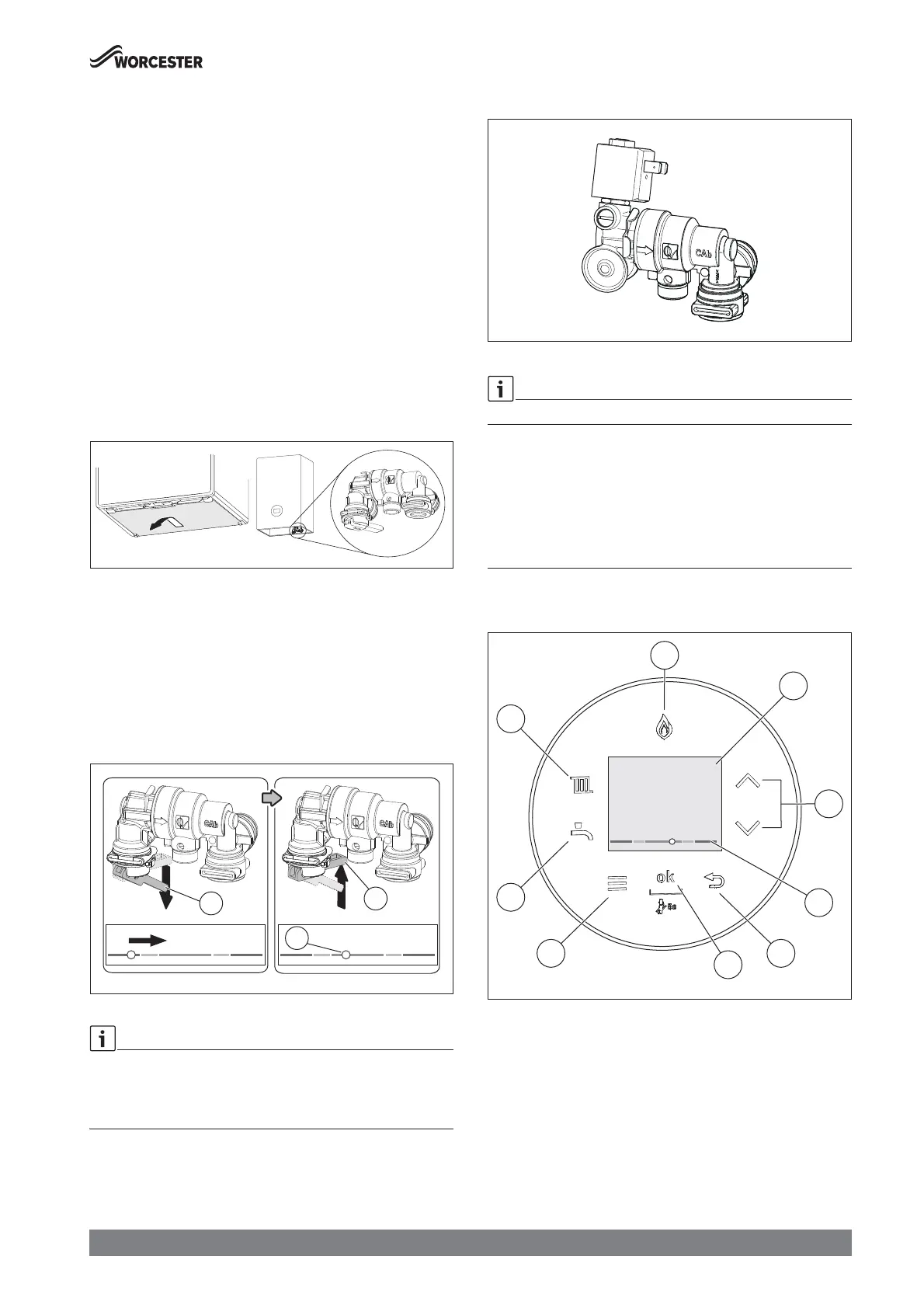
Locate the filling link and follow the instructions for re-pressurising the
system.
Fig. 3 Enable access to keyless filling link
Ā Re-pressurise the system.
– Pull the lever [1] down to start the filling process.
– The pressure indicator on the pressure display will start to move
towards the green bar.
Ā When the pressure indicator reaches the middle of the green bar [2]
and the pressure is between 1 and 1.5 bar
– Release the lever [1] to stop the filling process.
Ā Top up the system pressure, if as a result of the air bleeding the
pressure drops off.
Fig. 4
If the indicator is on the right hand side red pressure zone as a result of
over filling:
Ā Bleed one radiator until the pressure indicator returns to the green
bar.
3.3.1 Greenstar Intelligent Filling System (accessory)
Fig. 5 Greenstar Intelligent Filling System
An Intelligent Filling System is available as an accessory.
The Intelligent Filling System refills the water into the heating system as
required. Your specialist programmes the Intelligent Filling System
according to your heating system. Have your specialist explain the
function of the Intelligent Filling System to you.
Automatic refilling keeps the pressure in the heating system at the
programmed value.
4 Operating the appliance
4.1 Display overview
Fig. 6 Control Panel
[1] Display
[2] c and d keys
[3] Heating water pressure display
[4] d key
[5] OK key
[6] Menu key
[7] DHW key
[8] Heat key
[9] Burner display
0010023634-001
0010033251-001
1
2
46
7
8
9
5
3






 To Next Page