Operating the appliance
Greenstar 8000 + – 6721890759 (2024/06)
8
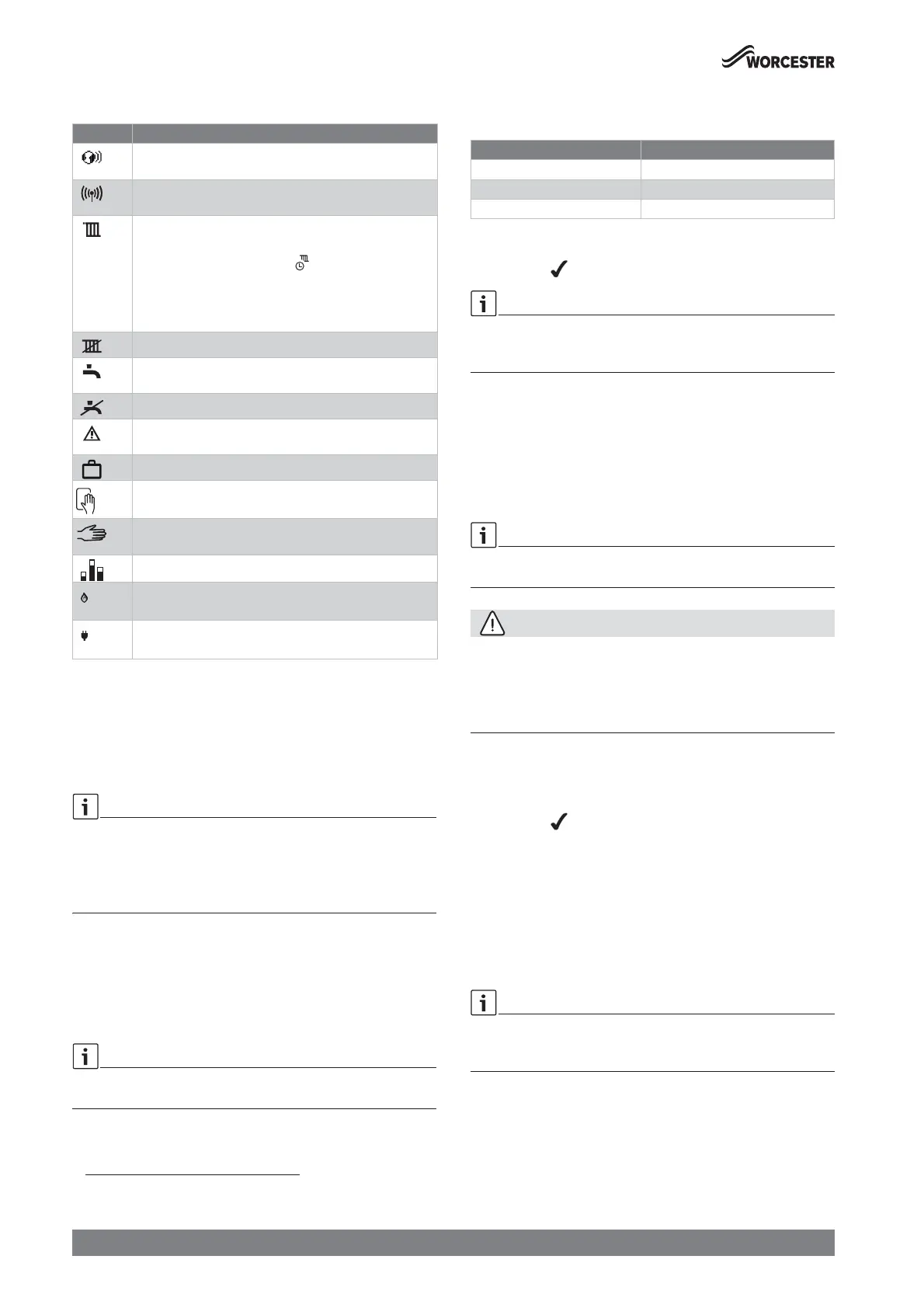
4.2 Symbols in the display
Table 3 Symbols in the display
The heating and hot water settings have been adjusted by the installer to
the appliance’s optimum settings.
Ā Before making any adjustments it is advisable to make a note of these
settings so that you can return to these optimum settings in the
future.
4.3 Adjusting the appliance flow temperature
4.3.1 Heating key
The heating key is used to set the max. flow temperature. The maximum
flow temperature can be set between 30 °C and 88 °C
1)
. The current
flow temperature is shown on the display.
With underfloor heating systems observe the maximum permissible flow
temperature.
Ā Press the ( key.
The set maximum flow temperature appears.
Ā Press the c or d keys to set the desired maximum flow
temperature.
Table 4 Maximum flow temperature
Ā To save the setting, press the ok key or wait for 2 seconds.
The symbol appears for a short time.
If a time program is activated and set on S auto press the ok key to
switch to S Advance. Time programs are available with Key
(accessories).
S auto: Heating is switched on and off according to programmed times
for heating.
S Advance: Switch to S Advance to move to the next on or off time and
directly switch on or off heating.
4.4 Hot water mode
4.4.1 Hot water key
Hot water function is only available with optional integral diverter valve
kit fitted.
CAUTION
Risk of scalding
At maximum adjusted hot water temperature can cause serious
scalding.
Ā Only use the maximum adjustable hot water temperature for thermal
disinfection.
Ā Press the * key.
The set hot water temperature appears.
Ā To set the desired hot water temperature, press the c or d keys.
Ā To save the setting, press the ok key or wait for 2 seconds.
The symbol appears for a short time.
Ā To switch hot water operation mode, press the ok key.
In S eco mode the appliance will heat the cylinder if the temperature falls
approximately 12 °C below the set temperature. Eco mode is enabled by
default, during the initial appliance start up.
In S Preheat mode the appliance will heat the cylinder if the temperature
falls approximately 6 °C below the set temperature. The appliance heats
the cylinder more frequently. This tops up the cylinder temperature for
quicker heat up times, this is useful for large/longer demand periods.
If a time program is available and hot water operation mode set on S auto
press the ok key to switch to S Advance. Time programs are available
with Key (accessories).
Auto: Heating the cylinder is switched on and off according to
programmed times.
S Advance: Switch to S Advance to move to the next on or off time and
directly switch on or off heating the cylinder.
Symbol Explanation
Connection with the Wi-Fi network (only available with
accessories)
Connection with RF transmitter, e.g. Comfort+ II RF room
thermostat (only available with Key accessories)
Central heating adjustment
S auto: Heating is switched on and off according to
programmed times for heating .
S Advance: Move to the next on or off time and directly
switch on or off heating.
Central heating off
Hot water adjustment (only available with optional integral
diverter valve kit)
Hot water off
Displays with the appliance status code and diagnostic
code during a fault condition.
Holiday symbol
Cleaning mode to enables the boiler to be cleaned without
making changes to the touch panel.
Central heating or hot water can be switched either
permanently on or off.
Energy consumption
1)
1) The energy values shown are an estimation based on internal data of the
appliance. Under real world conditions, many factors influence the energy
consumption and the shown values will deviate from the values of an energy
meter. The information is for indication only and should not be used for billing
purposes. The values can be used for relative comparison of energy consumption
between different days/weeks/month.
Gas consumption
Electricity consumption
1) The maximum value can be reduced by the service technician.
Supply temperature Sample application
Approx. 50 °C Underfloor heating system
Approx. 75 °C Radiator heating system
Approx. 82 °C Convector heating system






 To Next Page