Key (accessories)
9
Greenstar 8000 + – 6721890759 (2024/06)
4.5 Operating the menu
Opening and closing the menu
Ā To open the menu, press the key.
Ā To exit the menu, press the key again.
-or-
Ā Press the d key.
Changing the setting values
Ā To highlight a menu item, press the c key or the d key.
Ā Select the menu item with the ok key.
Ā To change the value, press the c or d key.
Ā Press the ok key.
The new value is saved.
Exiting the menu without saving values
Ā Press the d key.
4.6 Settings in the menu
The factory settings are highlighted in the following table.
Table 5 Settings Menu
5 Key (accessories)
5.1 Installing the Key
Installing the Key will enable timer functions (Additional functions
Æ chapter 4.6 "Settings in the menu", page 9). For Pairing Æ Key
manual.
Always turn off the power to the appliance before installing Key
(accessories).
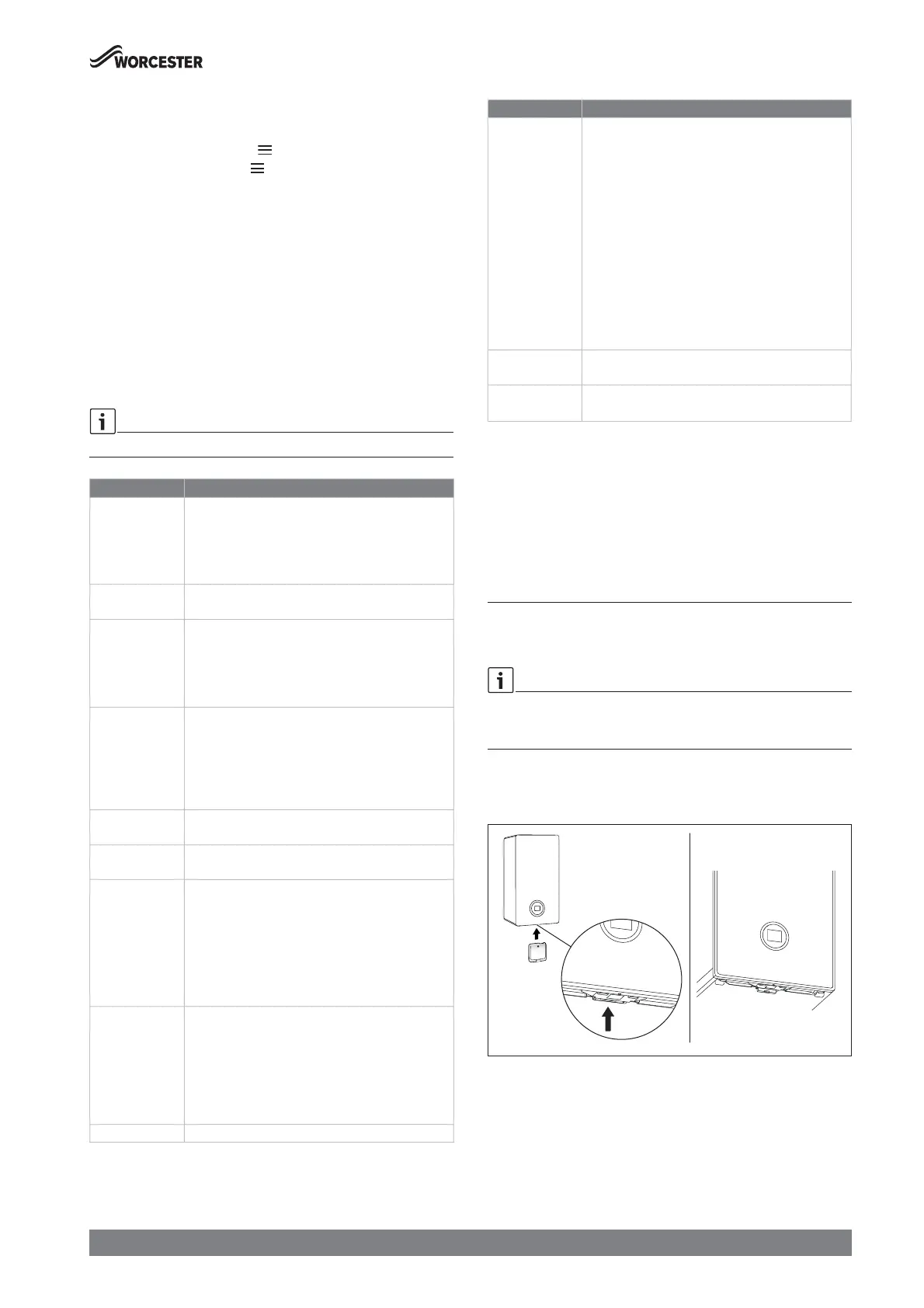
Ā Plug Key into Key housing.
Fig. 7 Position of Key housing
Menu item Function definition
Heating mode • On
•Auto
1)
: Activate time program
• Once: Heating is on from the first programmed on time
to the last programmed off time without programmed
intermissions.
Heat. time prog.
1)
Timer for heating: Weekday(s) selection, day program and
timer adjustment (Æ "Time program", page 10)
1)
DHW operation • On
• Auto: Activate time program.
• Once: Heating the cylinder is on from the first
programmed on time to the last programmed off time
without programmed intermissions.
Eco/Preheat • Eco: Appliance will heat the cylinder if the temperature
falls approximately 12 °C below the set temperature for
hot water.
• Preheat: Appliance will heat the cylinder if the
temperature is approximately 6 °C below the set
temperature for hot water.
DHW time prog.
1)
Timer for hot water: Weekday(s) selection, day program
and timer adjustment (Æ "Time program", page 10)
1)
Boiler status Screen with current system values including the pressure
indicator.
Information The current system values and the active operating
conditions can be called up in the Information menu.
Changes are not possible.
• System pressure
• Hot water Temp. (DHW temperature)
• Weather comp. (weather-compensated control)
1)
• Key (Type of installed Key)
Energy consump.
2)
Display Gas consumption
• Last 24h
• Last 30 days
Display Elec. consump.
• CH last 24 h
• CH last 30 d.
Holiday
1)
Start and end date of the holiday, activate and deactivate.
Settings • Time: Set the current time.
1)
• Date: Set the current date.
1)
•Parental lock
–On
– Off
•Display
– Switch off after: Set the time after which the
display is switched off.
– Brightness: Set the display brightness.
• Key illum.
• Language: Change the language of the menu and the
menu items.
•Units
1)
Cleaning funct. No operation is possible for 15 s. The display shows a
countdown.
Emergency mode
3)
• On: Set the desired heating flow temperature.
• Off
1) Only available with installed Key (accessories)
2) The energy values shown are an estimation based on internal data of the
appliance. Under real world conditions, many factors influence the energy
consumption and the shown values will deviate from the values of an energy
meter. The information is for indication only and should not be used for billing
purposes. The values can be used for relative comparison of energy consumption
between different days/weeks/month.
3) Allows manual control of heating during loss of RF Key signal
Menu item Function definition






 To Next Page