HANGZHOU WORLDE DIGITAL PIANO CO.,LTD HANGZHOU WORLDE MUSIC ELECTRONIC CO., LTD
WEBSITE: WWW.WORLDE.COM.CN EMAIL:SALES@WORLDE.COM.CN TEL:86 571 88730848
- 21 -
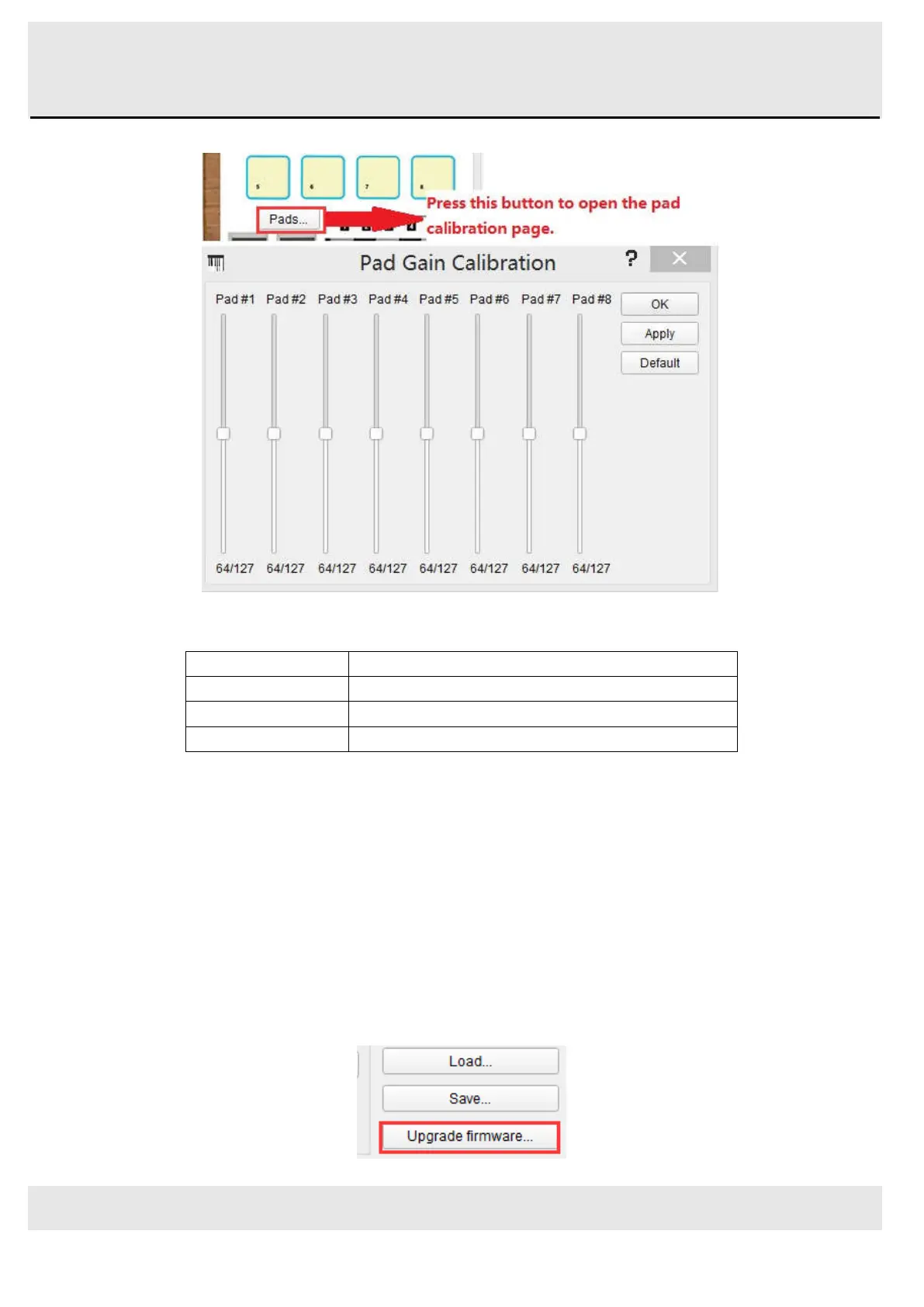
calibration page:
Here you can alter the pad velocity gain. Each of the 8 hardware pads has a dedicated setting.
OK
Apply all changes and close this dialog window
Apply
Apply all changes but keep this dialog window open
Default
Set all sliders to the center position
Close window
Don’t commit changes to keyboard
Please be cautious with low values as they could have some negative side effects.
6.2 Upgrade firmware
We’ve done our best to provide you with bug-free firmware (the software inside the keyboard itself).
Should a problem be found later however, you should be able to upgrade it using the procedure described below.
We strongly advise you to perform such an upgrade only if instructed to by WORLDE support engineer.
The current firmware revision is automatically displayed at launch time provided the keyboard is plugged in.
Before attempting this procedure, be sure to have the new firmware file handy.
Click on the “Upgrade firmware…” button:



 To Next Page