Giving Wrex the Dawg commands /
Volume control / Bump button nose / Eye icons
10
Giving Wrex the Dawg commands
ThissectionoutlineshowtocontrolWrextheDawg,andhowtounderstandhis
moodsanddesires!
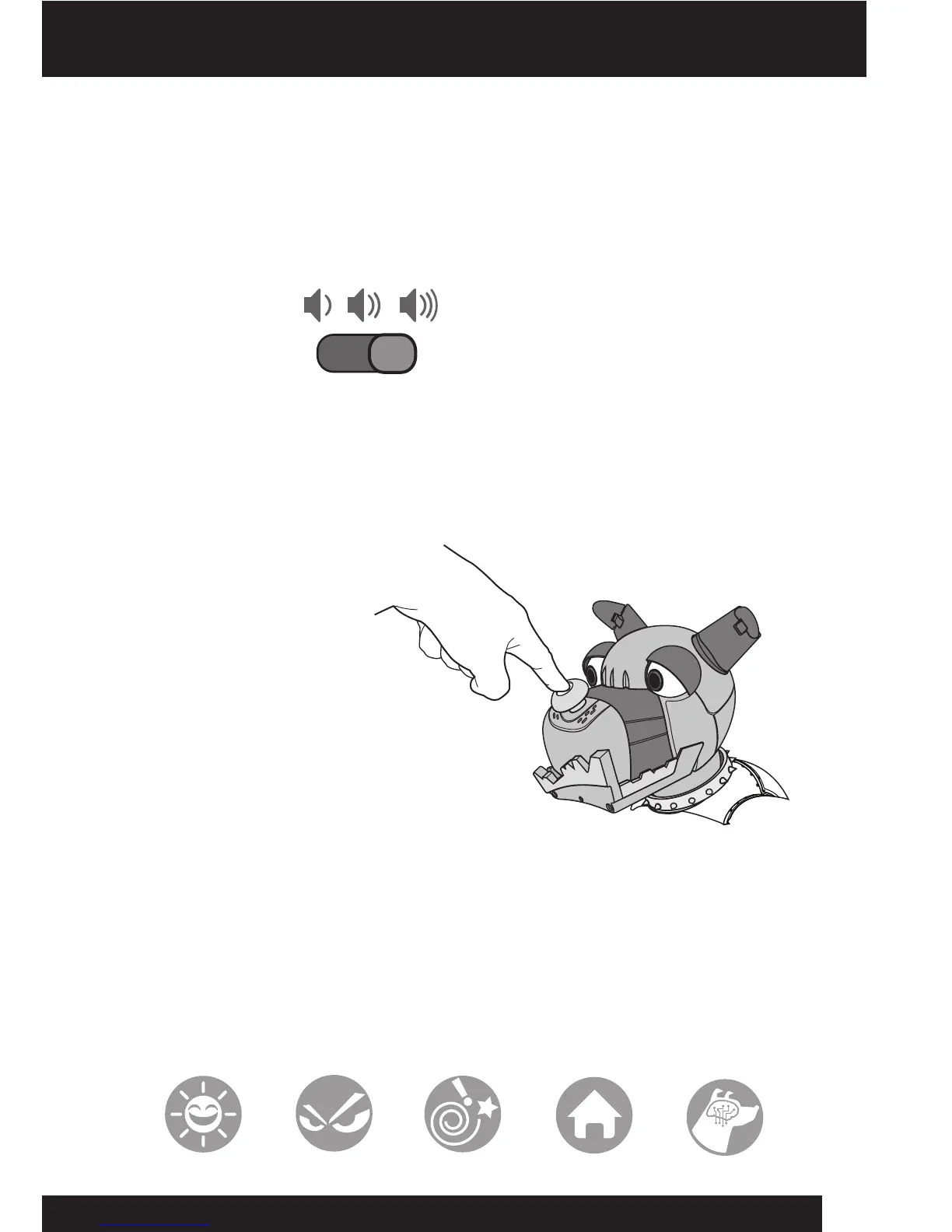
Volume control
WrextheDawghasthreevolumelevels:
•Low
•Medium
•High
Tochangethevolumelevel,pointtheremotecontrolleratWrextheDawgandslide
thevolumeswitchtothedesiredposition.
Bump button nose
WrextheDawg’sbumpbuttonnoseactsasafun“stop”buttonforhim.
Presshisnosewhenheis
movingandhewillstop
whatheisdoing.
Ifyoupresshisbumpbutton
nosewhenheisnotmoving,
hiseyeswillspinandhewill
changehisdesire.
Eye icons
WrextheDawghasfouriconsoneachspinning“jackpot”eye,withatotaloften
combinationsthatreecthiscurrentmoodsanddesires!Hislefteyedisplayshis
moodsandhisrighteyedisplayshisdesires.
YoucanchangehismoodusingtheMood dial ontheremotecontroller(referto
page4),andchangehisdesirebypressinghisbumpbuttonnose--theoutcomeis
random!WrextheDawgcanalsochangehismoodsautonomouslywhenheisin
GuardandOff the Leash Mode.













 To Next Page