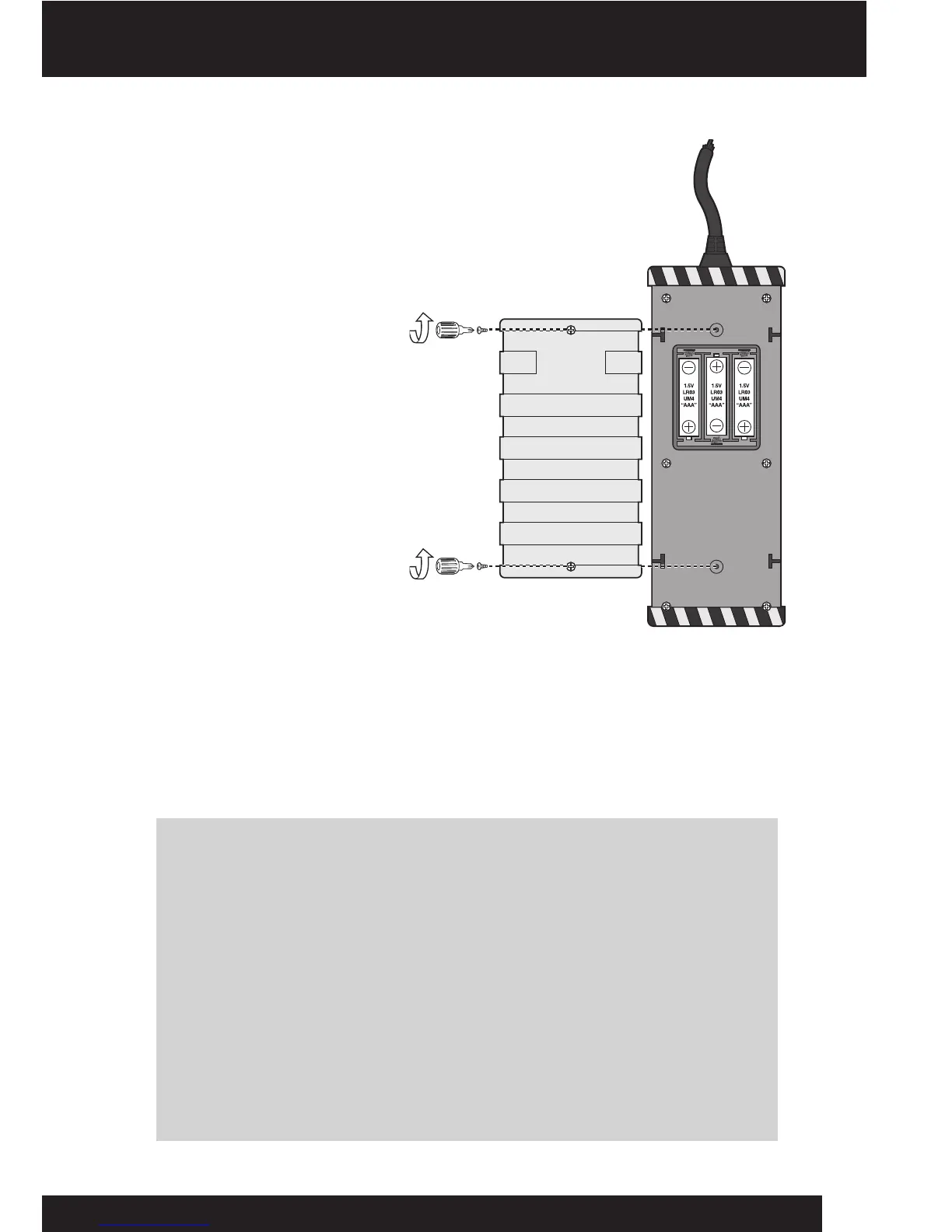
Installing or changing the batteries in the remote controller
Installthebatteriesasfollows:
1.Openthebattery
compartmentontheremote
controllerusingaPhillips
screwdriver(notincluded)to
removethescrewsonthe
batterycompartmentcover.
2.Insertthebatteriesaccording
tothediagram.Ensurethatthe
positiveandnegativepolarities
matchtheillustrationsinside
thebatterycompartment.
3.Replacethebattery
compartmentcoverandreplace
thescrewsusingthe
screwdriver.Donot
over-tighten.
NOTE: Youwillknowwhenthebatteriesintheremotecontrollerarenearly
depletedwhenWrextheDawgbecomeslessresponsivetocommands.
Important battery information
•Useonlyfreshbatteriesoftherequiredsizeandrecommendedtype
• Donotmixoldandnewbatteries,differenttypesofbatteries[standard(Carbon-Zinc),
Alkalineorrechargeable]orrechargeablebatteriesofdifferentcapacities
•Removerechargeablebatteriesfromthetoybeforerechargingthem
• Rechargeablebatteriesareonlytobechargedunderadultsupervision
• Pleaserespectthecorrectpolarity,(+)and(-)
• Donottrytorechargenon-rechargeablebatteries
• Donotthrowbatteriesintothere
• Replaceallbatteriesofthesametype/brandatthesametime
• Thesupplyterminalsarenottobeshort-circuited
• Removeexhaustedbatteriesfromthetoy
• Batteriesshouldbereplacedbyadults
• Removebatteriesifthetoyisnotgoingtobeplayedwithforsometime
• Thisusermanualshouldbekeptbecauseitcontainsimportantinformation
Battery details
6
Underside of remote controller













 To Next Page