Battery details
5
Battery details
Battery requirements
WrextheDawgrequires4x“C”sizebatteriesand2x“AA”sizebatteries(not
included).Theremotecontrollerrequires3x“AAA”sizebatteries(notincluded).
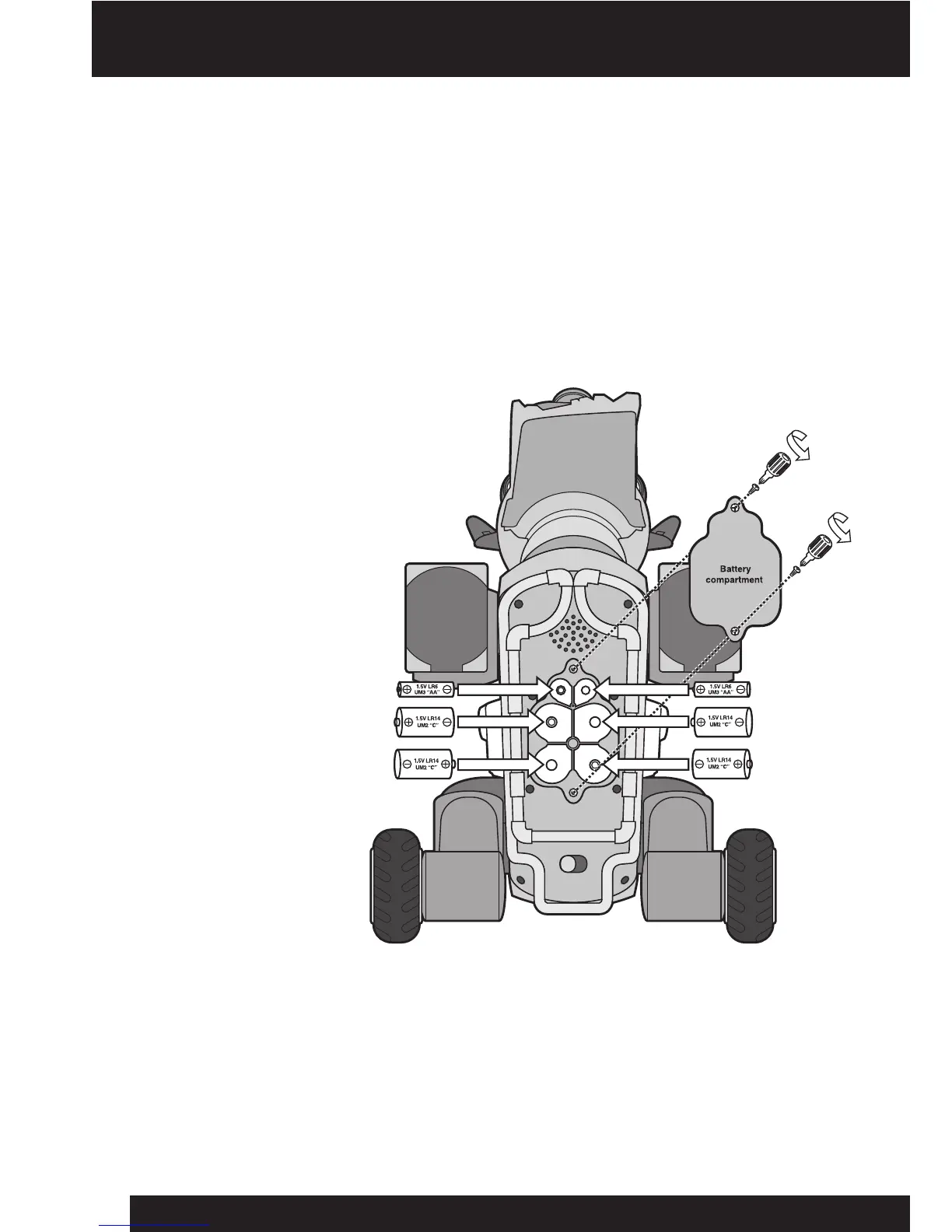
Installing or changing the batteries in Wrex the Dawg
TochangethebatteriesinWrextheDawg,rstcarefullylayhimonhisback.Donot
balancehimorplacehimnearatableedge.Installthebatteriesasfollows:
1.Openthebattery
compartmentonthe
undersideofWrextheDawg
usingaPhillipsscrewdriver
(notincluded)toremove
thescrewsonthebattery
compartmentcover.
2.Insertthebatteries
accordingtothediagram.
Ensurethatthepositive
andnegativepolarities
matchtheillustrations
insidethebattery
compartment.
3.Replacethebattery
compartmentcoverand
replacethescrewsusing
thescrewdriver.Donot
over-tighten.
NOTE: YouwillknowwhenWrextheDawg’sbatteriesarenearlydepletedwhenhe
movesveryslowly,orbecomeslessresponsivetouserinteractionand/orcommands
fromtheremotecontroller.
Underside of Wrex the Dawg













 To Next Page