• Goal position/velocity/current
• Present position/velocity/current/voltage/temperature
Refer to Table.4 for a full list of supported registers.
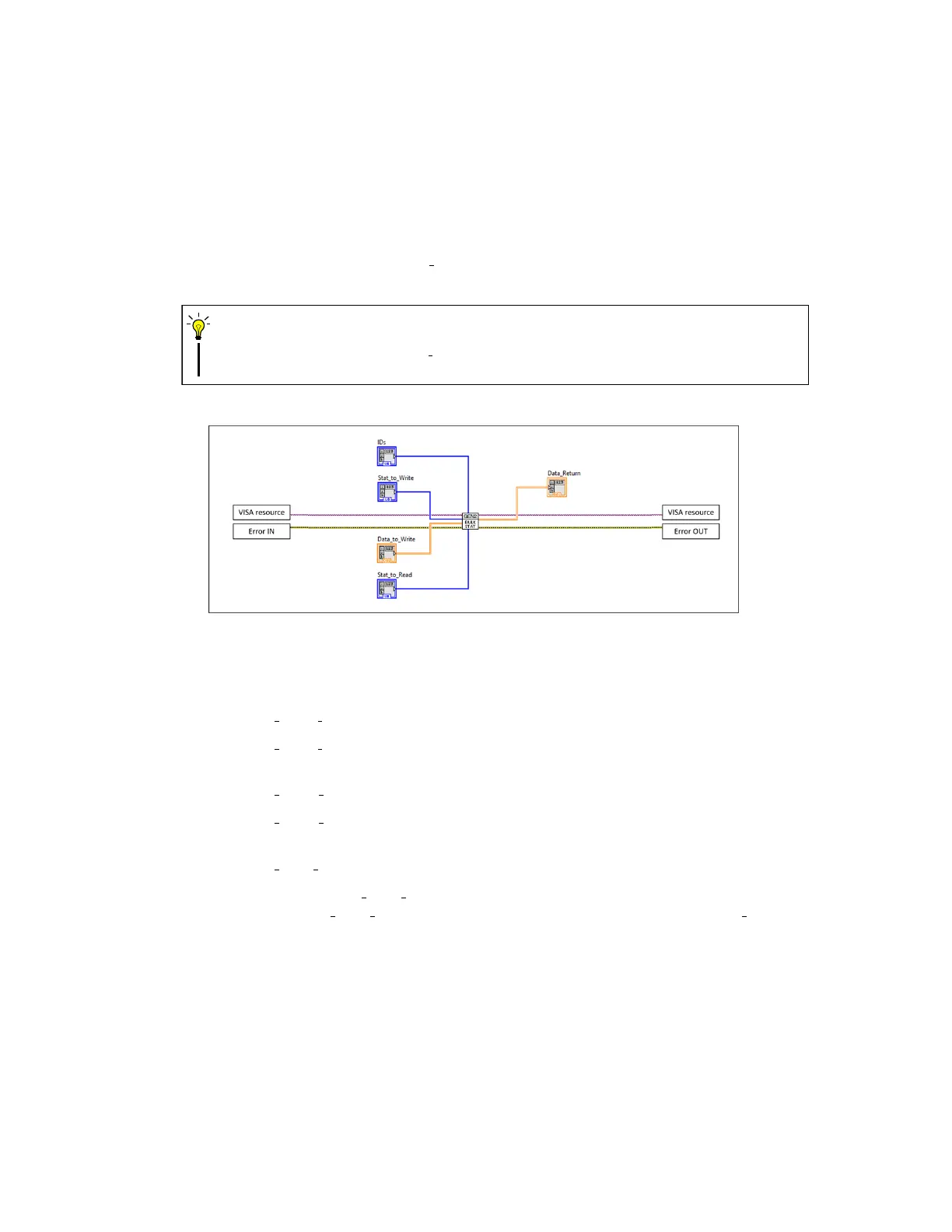
3) Bulk Communication Writing to/reading from multiple status registers of one or more BEAR
actuators can be done with the Bulk Stat subVI conventionally all at once. Use this function
as shown in figure 16.
Bulk communication with Bulk Stat subVI can only be used with supported status
registers.
CAUTION
Figure 16: Bulk read/write with status registers.
4) Examples You can find the following examples in the LabBEAR package:
• SIMPLE Read Stat A simple example of reading status registers from one BEAR.
• SIMPLE Read Config A simple example of reading configuration registers from one
BEAR.
• SIMPLE Write Stat A simple example of writing data to status registers on one BEAR.
• SIMPLE Write Config A simple example of writing data to configuration registers on
one BEAR.
• SIMPLE Bulk Stat A simple example of bulk communication.
5) Tuning Interface: RS485 Data Ctrl When it comes tuning or debugging your BEAR using
LabVIEW, the RS485 Data Ctrl VI is a very handy tool. The front panel of Data Ctrl is as
shown in figure 17, and it is introduced section by section as below.
a. Port setting Configure the port settings here to match your BEAR before you run the VI.
35


 To Next Page