Datenübertragung
Data transmission
Oxi 340
35
Serielle Schnittstelle
Serial interface
Seriellen Ausgang des Meß-
gerätes mit seriellem Anschluß
PC/Drucker verbinden.
PC: Kabel AK 340/B,
Best.-Nr. 902 841
Drucker: Kabel AK 325/S,
Best.-Nr. 902 837
Die Ein-/Ausgabe wird auto-
matisch auf RS 232 umge-
schaltet.
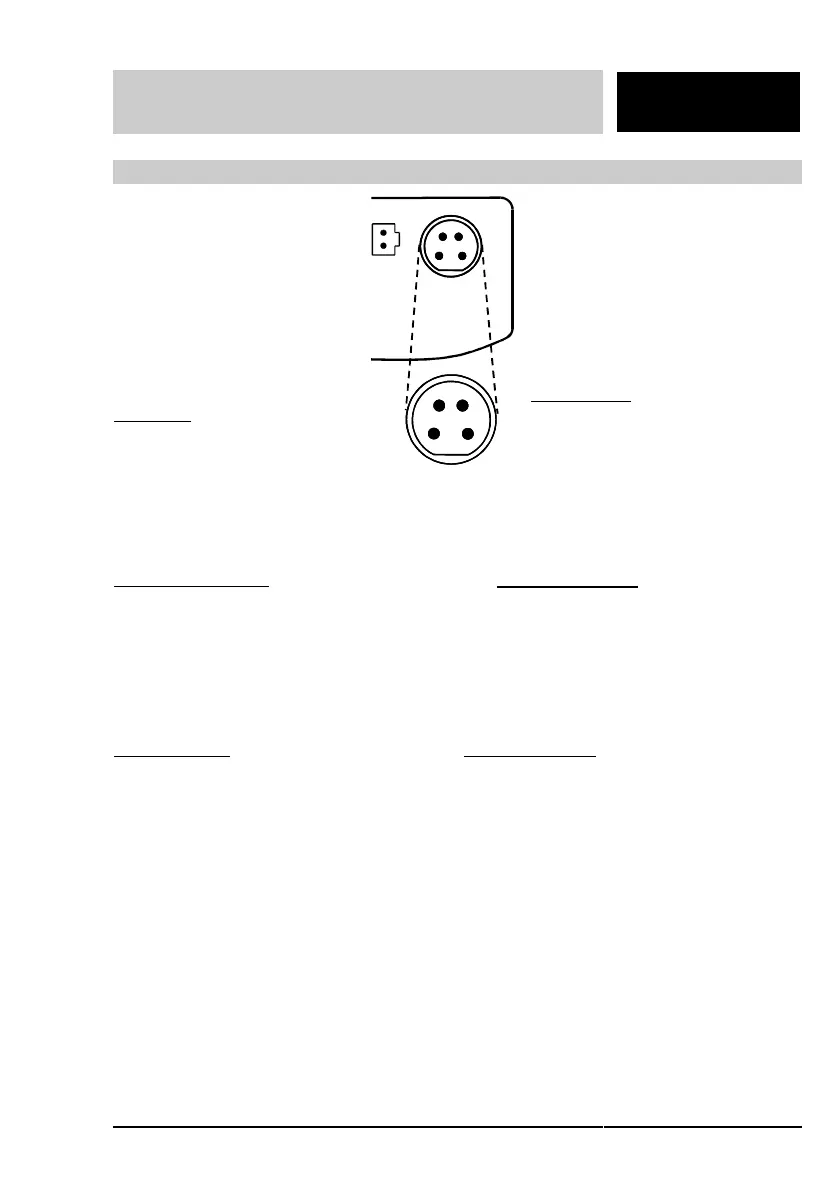
Belegung
:
1 CTS
2 Steckercodierung + RxD
3 Masse
4 TxD
Verbinden von 2 und 3 und
Anschluß eines PC/Drucker
aktiviert die serielle Ausgabe.
1
2
3
4
Connect serial ouput of the meter
to serial connection of the
PC/printer.
PC: Cable AK 340/B,
Order no. 902 841
Printer: Cable AK 325/S,
Order no. 902 837
The input/output is automatically
switched over to RS 232.
Connections
:
1 CTS
2 Plug codification + RxD
3 Mass
4 TxD
Connecting 2 and 3 or connection
of a PC/printer activates the serial
output.
Übertragungsdaten am PC/Drucker
einstellen.
Baudrate: 1200, 2400,
4800, 9600 wählbar
Parität (nur PC): keine
Handshake: RTS/CTS + Xon/Xoff
Datenbits (nur PC): 8
Stopbit (nur PC): 1
Set transmission data at the PC/printer:
Baud rate: 1200, 2400,
Parität (nur PC): none
Handshake: RTS/CTS + Xon/Xoff
Data bits (PC only):8
Stop bit (PC only): 1
Sparschaltung:
Das Gerät schaltet ca. 1 h nach der
letzten Tastenbetätigung automatisch ab.
Ausnahme:
Dauerbetrieb an PC oder Drucker bei
angeschlossenem Schnittstellenkabel
und aktivierter zeitgesteuerter Ausgabe.
Economy circuit:
The meter automatically switches itself of
approx. 1 h after the last key operation.
Exception:
Continuous operation on PC or printer
with connected interface cable and
activated timed output
.
Die Konfiguration der seriellen
Schnittstelle (Baudrate, zeitgesteuerte
Übertragung, Übertragung auf Tasten-
druck) entnehmen Sie dem Kapitel
"Konfiguration".
For setup of the serial interface (Baud
rate, timed transmission, transmission on
keypressing) please refer to chapter
"Setup".



 To Next Page