EasyManua.ls Logo

Xcruiser XDSR57FTA - Remote Control Unit

Xcruiser XDSR57FTA
16 pages
Print Icon
To Next Page IconTo Next Page
To Previous Page IconTo Previous Page
Loading...
7
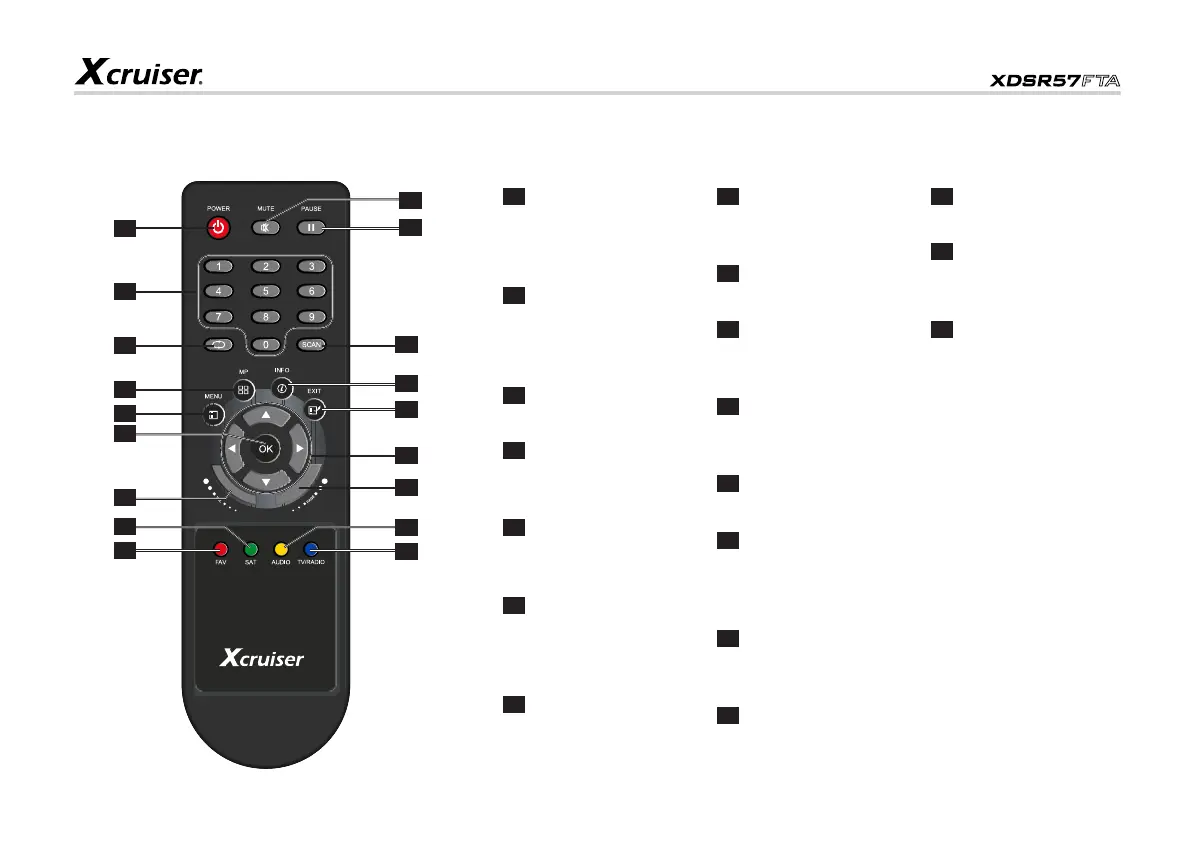
3. Remote Control Unit
1
POWER: Press
to switch between
Operation and Standby
modes.
2
0-9: Press to enter
required mumbers in
the input box or select a
channel to watch.
3
: Press to switch back
to previous channel.
4
MP: Press to display
the multi-pictures
window.
5
MENU: Press to
display the Main Menu on
the screen.
6
OK: Press to execute
the selected item in the
menu or to confirm the
desired value input mode.
7
VOL: Press to adjust
the value of the volume.
8
SAT: Press to display
the satellite list of
searched channels.
9
FAV: Press to display
the favorite channel list.
10
TV/RADIO: Press to
switch between TV and
Radio modes
11
AUDIO: Press to
display the Audio Setup
window.
12
PAGE: Press page up
or down.
13
NAVIGATION KEYS:
Move cursor UP/DOWN/
LEFT/RIGHT, PAGE UP/
DOWN, VOLUME +/-.
14
EXIT: Press to returm
to the previous menu or
escape from the item.
15
INFO: Press to show
information of the current
channel.
16
SCAN: Press to enter
the Auto Scan menu.
17
PAUSE: Press to
switch between Pause
and Play.
18
MUTE: Press to
temporarily cut off the
sound.
8
7
6
5
4
3
2
1
17
16
15
14
13
12
11
10
18
9
www.xcruiser.net
XDSR57FTA

Related product manuals