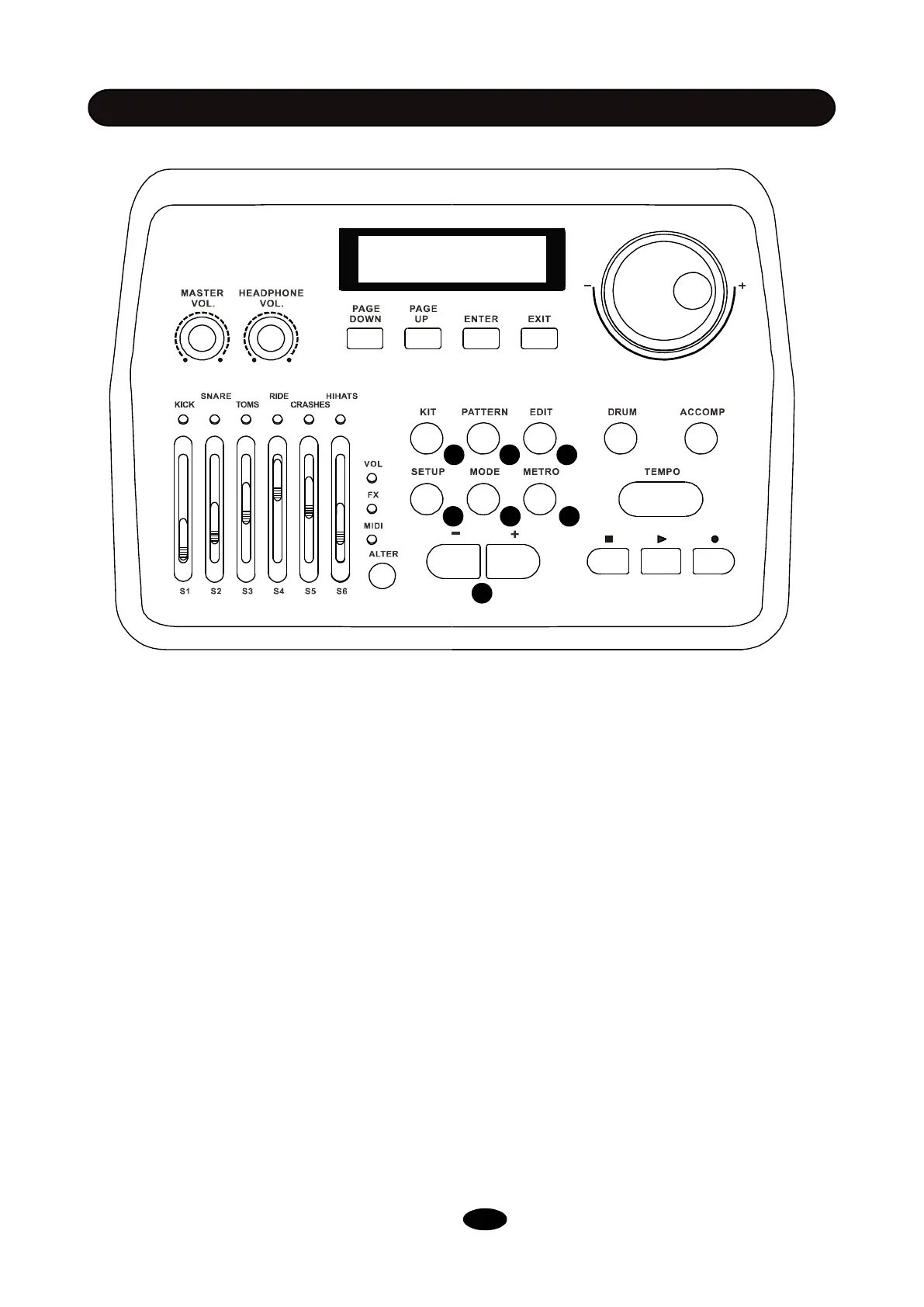
10. KIT: Press this button to engage kit mode. You can use -/+ button(15/16) or scroll wheel(7) to
select a kit in this mode.
11. PATTERN: Press this button to engage pattern mode, where you can play demo patterns,
exercise with patterns or do some drum recording.
12. EDIT: Press EDIT button to edit the current drum kit, including voice type, voice, volume, reverb
level, pitch and pan. (See chapter EDIT).
13. SETUP: Press SETUP button to adjust system settings, including BACK VOLUME, MASTER
TUNE, LOCAL, FX SET, MIDI SET, ADVANCE and RESET. (See chapter SETUP).
14. MODE: Change playing modes for demo patterns.
Play One: Play a single pattern once.
Repeat One: Loop a single pattern.
Play All: Play all patterns once.
Repeat All: Loop all patterns.
15. METRO: Press this button to set metronome on/off, volume, tempo, time signature and voice.
Use PAGE DOWN/UP to switch between options.
16. -/+: Use these two buttons to decrease or increase values and settings. Also you can select a kit
using these buttons.
SOUND MODULE
8
10 11 12
13 14 15
16


 To Next Page