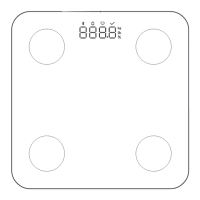
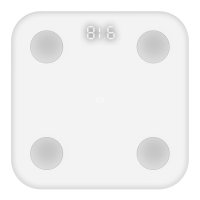
The Xiaomi Body Composition Scale S400 is a smart scale designed to help users monitor their health, track fat loss, and aid in body shaping. It offers various measurement capabilities beyond just weight, including body fat percentage and heart rate, making it a comprehensive tool for personal health management.
Function Description
The primary function of the scale is to measure body weight and various body composition data. It utilizes stainless steel electrodes on its surface to perform bioelectrical impedance analysis (BIA), which is used to estimate body fat percentage and other metrics. The scale can operate in several modes:
- Weight Weighing Mode: This is the most basic function, allowing users to measure their weight without needing a Bluetooth connection to an app.
- Body Fat Measurement Mode: When connected to the Mi Home/Xiaomi Home app, the scale measures body fat percentage, heart rate, and other body composition data.
- Small Object Weighing Mode: The scale can weigh objects as light as 0.1 kg. To activate this mode for objects below 5 kg, the user needs to gently step on or press the scale's surface until it displays "0.0 kg."
- Weighing with Baby Mode/Balance Test Mode: These specialized modes can be enabled and utilized through the Mi Home/Xiaomi Home app, providing instructions within the app for their use. These functions, along with changing the scale's unit, require connection to the app.
- Offline Weighing Mode: After the initial binding with the app, the scale can save weighing data even when not connected to the phone. This data is automatically uploaded and saved to the Mi Home/Xiaomi Home app the next time the scale connects to the phone.
- Guest Measurement Mode: This mode, enabled via the app, allows guests to measure their data without it being saved to the user's account.
The scale is not a medical device, and the parameter information and measurement analysis it provides are for reference only. They should not be used for disease diagnosis, prevention, treatment, or supervision, nor are they suitable for use in clinical or hospital settings.
Usage Features
To ensure accurate measurements and optimal functionality, users should follow specific guidelines:
- Battery Installation: The scale requires three AAA alkaline batteries. Users must ensure the positive and negative poles are installed correctly. After installing batteries or moving the scale, it's recommended to wait 5 seconds until the display turns off, then gently step on the scale to wake it up. Once "0.0 kg" is displayed, the scale is ready for use.
- Placement: The scale should be placed on a hard, flat surface, ensuring all feet touch the ground evenly.
- App Connection: The scale connects to the Mi Home/Xiaomi Home app (compatible with Android 8.0 & iOS 12.0 or above) via Bluetooth. Users can scan a QR code or search for the app to download it. Once installed, the app guides the user through adding the device. The app allows users to view detailed body reports, manage settings, and access additional functions.
- Measurement Posture: For accurate body composition data, users must stand barefoot on the scale with knees and feet slightly apart, ensuring both feet are firmly against the stainless steel electrodes. The soles of the feet should cover the electrodes as much as possible, and the user should stand straight and naturally. Incorrect postures, such as wearing socks, bent knees, insufficient foot contact with electrodes, or squatting, will lead to inaccurate results.
- Data Synchronization: When the device is connected to the scale via Bluetooth, data can be viewed in the app. If disconnected, measurement data is saved on the scale and will sync to the app upon reconnection. The scale also supports a gateway function, allowing data to be read if a Bluetooth gateway-capable product with the latest firmware is already added to the app.
- Device Sharing: After binding the scale to a main account, it can be shared with other users in the app. However, the main account must exit the app or disable Bluetooth for shared users to connect successfully. This feature is exclusive to Xiaomi Accounts.
- OTA Updates: The scale supports Over-the-Air (OTA) updates, which can be performed by connecting to the app and following the on-screen instructions.
- Reset Functionality: Pressing and holding the reset button for 7 seconds allows users to rebind the scale or restore it to factory settings.
Certain user groups may experience inaccurate body composition data and will only receive basic body weight measurements. These include individuals under 6 or over 80 years old, pregnant or puerperal women, individuals with limb loss or high paraplegia, those with abnormal spine, joints, bones, osteoporosis, cervical spondylosis, lumbar disc herniation, or other orthopedic disorders, individuals with a cold or fever, those undergoing hemodialysis, and professional athletes. Additionally, individuals with impaired limb sensation, mobility issues, fractures, or metal implants should consult a doctor before using the scale and use it under supervision.
Maintenance Features
Proper care and maintenance are essential for the longevity and accuracy of the scale:
- Cleaning: The scale should be regularly wiped with a clean, slightly damp, soft cloth (using a neutral detergent if needed), and then dried with a dry cloth or paper towel. Batteries should be removed before cleaning. Corrosive solutions, external heating equipment (like microwave ovens or hair dryers), or immersion in water should not be used.
- Environmental Conditions: The scale should be used in a dry environment, avoiding damp places like bathrooms. It should not be used with wet feet or on a wet surface to prevent slipping. Avoid environments with extreme temperatures (above 40 °C or below 0 °C), strong magnetic fields, or proximity to water, fire, or high-temperature sources, as these can affect battery performance and cause errors.
- Handling: The scale should not be impacted, squeezed, dropped, thrown, or scratched, as this can damage its surface. If damaged, discontinue use immediately and contact customer service. Do not attempt to touch or remove broken parts.
- Battery Management: Only safe and qualified AAA alkaline batteries should be used. Batteries should not be placed in high-temperature environments, disassembled, struck, squeezed, or cut. If a battery becomes severely swollen, stop using it immediately. Batteries should be kept away from children and pets to prevent ingestion or chemical burns. If the battery compartment does not close securely, stop using the product and keep it away from children. If the scale will not be used for an extended period (3 months or more), the batteries should be removed to prevent leakage, overheating, or deformation. Used batteries should be disposed of safely according to local laws and regulations, not as household waste.
- Troubleshooting: The manual provides a troubleshooting guide for common issues such as the scale not turning on, significant weighing deviation, "----" display, or significant body fat measurement deviation. Solutions typically involve checking battery levels, ensuring proper placement, cleaning electrodes, maintaining correct posture, and connecting to the app.



 To Next Page
 General