Partial cleaning
- Press the button to activate the partial cleaning function.
Cleaning the room / turning o and turning on the device
- Press the button to turn on the cleaning function.
- Press and hold the button to turn the device on or o.
Ring-shaped indicator
- White color: level of charge> 20%;
- Red color: charge level <20%;
- Flashing indicator: in the recharge mode or in the on mode;
- Fast ashing red: malfunction.
Charging
- Press the button to recharge.
Note: during cleaning, charging or partial cleaning, press any button to pause the device.
Reset Wi-Fi settings
Simultaneously press and hold the Cleaning and Recharging buttons for 3 seconds.
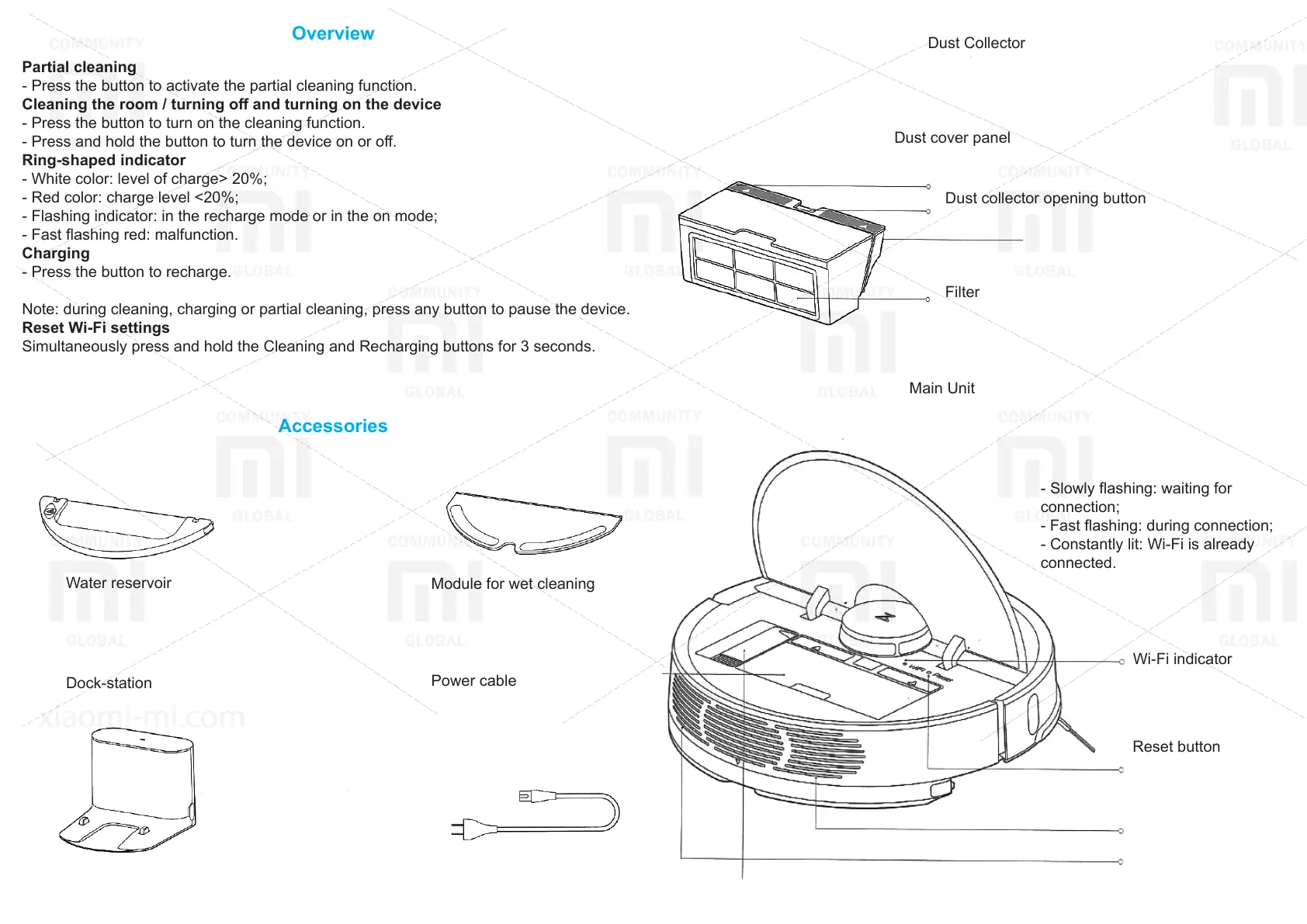
Accessories
Overview
Water reservoir
Dock-station
Module for wet cleaning
Power cable
Dust Collector
Dust cover panel
Dust collector opening button
Filter
Main Unit
Wi-Fi indicator
- Slowly ashing: waiting for
connection;
- Fast ashing: during connection;
- Constantly lit: Wi-Fi is already
connected.
Reset button
Speaker
Ventilation holes







 To Next Page