http://xim.tech
XIM NEXUS
Auto Calibration
Auto Calibration
The XIM NEXUS Controller, like all game controllers, contains analog devices and sensors that require calibration. Your controller comes
pre-calibrated so you should rarely to never have to calibrate. But, you are given access to all aspects of calibration so that, if you choose,
you can further customize and refine your experience. Calibrating your Controller incorrectly will never hurt or damage it in any way.
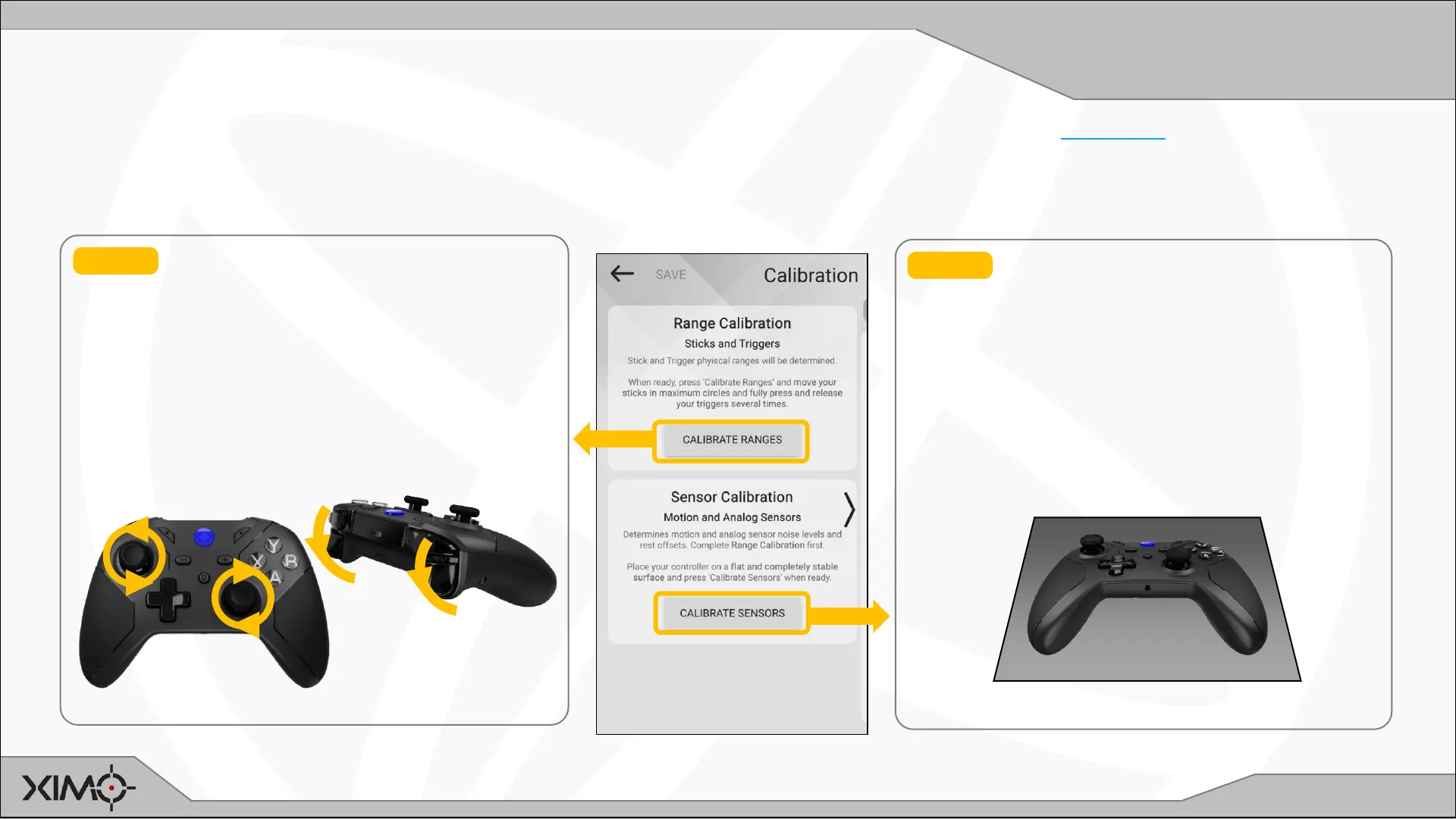
STEP 1 RANGE CALIBRATION determines
the full range of motion of the triggers and
sticks.
Press Calibrate Ranges and then:
• Move your sticks in full circular motions
• Press and release your triggers fully
• Continue until Manager finishes
STEP 2 SENSOR CALIBRATION determines
base noise levels and offsets of sensors.
Place Controller on a stable surface.
Press Calibrate Sensors and then:
• DON’T TOUCH the Controller
• Wait until Manager finishes


 To Next Page