EasyManua.ls Logo

Ximo NEXUS - Manual Calibration; Manual Right Stick Calibration; Manual Right Trigger Calibration; Motion Sensing Calibration

Ximo NEXUS
38 pages
Print Icon
To Next Page IconTo Next Page
To Previous Page IconTo Previous Page
Loading...
http://xim.tech
XIM NEXUS
Manual Calibration
Manual Calibration
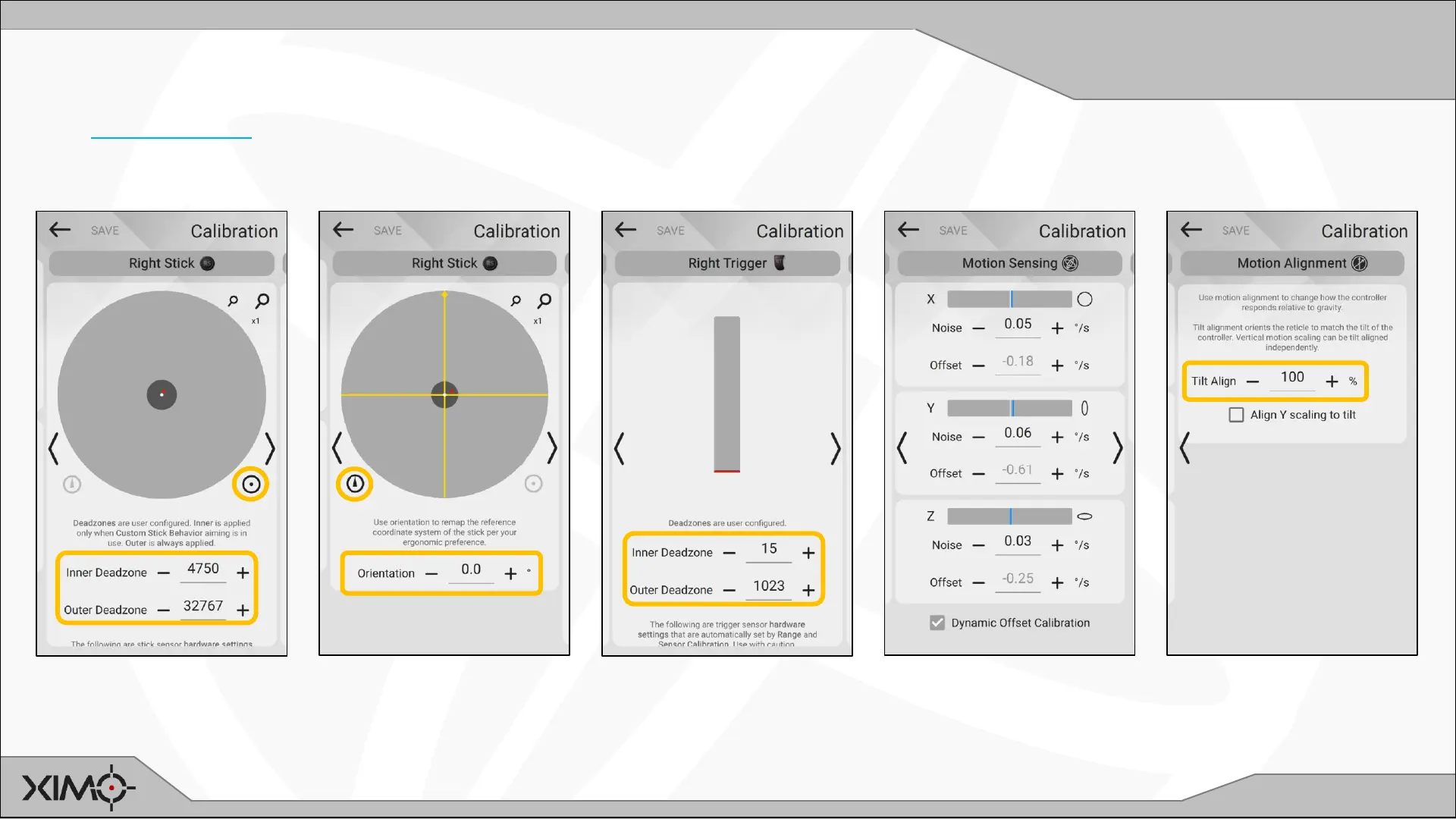
After Auto Calibration, you can make additional changes such as modification of auto calibrated values and adjustment of stick and
trigger deadzones to your preference. The Manual Calibration interface is to the right of Auto Calibration in Manager.
Stick produces 0 value in
inner deadzone and
maximum in outer.
Modifies coordinate
system of the stick.
Changes which direction is
forward.
Trigger produces 0 value
in inner deadzone and
maximum in outer. Reduce
inner for hair trigger.
Motion sensor gyroscope
noise and offsets.
Generally never need to
adjust.
Changes motion sensor
gravity alignment.